Shotwell
Shotwell: The Ultimate Professional Screenshot Editor Built Natively for iPhone
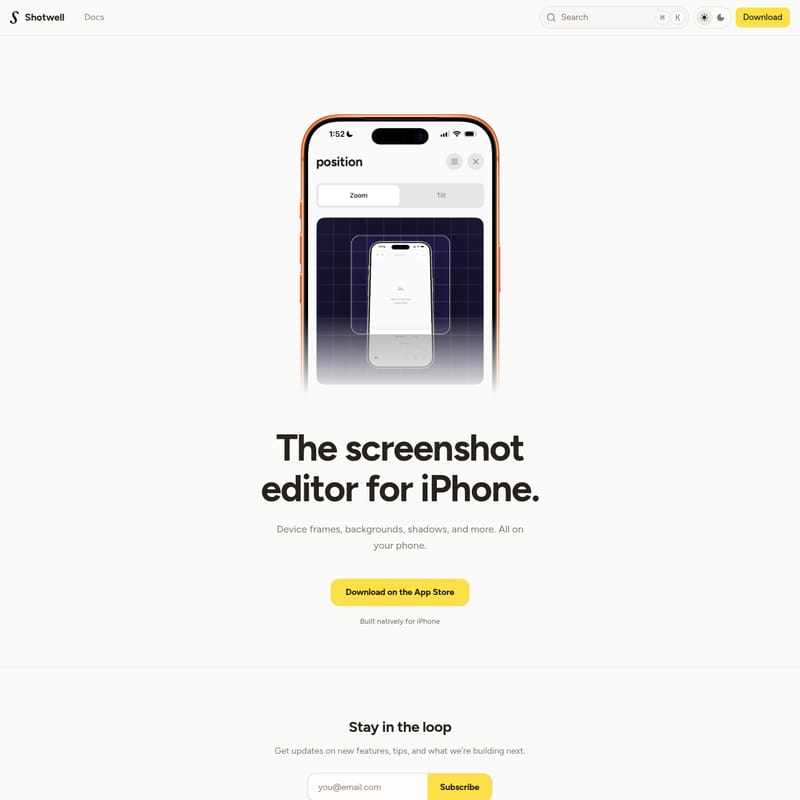
Shotwell is a powerful, native iPhone screenshot editor designed to transform basic captures into professional-grade visuals. By allowing users to add device frames, customizable backgrounds, and realistic shadows directly on their mobile devices, Shotwell streamlines the workflow for designers, developers, and social media creators. Built in San Francisco, it offers a seamless iOS experience for enhancing screenshots on the go.
2026-04-07
--K
Shotwell Product Information
Shotwell: The Professional Screenshot Editor for iPhone
In the modern digital landscape, sharing a raw screenshot is often not enough to capture attention or maintain a professional aesthetic. Whether you are a developer showcasing an app or a creator sharing a snippet of your work, the presentation matters. Shotwell is the premier screenshot editor for iPhone that allows you to transform standard screen captures into polished, high-quality visuals directly from your mobile device.
What's Shotwell?
Shotwell is a specialized mobile application built natively for iPhone, designed to bridge the gap between a simple screen grab and a professional marketing asset. It serves as a comprehensive screenshot editor that brings desktop-level customization tools to the palm of your hand.
Created by Matt in San Francisco, this app focuses on providing a seamless, native iOS experience. Instead of transferring files to a computer to use heavy design software, Shotwell users can apply professional styling—such as device frames, backgrounds, and shadows—instantly. It is the go-to solution for anyone looking to elevate their visual communication without leaving their phone.
Key Features of Shotwell
Shotwell is packed with features that make it a standout screenshot editor for iPhone. By focusing on the essential elements of high-end design, it allows users to produce stunning results in seconds.
Native iPhone Integration
Unlike web-based tools or ported applications, Shotwell is built natively for iPhone. This ensures that the interface is fluid, the performance is optimized for mobile hardware, and the user experience feels intuitive to any iOS user.
Realistic Device Frames
One of the most effective ways to make a screenshot look professional is by placing it within a device frame. Shotwell provides authentic frames that give your screenshots context, making them look like they are being viewed on a physical iPhone.
Customizable Backgrounds
Move beyond the transparent or white background. Shotwell allows you to wrap your screenshots in various backgrounds to match your brand's aesthetic or the specific mood of your project. This feature is perfect for creating social media content that pops.
Professional Shadows and Effects
To add depth and dimension, Shotwell includes advanced shadows. These effects help the screenshot "lift" off the background, providing a 3D effect that mimics high-end promotional materials used by professional design agencies.
Use Case Scenarios for Shotwell
How can you incorporate this screenshot editor into your daily workflow? Here are several ways professionals are currently using Shotwell to enhance their output:
- App Developers: Use Shotwell to create beautiful App Store preview images. By adding device frames and clean backgrounds, you can make your app's features stand out to potential users.
- Social Media Managers: Quickly wrap a tweet, a thread, or a snippet of an article in a stylish frame to share on platforms like Instagram or LinkedIn. The added shadows and color-coordinated backgrounds significantly increase engagement.
- Product Designers: Share progress updates with stakeholders. Presenting a mockup within a native iPhone frame via Shotwell provides a more realistic sense of the final product than a flat image file.
- Tech Bloggers: When writing tutorials or reviews, use Shotwell to ensure every instructional image looks consistent and professional.
Stay in the Loop
Shotwell is constantly evolving. Users can subscribe with their email address to stay in the loop regarding:
- Updates on new features.
- Expert tips on making the most of the screenshot editor.
- Behind-the-scenes insights into what the developer is building next.
FAQ
Where can I download Shotwell?
You can download Shotwell on the App Store. It is specifically designed for iPhone users seeking a native editing experience.
Is Shotwell available for desktop?
Shotwell is built natively for iPhone, focusing on providing the best mobile experience for editing screenshots on the go.
What kind of edits can I make with Shotwell?
You can add device frames, change backgrounds, and apply shadows to your screenshots, among other styling options.
Who created Shotwell?
Shotwell was made by Matt in San Francisco (SF).
Does Shotwell have a privacy policy?
Yes, Shotwell maintains clear Terms and Privacy documentation to ensure user data and rights are respected.
"The screenshot editor for iPhone. Device frames, backgrounds, shadows, and more. All on your phone."
By focusing on a native experience and essential design tools, Shotwell remains the most efficient screenshot editor for iPhone for users who value both speed and quality. Whether for professional or personal use, it turns every capture into a masterpiece.