Shepherd
Shepherd: A Free Chrome Extension for Automatic Productivity Tracking and Browser Habit Visualization
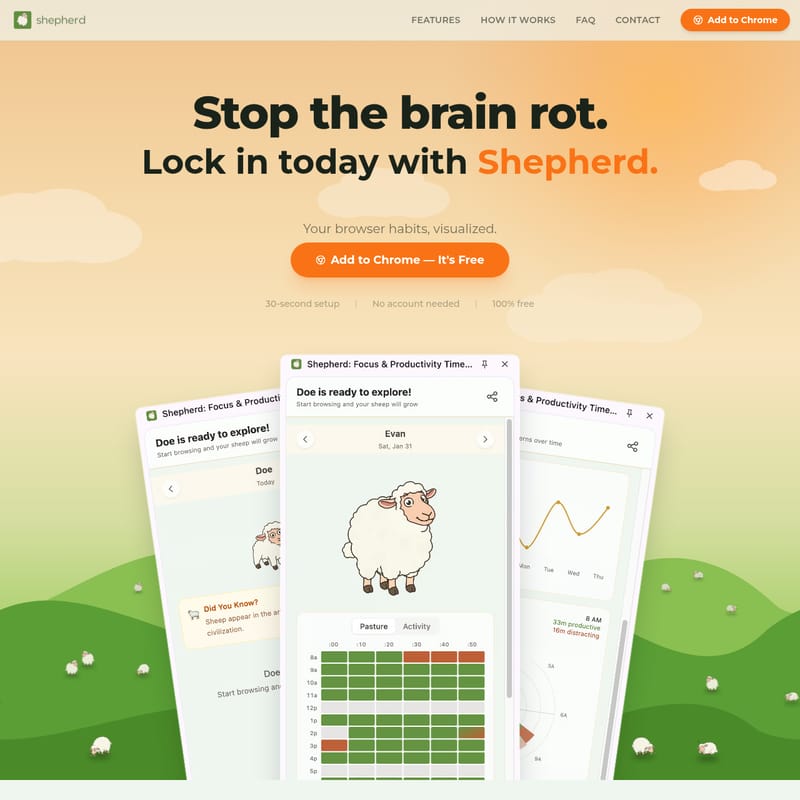
Shepherd is a powerful, free Chrome extension designed to stop 'brain rot' by visualizing your browser habits. With a 30-second setup and no account required, Shepherd automatically categorizes every website you visit to generate a daily Health Score. It tracks weekly trends, hourly patterns, and top sites passively in the background without slowing down your browser. Featuring the 'Daily Sheep'—a visual productivity indicator that evolves based on your focus—Shepherd helps users spot distractions early and take full accountability for their digital time through automated insights and comprehensive trend reporting.
2026-02-25
--K
Shepherd Product Information
Shepherd: Stop the Brain Rot and Visualize Your Browser Habits
In an era of constant digital distractions, taking control of your time is more critical than ever. Shepherd is a comprehensive productivity tool designed to help you lock in today by providing a clear, visual representation of your browsing behavior. If you are looking to improve your focus and eliminate "brain rot," Shepherd offers the perfect solution to hold yourself accountable without the need for manual data entry.
What's Shepherd?
Shepherd is a free browser extension specifically built for the Chrome ecosystem that allows you to see your habits, spot patterns, and ultimately own your day. It functions as a passive productivity tracker that monitors the websites you visit and transforms that data into actionable insights. Unlike traditional trackers that require constant management, Shepherd runs quietly in the background, ensuring you have a full visualization of your browser habits at your fingertips.
By using Shepherd, you can transform a chaotic browsing experience into a structured, data-driven journey. It is designed for users who want to see exactly where their time goes, whether they are spending hours on productive platforms like GitHub and Google Docs or losing time to distracting sites.
Features of Shepherd
Shepherd is packed with features that prioritize ease of use and automated accountability. Here is what makes the Shepherd experience unique:
Zero Manual Input
One of the standout features of Shepherd is that it requires no manual input from the user. You don't have to start timers or tag websites yourself; the tool provides full accountability automatically.
Health Score
Shepherd introduces the concept of a Health Score. Every site you visit is auto-categorized, allowing the tool to generate one comprehensive score for your entire day. This score reflects the balance between your productive time and your distracting time.
Trends & Patterns
To help you spot distractions early, Shepherd provides detailed analytics including:
- Weekly trends: See how your productivity fluctuates over seven days.
- Hourly patterns: Identify which times of day you are most focused.
- Top sites: Automatically list the domains where you spend the most time.
Daily Sheep
To make productivity engaging, Shepherd features the Daily Sheep. Stay focused and grow your sheep; a new sheep appears every day and changes its appearance based on your productivity levels. It serves as a visual mascot for your daily focus goals.
How It Works
Setting up Shepherd is designed to be as frictionless as possible. You can lock in today with Shepherd in just three simple steps:
01. Add to Chrome
Getting started takes only a 30-second setup. Simply Add to Chrome with one click. There is no account needed, ensuring your privacy and a fast start.
02. Browse Normally
Once installed, Shepherd runs passively. You don't need to change your behavior; simply browse the web as you usually would. Shepherd categorizes every site in real-time, distinguishing between productive work (like Stack Overflow or Google Docs) and distracting content.
03. See Your Score
Open the Shepherd panel to see your results. All your productivity trends, top sites, and your Daily Sheep are gathered in one easy-to-read dashboard. You can view specific data points, such as:
- Productive vs. Distracting time (e.g., 390m productive vs. 55m distracting).
- Daily Health percentages (e.g., Health: 85%).
- Historical data across the week (Sun through Sat).
Use Case for Shepherd
Shepherd is ideal for anyone who spends a significant portion of their day inside a web browser. Common use cases include:
- Students: Monitoring study sessions to ensure that research time doesn't turn into social media scrolling.
- Developers: Tracking time spent on documentation and coding platforms versus distracting entertainment sites.
- Remote Workers: Maintaining a high Health Score during work hours to ensure peak performance and work-life balance.
- Content Creators: Understanding their hourly patterns to identify when they are most creative and focused.
By providing a clear visualization of browser habits, Shepherd helps users identify the exact moment they lose focus, allowing them to adjust their behavior immediately.
FAQ
Is this free?
Yes, Shepherd is 100% free to use.
Does it slow down my browser?
No. Shepherd is designed to run passively and efficiently in the background without affecting your browser's performance.
How does categorization work?
Shepherd auto-categorizes every site you visit. It uses an internal system to determine if a site is typically productive or distracting, contributing to your overall daily Health Score.
How is this different from other productivity tools?
Unlike many tools that require complex setups or paid accounts, Shepherd requires no account and offers a 30-second setup. It focuses on visual accountability through features like the Daily Sheep and simple Health Scores.
What's the sheep about?
The Daily Sheep is a visual representation of your productivity. It grows and changes based on how focused you are throughout the day, providing a fun and intuitive way to track your progress.
How do I get started?
Simply navigate to the Chrome Web Store and click Add to Chrome. You can start visualizing your habits immediately with zero manual input.
"Stop the brain rot. Spot the patterns. Own your day with Shepherd."
By choosing Shepherd, you are opting for a tool that values your time and privacy while providing the data you need to stay productive. Lock in today with Shepherd and transform your browsing habits for the better.