pumaDB
pumaDB: The Durable JSON Memory Layer for AI Agents and Server-Side Applications
pumaDB provides a hosted memory layer for AI agents, solving the problem of context loss. By connecting via MCP or REST API, agents can store and retrieve JSON records, project conventions, and user preferences. Featuring safety rails, version history, and natural language edits, pumaDB ensures durable, reviewable memory for ChatGPT, Claude, and serverless apps without complex database management.
2026-06-22
--K
pumaDB Product Information
pumaDB — The Durable Memory Layer for AI Agents
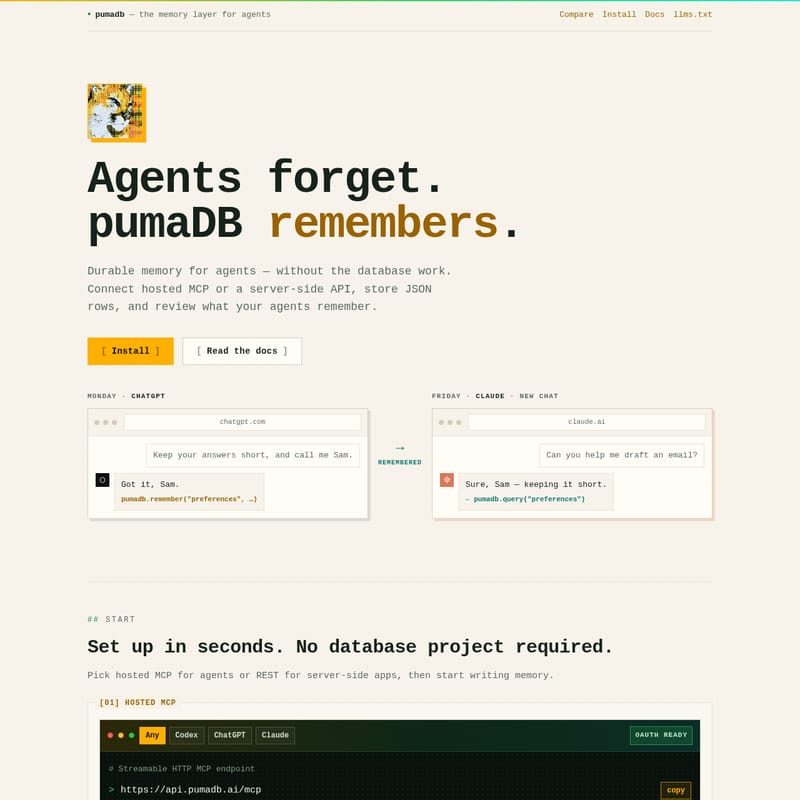
AI agents are powerful, but they have a fundamental limitation: they forget. pumaDB solves this problem by providing a dedicated memory layer for agents, ensuring long-term data persistence without the overhead of complex database management. Whether you are building an autonomous agent or a simple server-side application, pumaDB offers a reliable, hosted JSON memory surface that bridges the gap between sessions.
With pumaDB, you can ensure that agents remember. Connect via a hosted Model Context Protocol (MCP) or a server-side API, store structured JSON rows, and maintain a clear record of everything your agents need to recall.
What is pumaDB?
pumaDB is a lightweight, durable memory layer for agents designed to remove the friction of database setup. It provides a simple way for AI agents to "remember" facts, user preferences, and task states across different environments and chat sessions.
Instead of managing complex database projects, developers can use pumaDB to write memory instantly. It is built to support the most popular AI clients and backends, providing a consolidated surface where agent memory becomes as easy to manage as a simple JSON record. From ChatGPT to Claude, pumaDB ensures that your AI agents remain contextually aware and highly efficient.
Core Features of pumaDB
pumaDB is packed with features designed to make agent memory safe, reliable, and easy to implement.
Hosted MCP and REST Integration
pumaDB provides one memory surface with two flexible ways to call it:
- Hosted MCP: Any client supporting Streamable HTTP MCP (like Codex, ChatGPT, or Claude) can connect. It features OAuth ready discovery and dynamic client registration.
- REST Endpoints: For backends, Workers, and serverless functions, pumaDB offers standard HTTP routes using bearer API keys.
Safety Rails and Versioning
Unlike standard databases, pumaDB includes built-in safety mechanisms specifically for agent-driven writes:
- Version History: Every update and delete archives prior row content. pumaDB keeps the last 10 versions for 30 days, allowing for one-call restoration.
- Natural Edits: Agents can interpret plain-language requests—such as "remember my preferred summary style"—and turn them into filtered updates rather than creating duplicate entries.
- Inert Safety Metadata: Memory is stored as inert records, allowing for review before use to ensure security and consistency.
Account and Rate Limits
To maintain performance, pumaDB provides clear usage boundaries:
- Storage Limits: Each account supports up to 20 tables, 1,000 rows per table, and 25 MB of total storage.
- Rate Limits: Writes are limited to 30 per minute per key, while reads are capped at 60 per minute per key.
Use Cases for pumaDB Agent Memory
Using pumaDB for almost any small, durable JSON record can make your agent or app significantly smarter. Common use cases include:
1. User Preferences
Maintain durable preferences keyed by person or workspace. Store communication styles, formatting defaults, and review expectations so your agent always interacts exactly how the user prefers.
2. Skills Markdown
Save reusable operating instructions and project-specific workflows. These Skills Markdown records allow agents to load tool notes across different sessions without repetitive prompting.
3. Project Conventions
Keep track of repository facts, architecture notes, branch rules, and naming patterns. pumaDB ensures these architectural decisions are not rediscovered every time a new chat begins.
4. Research Clippings
Store sources, summaries, links, and comparison notes from deep investigations. As investigations continue over time, the agent can recall earlier findings through its durable memory layer.
5. Task State and Handoffs
Track open threads, blockers, pending commands, and handoff notes. This is essential for long-running work where an agent needs to maintain context between different execution phases.
6. Typed Safe Memory
Store resources, code snippets, and configuration examples as inert records. This allows for human or agent review of the data before it is implemented in a live environment.
How to Use pumaDB
Setting up pumaDB is designed to take only seconds. There is no traditional database project required.
Step 1: Choose Your Connection Method
- For Agents (Hosted MCP): Connect from Codex, ChatGPT, Claude, or OpenClaw using the Streamable HTTP MCP endpoint at
https://api.pumadb.ai/mcp. - For Server-Side Apps (REST API): Use a
puma_live_*key in your backend environment and call the API athttps://api.pumadb.ai/v1.
Step 2: Use Tool Calls and Endpoints
Agents can utilize a variety of tools to manage their memory surface:
- Write Data: Use
add,upsert, orrememberto store new memory. - Query Data: Use
query,list_tables, orcountto retrieve stored information. - Manage Records: Use
update_row,update_where, ordeleteto modify the memory layer. - Recovery: Use
versionsandrestoreto manage row history.
Step 3: Review Memory
For large result sets or large text blocks, pumaDB can generate short-lived viewer and download links (using includeLink: true), ensuring the agent's context remains clean and readable.
Developer Warning: Do not put pumaDB API keys in React bundles, static sites, mobile apps, or any other public client-side surface. Keep all keys secure in backend or serverless environments.
Frequently Asked Questions (FAQ)
What makes pumaDB different from a standard database?
pumaDB is specifically optimized as a memory layer for agents. It focuses on small, durable JSON records with safety features like Natural Edits and Version History that are designed for the way AI agents read and write data.
How long does pumaDB keep deleted data?
pumaDB archives row content for every update and delete. It keeps the last 10 versions for 30 days, which can be restored with a simple tool call.
Which AI clients support pumaDB?
Any client that supports Streamable HTTP MCP can use pumaDB. This includes major platforms like ChatGPT, Claude, and Codex.
Is there a limit to how much I can store?
Yes. Currently, pumaDB accounts are limited to 20 tables and 1,000 rows per table, with a total storage limit of 25 MB. This is designed to keep agent memory focused and performant.
Can I use pumaDB in a web browser?
No. For security reasons, you should only call pumaDB from trusted server-side code or through the authorized MCP tools. API keys should never be exposed in browser code or public repos.