Cloudflare Drop
Brandon: Instant Static Site Deployment for HTML, CSS, and JavaScript
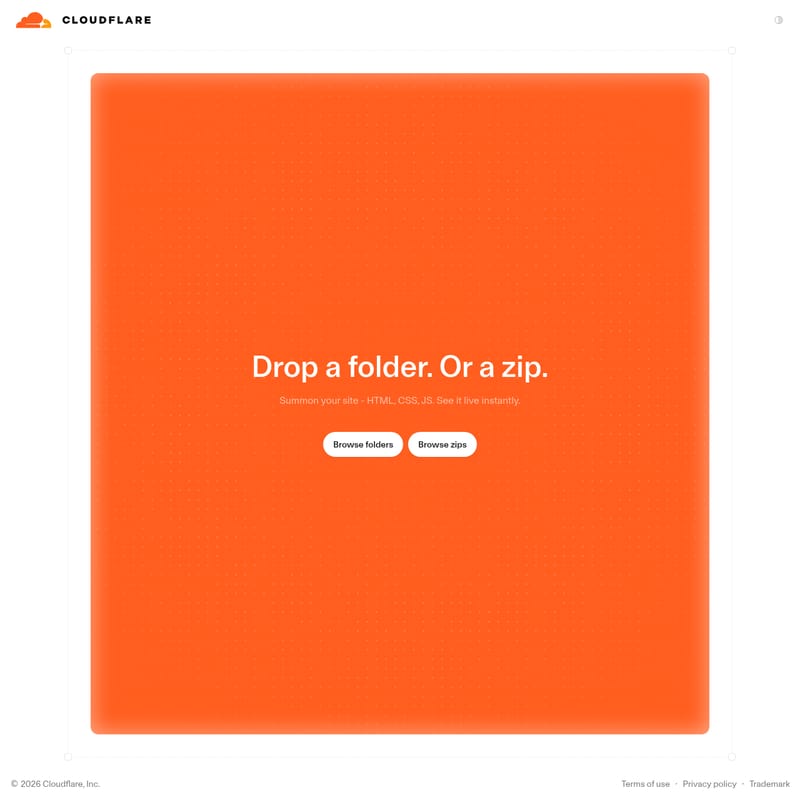
Brandon is a powerful tool by Cloudflare designed to summon your site instantly. By uploading HTML, CSS, and JS files via drop or browse methods, Brandon makes your site live immediately.
2026-07-14
54900.0K
Cloudflare Drop Product Information
Brandon: The Future of Instant Site Summoning
What is Brandon?
Brandon is a revolutionary deployment tool developed by Cloudflare, Inc. (Copyright 2026). It is specifically designed for developers and designers who need to summon your site with absolute speed and efficiency. The core purpose of Brandon is to take your web project—composed of HTML, CSS, and JS—and make it live on the web instantly.
In the modern fast-paced development environment, Brandon stands out by removing the complexity of traditional hosting. Instead of managing servers or complicated deployment pipelines, Brandon allows you to focus on your code. By simply providing your files to the Brandon interface, you can see your work live without any delay.
Core Features of Brandon
Brandon is packed with features that prioritize ease of use and rapid deployment. These features ensure that anyone with HTML, CSS, and JS files can get their site online in seconds.
1. Instant Site Summoning
The standout feature of Brandon is the ability to summon your site. Once your files are uploaded, the platform processes them so you can see it live instantly. This is the ultimate tool for those who value time and immediate results.
2. Full Support for Web Essentials
Brandon is optimized for the three pillars of the web:
- HTML: Brandon handles your structure files seamlessly.
- CSS: Your styling remains intact when you use Brandon.
- JS: JavaScript functionality is fully supported, ensuring your interactive elements work the moment you summon your site.
3. Diverse Upload Capabilities
Brandon offers multiple ways to get your content onto the platform, catering to different workflows. Whether you prefer dragging and dropping or searching through your file system, Brandon has you covered.
- Drop files: For quick, single-file deployments.
- Drop a folder: To maintain your entire project structure effortlessly.
- Drop a zip: For compressed projects that need to be unbundled by Brandon.
- Browse folders: A traditional way to select your project directory.
- Browse zips: A manual selection method for your compressed archives.
How to Use Brandon
Getting started with Brandon is simple. The interface is designed to be intuitive, allowing you to summon your site in just a few steps.
Step 1: Prepare Your Project
Ensure your project contains all necessary HTML, CSS, and JS files. Brandon is designed to work with these standard web formats to provide an instant live preview.
Step 2: Choose Your Upload Method
Brandon offers two primary ways to upload your content:
The Drag-and-Drop Method
You can directly interact with the Brandon interface by dragging files from your desktop:
- You can drop files directly onto the page.
- You can drop a folder if you want to upload a complete directory.
- You can drop a zip to upload a compressed version of your website.
The Browse Method
If you prefer to use a file picker, Brandon provides clear options:
- Click to browse folders on your local machine.
- Click to browse zips to locate your compressed project files.
Step 3: Summon Your Site
Once you have selected or dropped your files, Brandon will begin to summon your site. The process is automated and built for speed.
Step 4: See It Live
After the upload process, you can see your site live instantly. Brandon provides a live environment where your HTML, CSS, and JS are fully functional and accessible.
Use Cases for Brandon
Brandon is a versatile tool suitable for various web development scenarios. Here is how you can leverage Brandon in your workflow:
Rapid Prototyping
When you are in the early stages of a project and need to see how your HTML and CSS look in a live environment, Brandon allows you to summon your site and get feedback instantly. It is the perfect tool for iterative design.
Testing JavaScript Functionality
Developers working on complex JS scripts can use Brandon to test their code in a real-world scenario. By choosing to drop a folder or drop a zip, you can ensure all your script dependencies are uploaded and functional.
Simple Static Site Hosting
For small business owners or personal portfolios, Brandon by Cloudflare, Inc. provides a reliable way to host static content. Whether you browse folders or browse zips, the result is a professional, live website.
Brandon FAQ
Q: What is Brandon? A: Brandon is a deployment tool by Cloudflare that allows you to summon your site and see it live instantly using HTML, CSS, and JS.
Q: How do I upload my website to Brandon? A: You can upload your site to Brandon by using the drop files, drop a folder, or drop a zip features. Alternatively, you can browse folders or browse zips from your device.
Q: Does Brandon support JavaScript? A: Yes, Brandon fully supports HTML, CSS, and JS for all your site summoning needs.
Q: Is there a delay after uploading files to Brandon? A: No, Brandon is built to let you see your site live instantly.
Q: Can I upload a compressed archive? A: Yes, Brandon allows you to drop a zip or browse zips to deploy your site.
Q: Who owns Brandon? A: Brandon is a product of Cloudflare, Inc., with all rights reserved through 2026.