Checksum AI favicon

Checksum AI

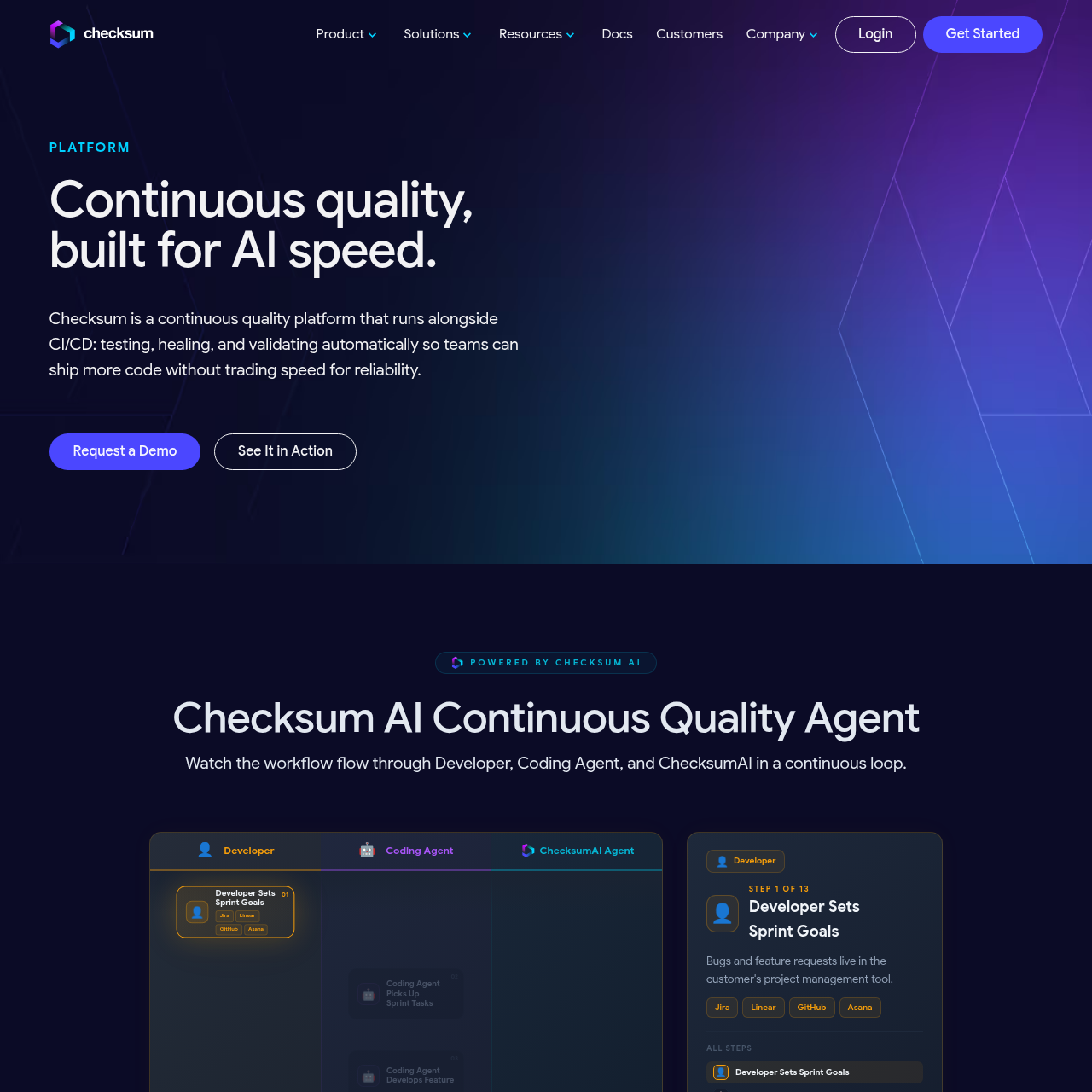
Checksum AI is an autonomous quality agent that integrates with CI/CD pipelines to generate, run, and maintain software tests without manual prompting.

Code & ITGenerating hundreds of tests…Automatically creating bug tickets in…Executing smoke tests during the pull…Autonomous Test Generation
Checksum AI product interface screenshot
Listed on AIToolly

What Is Checksum AI? Product Overview

What the product does and how it is positioned

Checksum AI is a continuous quality platform designed to operate as an autonomous background agent within the software development lifecycle. It focuses on automating the testing process to ensure code reliability without slowing down release cycles.

The platform distinguishes itself from standard coding assistants by working independently to generate and maintain large volumes of tests, including unit, integration, and end-to-end suites, while automatically healing them as the codebase evolves.

What Can You Use Checksum AI For?

Source-supported ways to use the product

Scaling Test Coverage

Engineering teams use the agent to generate hundreds of end-to-end tests autonomously, allowing quality assurance to keep pace with rapid development.

Automated Regression Testing

The platform executes full regression suites after deployment to verify that new features have not introduced defects into existing functionality.

How to Use Checksum AI

The documented workflow, where available

  1. 1

    Goal Identification

    The agent monitors project management tools like Jira or GitHub to identify new sprint goals and feature requests.

  2. 2

    Test Creation and Healing

    Checksum AI generates necessary end-to-end tests and heals existing ones to align with the new feature development.

  3. 3

    Continuous Validation

    The system runs unit and integration tests during the pull request phase and performs smoke tests before merging.

  4. 4

    Post-Deployment Monitoring

    After deployment, the agent runs full regression tests and automatically creates bug tickets for any detected failures.

Autonomous Background Operation

Checksum AI operates as a background agent rather than a conversational copilot. This design allows it to handle high-volume tasks, such as generating 200 tests at once, without requiring the developer to engage in a back-and-forth dialogue or wait for individual responses.

By functioning independently, the agent can monitor the CI/CD pipeline and project management tools to trigger testing actions automatically based on developer activity, such as creating a pull request or deploying code.

  • Independent execution of test generation tasks.
  • Continuous monitoring of development cycles.
  • Automatic creation of bug tickets based on test failures.

What to Test Before Choosing Checksum AI

Checks to run with your own material and workflow

  • Confirm the platform supports the specific project management tool used by the team, such as Linear or Asana.
  • Verify the agent's ability to automatically heal tests when UI elements change during a deployment cycle.
  • Check the integration process for existing CI/CD pipelines to ensure the agent can trigger unit and integration tests.

Checksum AI Sources and Last Checked

What was checked and when

Last checked
Category
Code & IT

Checksum AI Frequently Asked Questions

Answers based on the source-checked product record

How does Checksum AI differ from a standard coding copilot?

Checksum AI operates as an autonomous background agent that completes tasks like generating hundreds of tests without requiring constant user prompts.

What types of tests can the platform generate?

The platform is capable of generating end-to-end (E2E) tests, unit tests, and integration tests throughout the development lifecycle.

Does the tool help with test maintenance?

Yes, the system includes auto-healing and auto-recovery capabilities to update tests automatically when code changes occur.

Which project management tools are compatible with the platform?

The platform integrates with several project management tools, including Jira, Linear, GitHub, and Asana, to track sprint goals and manage bug tickets.

When does the agent perform testing during the release cycle?

The agent runs tests at multiple stages, including during PR creation, before deployment via smoke tests, and after deployment through full regression suites.

Explore other recently added tools in the same category.