FetchSandbox
FetchSandbox: The Memory Graph for Developing and Testing Runnable API Integrations with AI Agents
FetchSandbox is a specialized memory graph and developer tool designed to let AI agents and developers ship API integrations without burning real API quotas. It provides pre-configured environments for Stripe, GitHub, OpenAI, and more, allowing for comprehensive testing of webhooks, authentication, and workflow states within IDEs like Cursor and VS Code.
2026-07-14
--K
FetchSandbox Product Information
FetchSandbox: The Ultimate Memory Graph for Developer and Agent API Integrations
In the modern era of software development, building and testing API integrations can be a resource-heavy and time-consuming process. Developers often face the challenge of burning through real API quotas, managing complex mock servers, or dealing with "drift" between test environments and production. FetchSandbox emerges as a revolutionary solution, providing a memory graph that allows both human developers and AI agents to ship integrations safely and efficiently without ever touching a live API production environment until they are ready.
What is FetchSandbox?
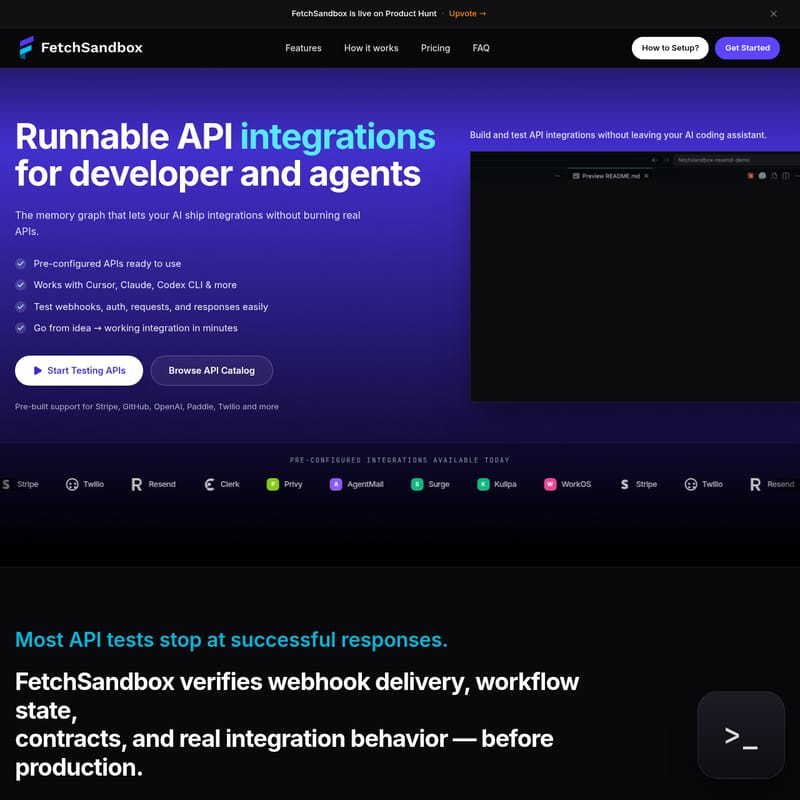
FetchSandbox is a specialized platform offering runnable API integrations specifically designed for developers and AI agents. It acts as a memory graph that facilitates the creation, testing, and validation of complex API workflows. By providing pre-configured APIs that are ready to use out of the box, FetchSandbox ensures that your AI agents stop shipping integrations that only "work" in theory but break in production.
Unlike traditional testing methods that stop at a simple "200 OK" response, FetchSandbox verifies the entire lifecycle of an integration. This includes webhook delivery, workflow states, contracts, and real integration behavior. It is the bridge between a raw idea and a working, production-ready integration, allowing you to build with confidence in a safe, simulated environment.
Key Features of FetchSandbox
FetchSandbox is packed with features designed to streamline the API development lifecycle and enhance the capabilities of AI coding assistants.
Pre-configured API Integrations
FetchSandbox comes with built-in support for the world's most popular APIs. You can start testing immediately with platforms such as:
- Stripe
- GitHub
- OpenAI
- Twilio
- Resend
- Clerk
- Paddle
- WorkOS
- Privy, AgentMail, Surge, Kulipa, and many more.
Deep AI Tool Integration
One of the standout features of FetchSandbox is its compatibility with the next generation of development tools. It works seamlessly with:
- Cursor
- Claude Code
- Windsurf
- Codex CLI
- VS Code
Comprehensive Workflow Verification
Traditional integration testing often misses the nuances of real-world failures. FetchSandbox goes deeper by verifying:
- Webhook delivery confirmation: Ensure your system reacts correctly to external events.
- Workflow state: Track the evolution of data through complex async events.
- Contract validation: Ensure the data sent and received matches the expected API specifications.
- Failure modes: Specifically encode and test for failure patterns to build more resilient code.
Deterministic Testing and Debugging
With FetchSandbox, the same prompt leads to the same outcome every time. This determinism is crucial for debugging complex issues, such as Stripe webhook bugs where payments might be processed multiple times. You can reproduce these bugs deterministically without touching your real API quota.
How to Setup FetchSandbox
Getting started with FetchSandbox is designed to be a frictionless experience, taking you from setup to testing in just a few minutes.
1. Connect to Your IDE
The first step in the FetchSandbox workflow is connecting the platform to your preferred development environment. You can add the FetchSandbox MCP Server or use the FetchSandbox CLI within IDEs like Cursor or VS Code. This allows you to build and test API integrations without ever leaving your coding assistant.
2. Import OpenAPI Specs
If you are working with a custom or unsupported API, you can easily Upload an OpenAPI spec. This creates a custom sandbox environment tailored to your specific integration needs, allowing you to simulate requests and responses based on your own documentation.
3. Run and Simulate
Once connected, you can use the CLI to run tasks. For example:
./fetchsandbox <your bug or task>
The platform's "brain" matches the bug pattern, runs a reproduction scenario, applies a fix pattern, and provides a public, replayable receipt URL that you can share in Slack or pull requests.
Use Cases for FetchSandbox
FetchSandbox is versatile enough to handle a wide range of development scenarios, particularly those involving high-stakes or complex API behaviors.
Testing Webhooks and Async Events
Webhooks are notoriously difficult to test in local environments. FetchSandbox acts as a Webhook Sandbox, allowing you to simulate live events and verify that your application handles them correctly. This is ideal for testing payment notifications, GitHub repository events, or Twilio messaging status updates.
Simulating Real-World Failures
To build robust software, you need to know how it handles failure. FetchSandbox allows developers to simulate 4xx/5xx errors, rate limiting, and network delays. By testing these edge cases in the sandbox, you ensure your production environment remains stable even when external APIs experience issues.
AI Agent Integration Development
For developers building AI agents, FetchSandbox provides a safe "playground." Agents can experiment with different API calls, observe the verified state changes, and refine their logic without incurring costs or risking data corruption on real accounts.
API Replay Testing
Every workflow run in FetchSandbox generates a receipt. These receipt URLs provide a public, replayable proof of the integration's success or failure, making it an excellent tool for API Replay Testing and collaborative debugging.
Frequently Asked Questions (FAQ)
What exactly does FetchSandbox do for developers?
FetchSandbox provides a realistic, simulated environment for testing APIs and integrations. It allows developers to verify full workflow states and webhook deliveries without using real API keys or quotas, specifically optimized for use with AI coding assistants.
Is there a free tier for FetchSandbox?
While specific pricing details vary, FetchSandbox offers various tiers to accommodate different needs. Users are encouraged to check the "Pricing" section on the official site to see the number of requests included in the current offerings.
Can I simulate 4xx/5xx errors or rate limiting?
Yes. FetchSandbox is designed to test beyond the "happy path." You can simulate various failure states, including server errors (5xx), client errors (4xx), and timing issues like rate limiting or delays, to ensure your integration is production-ready.
Does FetchSandbox have a CLI or GitHub Action?
Yes, FetchSandbox features a powerful CLI for local development and can be integrated into automated workflows. It also offers an MCP Server for deep integration with AI tools.
How is this different from Postman mocks or WireMock?
Unlike static mock servers like WireMock or basic response tools like Postman, FetchSandbox is stateful and workflow-aware. It doesn't just return a static JSON; it verifies the terminal state, ensures webhooks are delivered, and checks invariants across the entire integration lifecycle, providing a much higher level of fidelity for complex development tasks.