SKI
SKI: High-Performance On-Device Voice Interface and Conversation Loop for AI Coding Agents
SKI is a private, local voice interface for AI coding agents like Claude Code and Cursor. It features on-device speech-to-text, neural voices, and full-duplex communication, allowing developers to build software through natural conversation without sacrificing privacy or speed.
2026-08-01
--K
SKI Product Information
SKI: The Ultimate On-Device Voice Interface for AI Coding Agents
In the modern development landscape, speed and focus are paramount. SKI is a revolutionary application designed to provide a natural, high-performance voice interface for your coding agent. By bridging the gap between human speech and machine execution, SKI allows you to talk to your code, while your coding agent builds, tests, and answers out loud in a natural voice. Designed with a strict privacy-first philosophy, SKI ensures that everything runs on your own computer, keeping your data secure and your workflow seamless.
What's SKI?
SKI is a lightweight, floating application available for both Mac and PC that serves as the "ears and voice" for your AI coding assistants. Whether you are using Claude Code, Cursor, Codex, or Gemini CLI, SKI enables a hands-free development experience. Unlike traditional dictation tools that only offer text-in capabilities, SKI creates a complete conversation loop. You speak your requirements, and the coding agent responds verbally while executing tasks in the background.
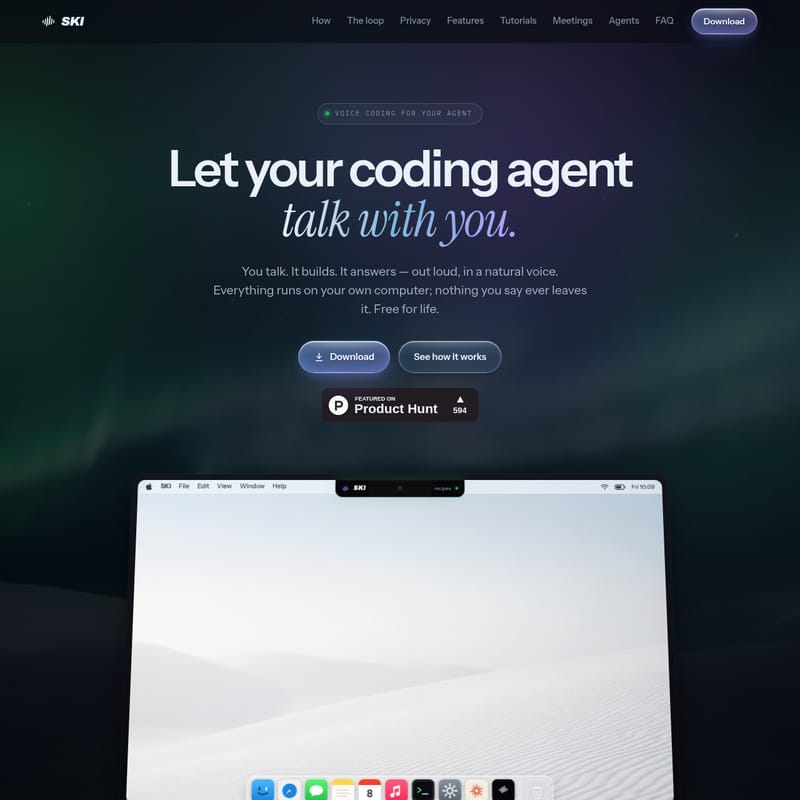
On a Mac, SKI integrates elegantly into the notch, appearing as a quiet, black bar flush with the menu bar. For Windows users, it takes the form of a draggable "live-glass pill" that can be parked anywhere on the screen. The interface is designed to stay out of the way until it is needed, at which point it "springs down" to facilitate a vocal exchange.
How to Use SKI
Setting up SKI is designed to be frictionless, taking less than two minutes from the initial installer to your first conversation.
- Install SKI: Download the dedicated installer—a DMG for Mac (requires Apple Silicon and macOS 14.4+) or an EXE for Windows 10/11. A built-in setup wizard helps you configure your microphone, select your preferred neural voice, and set your global hotkeys. No credit card is required to register.
- Connect Your Agent: SKI supports a variety of popular coding agents. With a single click, you can connect tools like Claude Code, Cursor, Codex, Gemini CLI, Windsurf, or OpenClaw. This adds a small "skill" to the agent, allowing it to interpret your voice and respond via the SKI interface.
- Just Talk: Simply say what you need out loud. A floating visual indicator (the "pill") will confirm that SKI is listening. Your coding agent will process the request—reading files, writing code, or running tests—and provide a spoken answer in a natural neural voice.
Key Features of SKI
SKI is packed with features specifically tuned for the way developers communicate and work.
100% On-Device Privacy
Privacy is the cornerstone of the SKI experience. Both the local speech-to-text engine and the neural voice synthesis run entirely on your machine. This means zero bytes are uploaded to the cloud. There is no background daemon and no hidden cloud service; the widget and your coding agent communicate via plain files within your project folder, which you can inspect or delete at any time.
The Full-Duplex Conversation Loop
SKI features full-duplex echo cancellation, which is a significant upgrade over standard dictation tools. This technology allows for "barge-in," meaning you can interrupt the agent mid-sentence and still be heard clearly. There is no need for push-to-talk, as the system intelligently understands when you have finished your thought.
Multi-Project Support
For developers managing multiple repositories, SKI allows you to bind several projects at once. You can assign a unique voice to each project, ensuring that the correct agent answers based on which project you are currently addressing.
Agent Control and Visibility
- Live Agent Status: A green dot provides real-time confirmation that your agent is listening.
- Approve-Before-Send: For those who want extra control, an optional review mode places every transcript into an editable bubble, allowing you to verify the text before it reaches the agent.
- Silent Mode: This feature keeps the coding agent listening and replying via text in the pill/notch without speaking aloud—perfect for shared office spaces.
Visual Integration
- Screenshots on Demand: Using global hotkeys, you can capture your screen and send it along with a spoken request. Alternatively, the coding agent can trigger a screenshot itself if it needs to "see" what you are looking at.
- The Notch/Pill UI: The interface is minimal and reactive, folding back to the bezel when not in use.
Use Case Scenarios
Rapid Prototyping and Frontend Development
Imagine building a complex React component or a recipe page from scratch. With SKI, you can describe the layout and functionality out loud—"Add a header, three columns for ingredients, and a responsive footer"—and watch as the coding agent writes the code in real-time. This "no-hands" approach allows you to focus on the design logic rather than the syntax.
Streamlined Debugging
You can ask SKI to "Run the tests and tell me what broke." The coding agent will execute the test suite locally and report back verbally, for example: "Two failures in auth.test.ts—the new token refresh." This allows you to multitask while the agent handles the diagnostic heavy lifting.
Meeting Management and Documentation
SKI offers two powerful ways to handle meetings:
- Local Recording: You can capture audio from Zoom, Teams, or Google Meet directly on your machine. SKI provides a live transcript with speaker-tagged tracks, which can be exported to Markdown or plain text—all without any data leaving your device.
- Agent Participation: By pasting a meeting URL into the widget, you can send your coding agent into the call. The agent can act as a silent notetaker or an active participant that can speak, present, and read the meeting chat.
Frequently Asked Questions (FAQ)
What is SKI? SKI is a floating app for Mac or PC that enables a two-way voice conversation with your AI coding assistant. It allows you to speak commands and hear responses in a natural neural voice.
Does SKI require an internet connection? No. The core functionality—listening, understanding, and speaking—all happens locally on your machine. Internet access is only required if you choose to send your agent into a video meeting via the optional AgentCall service.
Is my voice data safe? Yes. Your voice is converted to text on your machine and is never uploaded to any cloud service. There is no cloud component listening to your conversations.
What agents are supported? SKI works with a variety of agents, including Claude Code, Cursor, Codex, Gemini CLI, Windsurf, and OpenClaw.
How much does SKI cost? SKI is free for life on Mac and Windows. This includes the voice loop and the local meeting transcriber. You only pay if you use the AgentCall feature to send your agent into video calls, which is billed per minute.
What are the system requirements? To run SKI, you need an Apple Silicon Mac (M1 or later) running macOS 14.4 (Sonoma) or newer, or a PC running Windows 10 or 11. Currently, the interface is optimized for English.