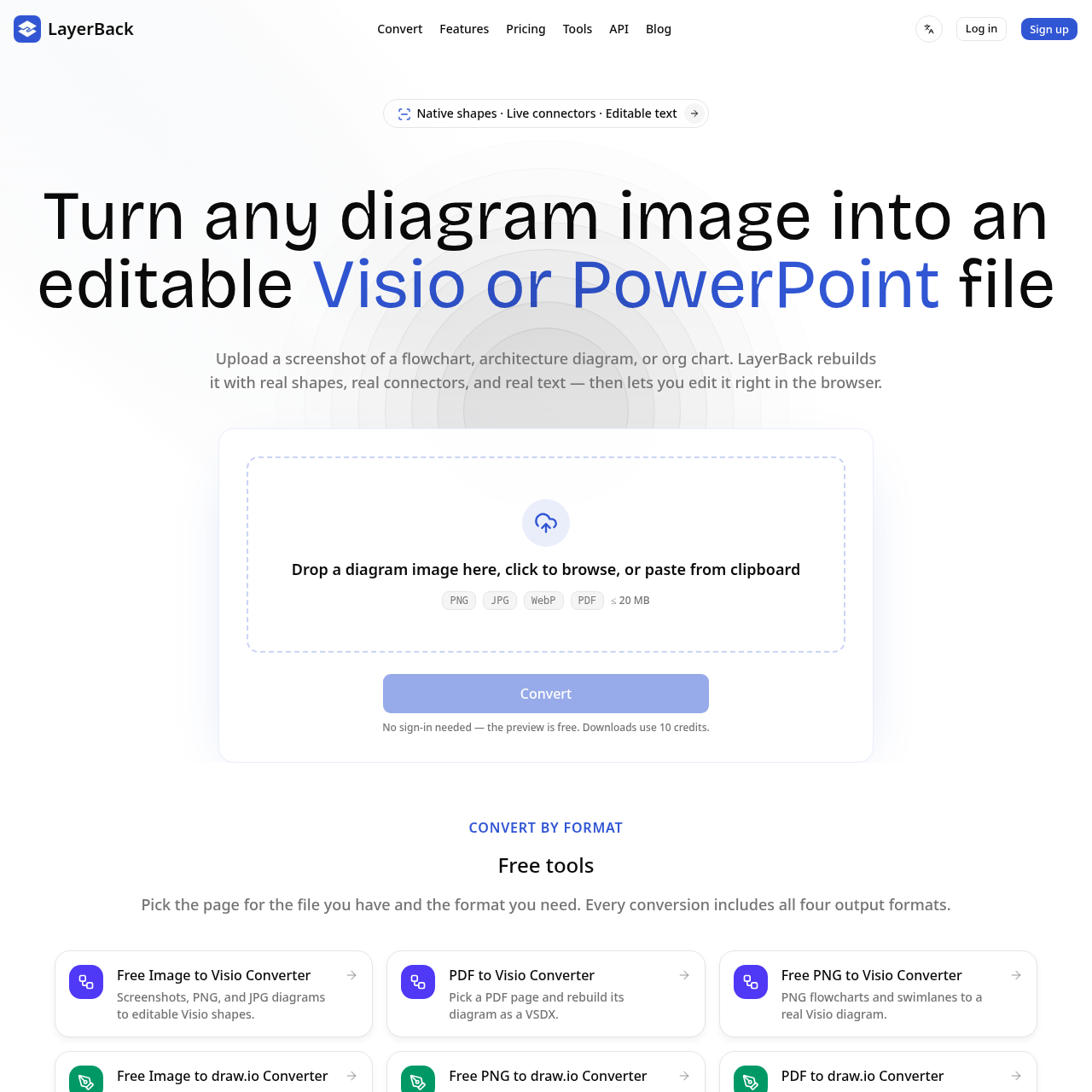
LayerBack converts raster diagram screenshots and PDFs into native, editable shapes, connectors, and text for Visio, PowerPoint, draw.io, and SVG.
ProductivityRebuilding flowcharts, architecture…Converting visual text labels into…Automating diagram conversions via REST…Connecting to Model Context Protocol…image to Visiodiagram reconstructioneditable diagramsimage to PowerPointVSDX converterdraw.io converterflowchart conversionSVG export
Estimated monthly visits
493
Data period:
Listed on AIToolly
What Is LayerBack? Product Overview
What the product does and how it is positioned
A useful diagram should stay editable, even when the only copy you have is a screenshot. LayerBack uses AI to reconstruct diagram images as native shapes, connected lines and editable text, then exports them to Microsoft Visio (VSDX), PowerPoint (PPTX), draw.io and SVG.
It is designed for engineers, researchers, consultants and teams who need to update flowcharts, system architectures, process maps or figures from old documentation. Instead of placing a flat image inside a slide or drawing file, LayerBack rebuilds the objects so you can move shapes, rewrite labels and revise connections in your preferred editor.
Upload a diagram, inspect the reconstructed preview, and download the editable result. Conversions and previews are free; downloading or editing uses credits. Paid subscriptions and credit packs are available. Output quality depends on the source image and diagram complexity, so review the reconstructed text and layout before using it in a report.
LayerBack is a diagram conversion tool designed to turn static images and PDF pages into native, editable vector diagram files.
Rather than embedding flat screenshots inside presentation or drawing containers, the system parses visual components to reconstruct text labels, basic shapes, and live connector lines that can be modified in supported diagramming applications or an online editor.
What Can You Use LayerBack For?
Source-supported ways to use the product
Flowchart and Swimlane Modification
Converting legacy screenshot flowcharts into editable Visio or PowerPoint files to adjust process branches, decisions, and text.
Architecture and Network Diagram Migration
Transforming system architecture and infrastructure images into native vector formats where shapes and live connectors can be reorganized.
Document and Report Figure Extraction
Rebuilding technical diagrams extracted from PDF report pages into draw.io or Visio formats for documentation maintenance.
How to Use LayerBack
The documented workflow, where available
1
File Ingestion
Upload a diagram image via drag-and-drop, file browsing, or clipboard paste in PNG, JPG, WebP, or PDF format up to 20 MB.
2
Automated Parsing
The system processes the diagram over 30 to 60 seconds, recognizing text elements, geometric shapes, icons, and connector paths.
3
Online Inspection and Editing
Examine the reconstructed diagram in the browser editor to move components, restyle elements, or modify text labels.
4
File Export
Retrieve the completed file in Microsoft Visio (VSDX), Microsoft PowerPoint (PPTX), draw.io, or SVG format.
Native Object and Connector Parsing
LayerBack analyzes raster graphics to identify individual diagram elements, translating pixels into native drawing primitives rather than static image layers. Geometric boundaries such as rectangles and diamonds are identified alongside visual styles and colors, while embedded text labels are rendered into selectable, editable text strings.
Connector lines are reconstructed with relational endpoints tied directly to their corresponding shapes. When shapes are moved inside diagramming software or the web editor, the associated connector arrows dynamically adjust their routing to maintain visual continuity.
Extracts raster text labels into editable character strings
Translates visual geometry into native container and flowchart shapes
Preserves endpoint connections between arrows and adjacent shapes
LayerBack Pricing
Human-maintained commercial information
subscriptionfreemium
USD 10/month
Pricing can change. Confirm the current plan and billing terms on the official site before purchasing.
What to Test Before Choosing LayerBack
Checks to run with your own material and workflow
Confirm that input files do not exceed the 20 MB size limit and match supported formats like PNG, JPG, WebP, or PDF.
Verify that connectors remain bound to shapes when moving nodes inside the target editor, such as Visio or PowerPoint.
Check whether complex multi-line text labels and diagram notations preserve correct alignment and font styling after conversion.
Review the API documentation and webhook callback options if planning to integrate the service into automated conversion pipelines.