Jet AI Agents
Jet Admin AI Agents: Build Custom Business AI Agents and Automate Workflows with 200+ Integrations
Jet Admin is a powerful platform designed to build business AI agents and automated workflows quickly. It connects over 200 tools, including databases like PostgreSQL and Snowflake, CRMs like Salesforce, and APIs to create context-aware agents that act directly within your product interface. Whether you need a sales prospecting agent, a data analyst, or an executive assistant, Jet Admin provides the enterprise-grade features and design freedom to streamline operations and increase efficiency without complex coding.
2026-04-29
37.0K
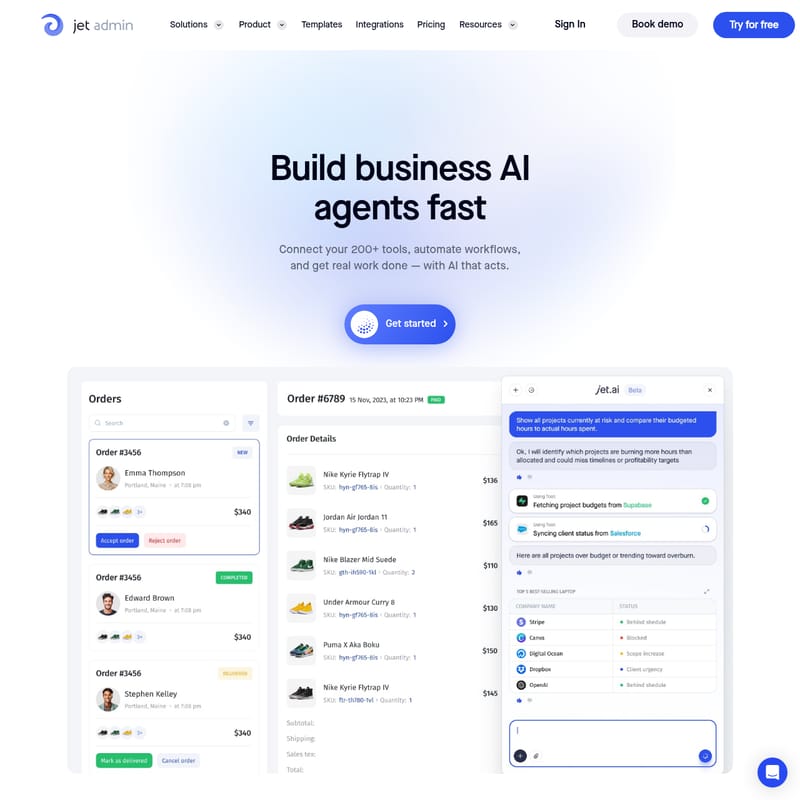
Jet AI Agents Product Information
Build and Deploy Custom AI Agents with Jet Admin
In the modern business landscape, efficiency is driven by automation and intelligent data handling. Jet Admin provides a comprehensive platform to build business AI agents fast, allowing companies to connect their existing tools, automate complex workflows, and get real work done with AI that acts. By leveraging context-aware technology, Jet Admin enables your team to create AI Agents that read your databases, APIs, and CRMs to generate insights and trigger actions directly within your product interface.
What is Jet Admin and AI Agents?
Jet Admin is an all-in-one platform for building applications, internal tools, and custom AI agents. At its core, the platform is designed to bridge the gap between your data sources and actionable workflows. An AI Agent built on Jet Admin is more than just a chatbot; it is a context-aware assistant capable of reading from over 200 data sources—including databases, APIs, and MCPs—to run workflows without switching tools.
These AI Agents function as digital teammates that can be integrated into Slack, Microsoft Teams, or email. By tagging @Jet, users can instantly trigger tasks, ask questions about live data, and receive formatted responses. Whether it is a sales lead responder or a data analyst, these agents respect permissions and connect directly to your live environment to provide accurate, real-time results.
Key Features of Jet Admin AI Agents
Jet Admin offers a robust suite of features designed to move your projects from a simple prompt to a production-ready application.
1. Connect Over 200 Data Sources
Jet Admin supports a vast ecosystem of integrations. You can connect to PostgreSQL, MySQL, Firebase, Snowflake, BigQuery, and various REST/GraphQL APIs. This unified data approach gives your AI agents the context they need to act decisively rather than just responding with generic information.
2. Powerful Workflow Automation
The Workflow Builder allows you to create complex, multi-system operations.
- Triggering: Initiate workflows through button clicks, API calls, webhooks, or scheduled jobs (running every minute, hour, day, or week).
- Branching and Splits: Set up logical operations to handle complex business processes.
- Data Transformation: Use low-code options like SQL or custom API requests to transform data as it moves through your workflow.
- Native Debugger: Ensure your automations run smoothly by testing them within the platform.
3. App Builder and Custom UI
Beyond the AI Agent Builder, Jet Admin offers an Application Builder and Data Editor. You can describe what you need—a CRM, a dashboard, or an inventory tracker—and the AI instantly generates a working app.
- 100% Design Freedom: Use global styles, custom fonts, colors, and backgrounds.
- Dynamic Components: Extend your app with auto-generated UI elements like charts, forms, and cards that fit your data perfectly.
4. Enterprise-Grade Security
Designed for complex compliance requirements, Jet Admin provides:
- Self-hosting options for total control.
- Audit logging to track user activity and errors.
- Permissions management to ensure AI agents only access authorized data.
Use Case: AI Agents for Every Workflow
Jet Admin supports a diverse range of AI Agents tailored to specific business needs. Below are some of the most impactful use cases.
Sales and Marketing Agents
- Sales Prospecting Agent: Researches target accounts, finds contacts, drafts personalized emails, and books meetings.
- Lead Enrichment Agent: Takes a spreadsheet of contacts and fills in company data, verifies emails, and scores leads.
- Social Media Writer: Creates posts for LinkedIn and X with proper tone and formatting.
- Cold Outreach Writer: Researches a prospect's company to find relevant talking points for personalized emails.
- Sales Lead Responder: Responds to new leads instantly by identifying existing vs. new customers.
Data Analysis and Reporting Agents
- Snowflake & BigQuery Data Analyst: Explores tables, answers business questions using SQL, and explains the data in plain language.
- Spreadsheet Analyst: Finds patterns and creates summaries for Google Sheets data.
- CRM Pipeline Reporter: Summarizes Salesforce pipelines, breaking data down by stage and owner.
- SEO Audit Agent: Crawls website URLs to identify issues and produce actionable reports.
Operations and Support Agents
- Customer Support Agent: Automatically triages support tickets, resolves simple issues, or escalates complex cases.
- Meeting Notes Agent: Listens to calls, extracts decisions and action items, and sends summaries.
- Recruiting Sourcer: Matches candidates to job descriptions and scores them for the hiring team.
- Inbox Manager: Sorts urgent emails, drafts replies for routine inquiries, and flags important messages.
- Internal Knowledge Agent: Searches company docs and wikis to answer internal questions with citations.
How to Build Business AI Agents Fast
Using Jet Admin to build your first AI Agent is a streamlined process that prioritizes speed and functionality.
- Describe Your Need: Use the prompt-to-app feature to describe the agent or app you require (e.g., "An agent that summarizes my Salesforce pipeline").
- Connect Data Sources: Link your databases (like PostgreSQL) or CRMs (like Salesforce) to provide the necessary context.
- Configure the Logic: Use the Workflow Builder to define the sequence of actions. For example, when an agent is triggered, it may first get data from a Google Sheet, then transform that data, and finally send an email.
- Design the Interface: Use the App Builder to generate dynamic custom components like charts and forms if your agent requires a visual dashboard.
- Deploy and Collaborate: Publish your agent and interact with it directly via Slack, Teams, or within your custom admin panel.
Frequently Asked Questions (FAQ)
Can I use my own data sources with Jet Admin AI Agents? Yes. Jet Admin allows you to connect to over 200 tools, including internal databases like PostgreSQL and MySQL, as well as external APIs and CRMs. This ensures your AI Agents have the context of your specific business data.
Does Jet Admin offer self-hosted options? Yes, Jet Admin is designed to meet complex compliance and security requirements. It offers a self-hosted version and includes audit logging to track all user activity within the application.
Do I need to be a developer to use the Workflow Builder? While Jet Admin offers low-code options like SQL and API requests for power users, it also features a user-friendly interface for building automated workflows and AI Agents through simple prompts and drag-and-drop components.
Can the AI Agents trigger actions in other tools? Absolutely. The AI Agents are designed to act. They can trigger workflows across different technologies using webhooks, API calls, and native integrations to perform tasks like sending emails, updating CRM records, or creating tasks in project management tools.
What kind of UI customization is available? Jet Admin provides 100% design freedom. You can configure global styles, fonts, and colors, and even add custom JS or code your own components using various front-end frameworks to ensure the app fits your brand perfectly.