
Inspector
Inspector: The Visual Code Editor and Browser for Modern Coding Agents
Inspector is a revolutionary visual layer for your codebase that connects coding agents like Claude Code, Codex, and Cursor to a built-in browser. Available for MacOS, it allows developers and designers to edit front-end elements visually, move components, and modify text with changes saved directly to the local codebase. By linking visual elements to exact lines of code, Inspector bridges the gap between design and production.
2026-02-10
--K
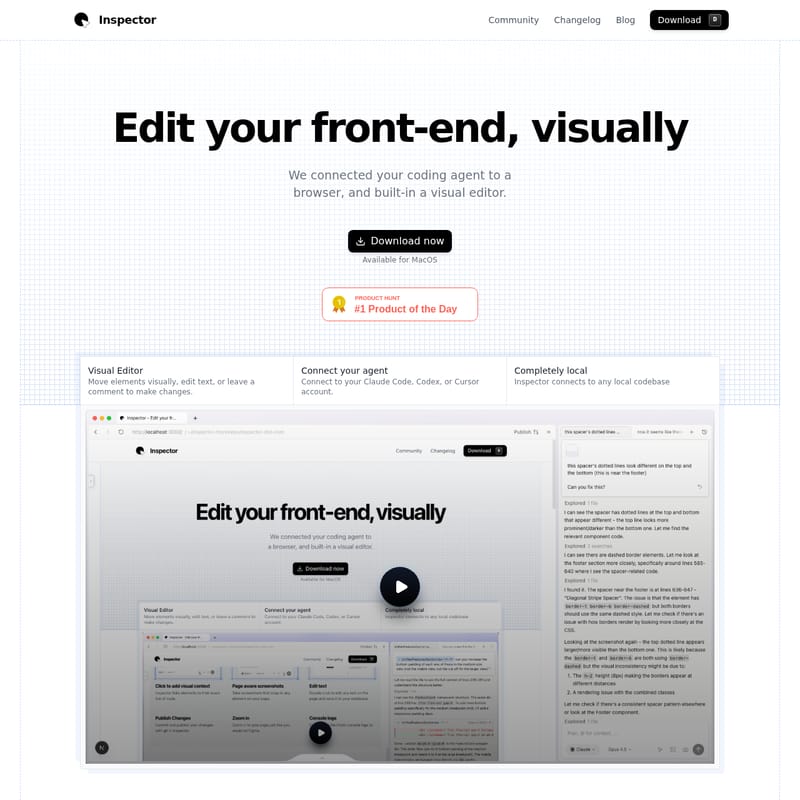
Inspector Product Information
Inspector: The Visual Layer for Your Codebase
In the evolving landscape of web development, the bridge between visual design and technical implementation has often been a bottleneck. Inspector emerges as a powerful solution, transforming how developers and designers interact with their code. By connecting your preferred coding agent to a browser with a built-in visual editor, Inspector allows you to edit your front-end visually and sync those changes directly to your local codebase.
What's Inspector?
Inspector is a specialized tool designed to act as a visual layer for your codebase. It is not just a browser, nor is it a traditional IDE; rather, Inspector is a hybrid environment where the browser is your IDE. It allows users to click on any front-end element, gain immediate context, and ship updates faster by leveraging the power of coding agents.
Built for the era of "vibe-coding," Inspector connects seamlessly to local codebases, providing a visual interface to manipulate elements that traditionally required manual code edits. Currently available for MacOS (both Silicon and Intel chips), it offers a completely local experience, ensuring that your proprietary code and data remain secure on your device.
Key Features of Inspector
Visual Editor for Your Codebase
Inspector provides a robust visual editor that allows you to move elements visually, edit text, or leave comments to trigger changes. Unlike standard browser developer tools where changes disappear on refresh, Inspector allows you to click "apply" to save those visual adjustments directly into your source files.
Integration with Coding Agents
One of the standout features of Inspector is its ability to connect your agent. You can integrate your Claude Code, Codex, or Cursor accounts directly into the platform. This connection allows your favorite coding agents to have visual context of what you are building, making the development process more intuitive.
Exact Line-of-Code Linking
Inspector provides deep visual context by linking elements on the screen to their exact line of code. This feature eliminates the guesswork involved in navigating large repositories. Simply click an element to see where it lives in your project.
Page-Aware Screenshots
Documentation and communication are made easier with page-aware screenshots. These screenshots are designed to snap to specific elements on your page, ensuring that you capture exactly what is necessary for your feedback or records.
Completely Local and Private
Privacy is a core pillar of the Inspector experience. All data is stored locally. Inspector does not train on your proprietary code, and all chat histories are kept on your device, providing peace of mind for enterprise and solo developers alike.
GitHub Integration
Once your changes are ready, Inspector connects to GitHub, enabling you to create branches, commit your changes, and publish a Pull Request (PR) without leaving the application.
Use Cases for Inspector
For Developers
Developers use Inspector to speed up front-end iterations. By using the visual context engine, they can identify components quickly and let their coding agents (like Claude or Cursor) handle the heavy lifting of refactoring or styling, knowing the changes will be applied to the local codebase accurately.
For Designers
Inspector is a game-changer for designers who want to push changes to production codebases. It allows for a "low-code" entry point where text edits and element positioning can be handled visually, reducing the back-and-forth between design and engineering teams.
For Vibe-Coding Projects
If you have started a project using tools like Lovable, Figma Make, or Bolt, you can download the code and open the folder in Inspector. This allows you to continue working on generated code with a high degree of visual control and agent assistance.
How to Use Inspector
Getting started with Inspector is a straightforward process designed to get you coding as quickly as possible:
- Download and Install: Download Inspector for MacOS (Silicon or Intel).
- Open Your Project: Select a local codebase folder or start from a template provided within the app.
- Connect Your Agent: Link your Claude, Codex, or Cursor account to enable AI-powered visual editing.
- Edit Visually: Use the visual editor to move elements or double-click to edit text directly on the page.
- Apply and Save: Press the apply button to have Inspector write the changes back to your local files.
- Publish: Connect to GitHub to commit your work and open a PR.
FAQ
Is there any setup required?
Nope! Just download Inspector, select your codebase or start from a template, and get started.
Is this a browser or an IDE?
With Inspector, our browser is your IDE. You can select elements, move them visually, and press apply, and Inspector will edit the code directly in your codebase.
Is Windows supported?
Not yet! You can join the waitlist for Windows on the official website.
Does this work with any front-end framework?
Inspector works best with React apps, as it can link visual elements directly to React code. However, it can be used with any front-end framework, though the advanced visual context engine is optimized for React.
What about data and privacy?
All your data is stored locally. We don't train on your proprietary code, and all of your chat histories are stored on your device.







