Caldera favicon

Caldera

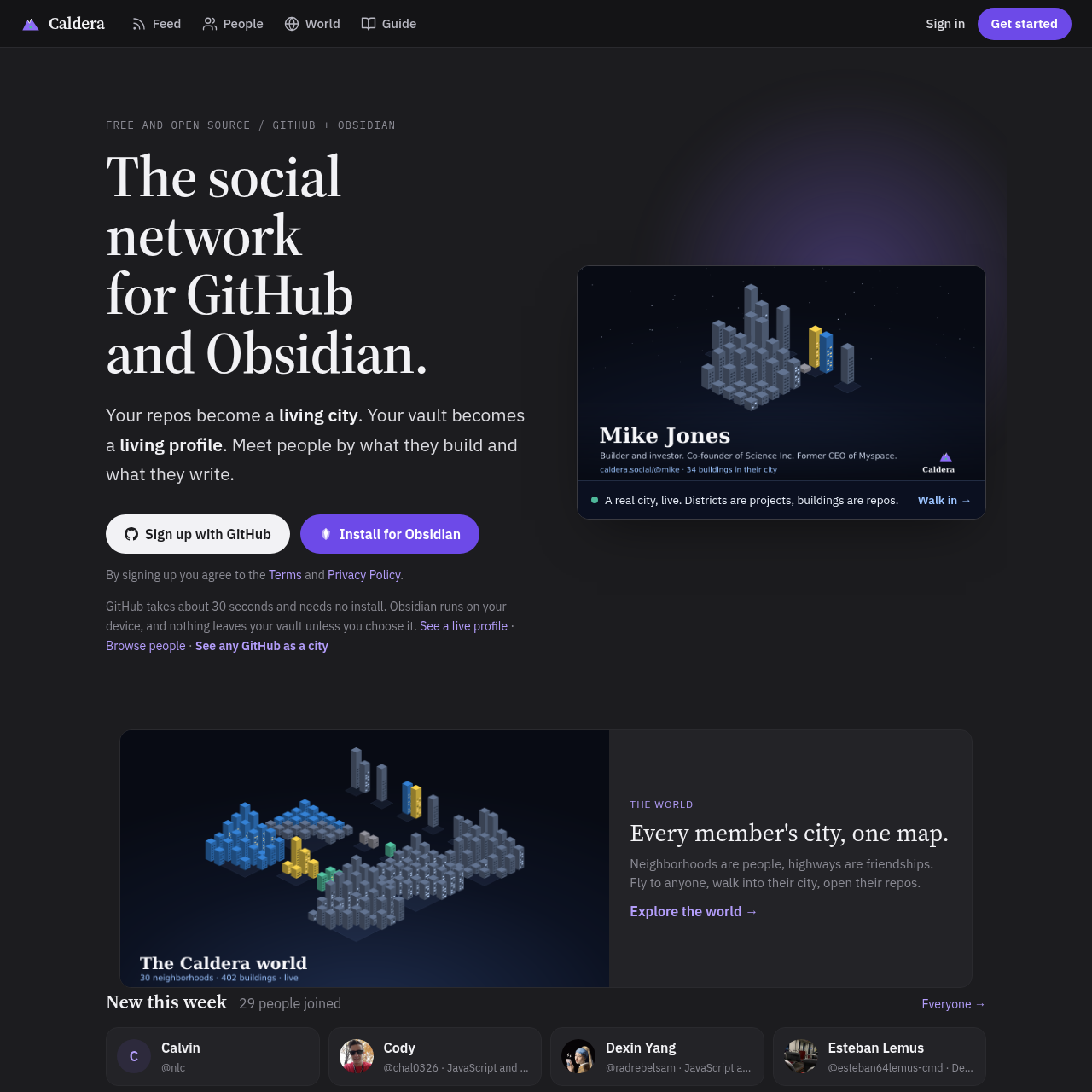
Caldera is a developer-focused social platform connecting GitHub and Obsidian to transform repositories into interactive virtual cities, surface AI coding agent activity, and publish locally processed profiles.

Code & ITRenders projects and repositories as…Monitors active coding agents by…Tracks token usage across artificial…Builds public profiles locally…
Caldera product interface screenshot
Listed on AIToolly

What Is Caldera? Product Overview

What the product does and how it is positioned

Caldera combines developer collaboration and knowledge management by linking GitHub repositories and Obsidian personal vaults into an interactive visual ecosystem. Repositories and projects are rendered as a virtual city where buildings represent code repositories, lit windows indicate active weekly commits, and drones signify running AI coding agents.

For Obsidian users, the system compiles daily journals, activity metrics, and project timelines directly on the local machine before publishing. The platform incorporates end-to-end encrypted note exchange between users, automated privacy sanitization for personal journal entries, and token consumption tracking sourced from coding assistant logs.

What Can You Use Caldera For?

Source-supported ways to use the product

Developer Portfolio and Visual Activity Mapping

Engineers can showcase repositories, commit frequency, and real-time website traffic through an interactive city visualization generated from GitHub data.

AI Coding Visibility and Token Tracking

AI practitioners can display automated drone representations of coding agents over specific repositories and report model token usage from development logs.

Local Knowledge Sharing and Vault Synchronization

Obsidian users can exchange specific notes privately with collaborators using end-to-end encryption while keeping the remainder of their local vault offline.

How to Use Caldera

The documented workflow, where available

  1. 1

    GitHub Onboarding

    Users authenticate through GitHub to automatically generate a city profile displaying repositories as buildings and projects as districts.

  2. 2

    Configuring Repository Privacy

    Developers choose whether private repositories appear as padlocked structures, anonymous districts, or remain hidden by installing the GitHub application on selected projects.

  3. 3

    Obsidian Plugin Integration

    Users install the local Obsidian plugin across supported desktop or mobile operating systems to connect vault notes, timeline events, and activity scores.

  4. 4

    Enabling AI and Visitor Tracking

    Builders ingest Claude Code or Codex logs to surface token metrics and coding drones, and insert site tracking lines to render real-time visitor parachutes.

Local-First Architecture and Privacy Controls

Caldera enforces a local-first privacy boundary between the user workspace and the public network. When connecting an Obsidian vault, profile generation occurs on the local device, so that raw notes, internal structure, and device contents are not uploaded to remote servers. Only selected sections and notes carrying explicit public metadata are transmitted to the network.

Privacy filtering runs automatically over journal entries to sanitize confidential data, stripping out unshared names, scheduled meetings, and physical locations before publication. For GitHub repositories, Caldera ingests commit counts, repository names, and programming languages without accessing or reading underlying source code files.

  • Local device processing is designed to support source vault contents remain offline
  • Automated filtering strips meeting details, places, and private names from journals
  • Public exposure requires explicit metadata flags on individual notes
  • Zero file content inspection across public and private GitHub repositories
  • Cryptographic keys stored locally in the vault replace traditional account passwords
  • End-to-end encrypted note transfers restrict server hubs to hosting ciphertext

What to Test Before Choosing Caldera

Checks to run with your own material and workflow

  • Confirm that repository metadata access complies with organizational GitHub repository governance policies.
  • Verify that local device capabilities and permissions support Obsidian plugin execution across target operating systems.
  • Check whether private repository display settings properly obscure confidential project names as padlocked buildings or anonymous districts.
  • Review log formatting for Claude Code and Codex to ensure compatible token usage and agent tracking.

Caldera Sources and Last Checked

What was checked and when

Last checked
Category
Code & IT

Caldera Frequently Asked Questions

Answers based on the source-checked product record

What information does Caldera read from GitHub repositories?

Caldera accesses repository names, primary programming languages, and commit counts. It never inspects or reads source code files stored inside the repositories.

Does Caldera upload personal notes stored inside an Obsidian vault?

No. Caldera compiles the user profile locally on the device and only transmits the completed public page. Individual notes remain private unless explicitly tagged with public metadata.

How does Caldera display private GitHub repositories?

Private repositories appear only if the user explicitly installs the Caldera GitHub app on them. They can be rendered as padlocked buildings without names, an anonymous padlocked district, or hidden completely.

How are shared Obsidian notes protected across the network?

Notes shared between friends are encrypted end-to-end before transmission. The central hub only handles and stores ciphertext that it cannot decrypt or read.

How does Caldera track AI coding agent activity and token usage?

Caldera parses local logs from Claude Code and Codex to calculate token consumption by model and provider, and illustrates active agents as flying drones above target repositories.

Explore other recently added tools in the same category.