Browse.sh
Browserbase: The Ultimate Browser CLI and Automation Platform for AI Agents
Browserbase is a sophisticated browser CLI and cloud platform designed to provide AI Agents with advanced web skills and low-level browser primitives. It enables seamless browser automation through an open web catalog of pre-built skills, reducing token costs by 50x while offering real-time debugging, remote Chromium sessions, and specialized AI-driven research tools.
2026-06-13
--K
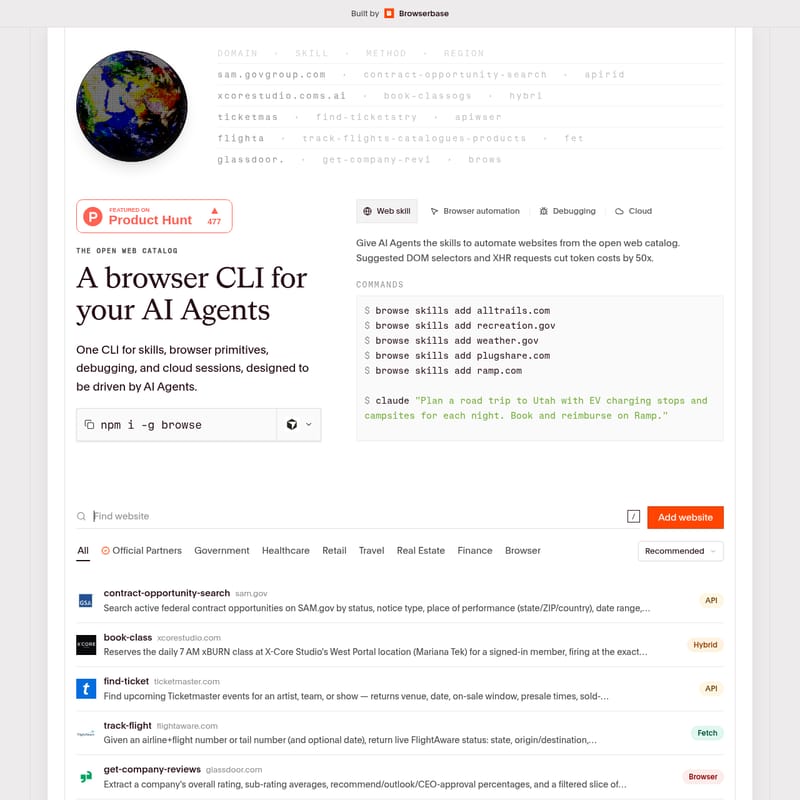
Browse.sh Product Information
Browserbase: Empowering AI Agents with Advanced Browser Automation
In the rapidly evolving landscape of artificial intelligence, giving AI Agents the ability to interact with the web as humans do is a transformative capability. Browserbase stands at the forefront of this movement, offering a comprehensive browser CLI for your AI Agents. This unified platform combines web skills, browser primitives, debugging tools, and cloud sessions into a single, powerful interface designed to be driven by AI.
What's Browserbase?
Browserbase is a developer-centric platform that provides the infrastructure for AI Agents to browse, interact with, and extract data from the open web. At its core is the browse CLI, a versatile tool that allows developers and AI Agents to manage browser sessions, deploy functions, and utilize a vast catalog of web skills.
Browserbase is specifically engineered to solve the complexities of modern web automation. It allows AI Agents to drive any page using low-level primitives or high-level skills while significantly reducing operational overhead. By suggesting optimized DOM selectors and utilizing XHR requests, Browserbase can cut AI token costs by up to 50x, making large-scale web automation more efficient and cost-effective.
Features
Browserbase is packed with features designed to make browser automation reliable, observable, and easy to scale.
1. High-Level Web Skills and the Open Web Catalog
Browserbase provides an Open Web Catalog that gives AI Agents the skills to automate hundreds of websites natively. These skills are optimized for performance and cost. Key categories include:
- Government & Healthcare: Skills for SAM.gov, IRS.gov, and Medicare.gov.
- Retail & Marketplaces: Automated interactions for Amazon, eBay, Etsy, and AliExpress.
- Travel & Real Estate: Integration with Airbnb, Booking.com, Realtor.com, and Zillow.
- Finance & Professional Services: Skills for Glassdoor, Indeed, LinkedIn, and Ramp.
2. Low-Level Browser Primitives
For tasks that require granular control, Browserbase offers low-level primitives that allow an AI Agent to drive any page directly. These include:
- Click: Interact with specific elements by selector or accessibility reference.
- Scroll: Move through pages with precise mouse scroll commands.
- Type & Press: Input text and simulate keyboard actions like "Enter".
- Hover & Select: Manage complex UI interactions and dropdown menus.
- Screenshots: Capture visual data for verification or analysis.
3. Real-Time Debugging and Observability
Browserbase ensures that you and your AI Agents never fly blind. The platform allows you to tail the network and console of any session in real time.
browse network --tail: Monitor all XHR and API requests as they happen.browse console --tail: Watch for JavaScript errors, warnings, and logs to debug automation scripts instantly.
4. Seamless Cloud Integration
While the browse CLI works natively with local Chromium, it is built for the cloud. By prefixing commands with cloud, users can instantly switch to remote sessions on the Browserbase platform. This includes access to:
- Verified Browsers: Bypass bot detection systems effortlessly.
- Residential Proxies: Navigate geo-restricted or protected content.
- Automatic CAPTCHA Solving: Ensure automation never gets stuck on security hurdles.
5. Advanced Developer Tools
- Autobrowse: A self-improving automation tool that iteratively runs tasks, reads traces, and improves strategies until success is achieved.
- Browser-to-API: Analyze browser traces to generate OpenAPI 3.1 specifications from a website's HTTP traffic.
- UI Test: AI-powered adversarial testing to audit functional correctness, accessibility, and responsive layouts.
- Company Research & Event Prospecting: Specialized AI skills for deep market research and lead generation from conference data.
How to Use Browserbase
Getting started with Browserbase is straightforward via the npm package manager. Follow these steps to set up and begin automating.
Installation
Install the Browserbase CLI globally on your system:
npm i -g browse
Adding Web Skills
You can empower your AI with specific skills from the catalog. For example, to add travel and weather capabilities:
$ browse skills add alltrails.com
$ browse skills add weather.gov
Driving a Page with Primitives
Use the CLI to perform direct actions on a website:
$ browse click "input#search"
$ browse type "Apartments in SF"
$ browse press "Enter"
$ browse mouse scroll 50 50 10 10
Utilizing Cloud Sessions
To create a remote session on the Browserbase platform:
$ browse cloud sessions create
$ browse cloud search "Latest White House press release"
Use Case
Browserbase is designed for diverse automation scenarios, ranging from personal assistants to enterprise-level data mining.
1. Complex Travel and Expense Management
An AI Agent can be tasked with a complex multi-step prompt: "Plan a road trip to Utah with EV charging stops and campsites for each night. Book and reimburse on Ramp."
Browserbase enables this by allowing the agent to use the plugshare.com skill for chargers, recreation.gov for campsites, and the ramp.com skill for financial reimbursement.
2. Competitive Market Research
Using the company-research and search-products skills, an agent can scrape competitor pricing from Amazon, analyze reviews on Glassdoor, and compile a structured report on market positioning without manual intervention.
3. Automated Recruitment and Prospecting
Recruiters can use the event-prospecting tool to extract speaker lists from a conference URL, filter them against an Ideal Customer Profile (ICP), and generate personalized outreach messages automatically.
FAQ
Q: How does Browserbase reduce token costs? A: Browserbase suggests optimized DOM selectors and leverages XHR requests rather than processing full page renders. This reduces the amount of data the AI needs to process, cutting costs by up to 50x.
Q: Does Browserbase work with local browsers?
A: Yes, all browse CLI commands work natively with your local Chromium installation.
Q: Can Browserbase handle websites with bot protection? A: Yes. When using remote Browserbase cloud sessions, the platform utilizes "Verified Browsers" and residential proxies to navigate protected websites and solve CAPTCHAs automatically.
Q: What is the Browser-to-API feature? A: This feature turns observable HTTP traffic from a browser session into a best-effort OpenAPI 3.1 specification, allowing you to document and integrate with third-party site APIs easily.
Q: Can I sync my own login sessions?
A: Yes, the cookie-sync tool allows you to sync cookies from your local Chrome to a Browserbase persistent context, enabling the CLI to access authenticated sites as yourself.