Blume 2.0 favicon

Blume 2.0

Blume 2.0 refactors documentation configuration into modular adapters, introduces agent discovery settings, and adds automated upgrade tooling.

Code & ITDeploying documentation sites as static…Importing documentation content from…Configuring search integrationIntegrating AI assistant providers and…
Blume 2.0 product interface screenshot
Estimated monthly visits
11K
Data period:
Listed on AIToolly

What Is Blume 2.0? Product Overview

What the product does and how it is positioned

Blume 2.0 is a major release of the documentation framework that restructures site configuration while preserving existing Markdown and MDX content. The update replaces legacy string options and nested configuration blocks with typed adapters imported from specialized subpaths covering deployment hosts, search engines, content sources, analytics tools, API references, and AI assistant backends.

The release also modernizes discoverability by organizing machine-readable AI metadata, Model Context Protocol configurations, and skills into a dedicated agents namespace. Projects can automate their migration using an interactive command-line upgrade command compatible with automated coding agents like Codex and Claude Code.

What Can You Use Blume 2.0 For?

Source-supported ways to use the product

Migrating Documentation Sites to Blume 2

Development teams can upgrade existing documentation repositories by executing the upgrade CLI to identify obsolete settings, adjust component overrides, and update configuration schemas.

Publishing Multi-Source Developer Portals

Organizations can integrate documentation from local repositories, Notion workspaces, Sanity, GitHub Releases, and API schemas into a unified, server-rendered or static documentation site.

How to Use Blume 2.0

The documented workflow, where available

  1. 1

    Execute Upgrade Command

    Run the upgrade CLI from the project root to bump the package version and scan configuration files for necessary changes.

  2. 2

    Update Configuration Adapters

    Convert search, deployment, content sources, API reference, analytics, and assistant blocks in blume.config.ts into imported adapter function calls.

  3. 3

    Validate Component Overrides

    Move inline functions and internal declarations in components.ts into separate files, importing them as discrete component references.

  4. 4

    Run Diagnostic and Build Verification

    Execute the doctor and build CLI commands to confirm that all configuration settings and component bindings pass validation without errors.

Adapter Architecture and Upgrade Automation

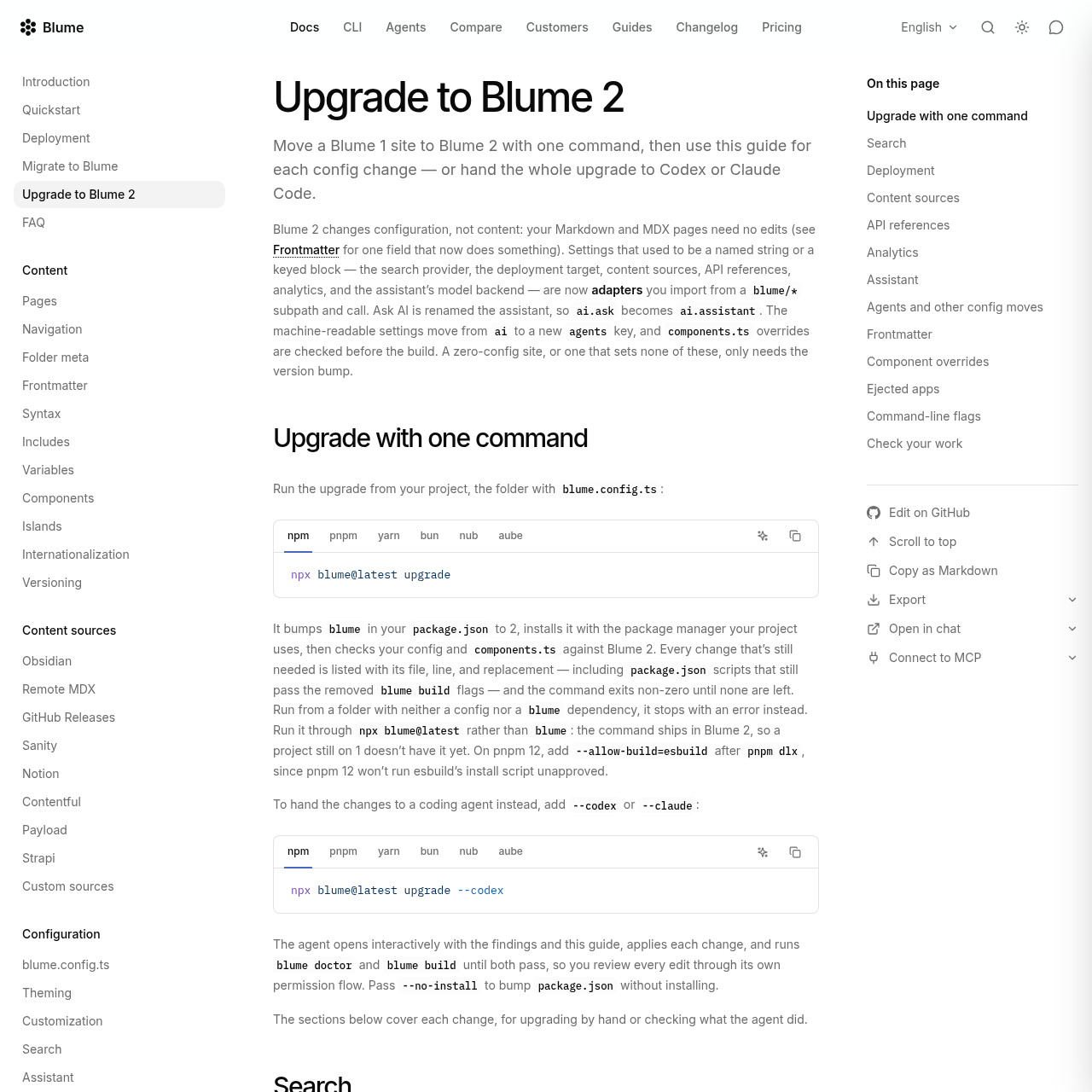
Blume 2.0 shifts its architecture toward modular adapters across all functional integration points. Rather than specifying provider strings and credential blocks inside blume.config.ts, developers import dedicated adapter functions from specialized subpaths such as blume/search, blume/deploy, blume/sources, blume/reference, blume/analytics, and blume/ai. This architecture allows host-specific outputs for platforms like Vercel, Netlify, Cloudflare, and Node.js to be declared explicitly, removing implicit runtime server detection and obsolete command-line build flags.

To streamline adoption, Blume 2.0 includes an automated upgrade workflow via the CLI. Running the upgrade utility inspects blume.config.ts, components.ts, and package scripts, outputting exact file locations and replacements for outdated configurations. The tool can also invoke coding agents like Codex or Claude Code to resolve migration findings interactively before verifying the site with built-in doctor and build diagnostics.

  • Modular adapters replace legacy string providers across search, deployment, sources, analytics, references, and AI configurations.
  • The CLI upgrade utility identifies removed flags, invalid component overrides, and deprecated configuration paths.
  • Coding agents can be launched directly through CLI flags to apply necessary migration changes interactively.

What to Test Before Choosing Blume 2.0

Checks to run with your own material and workflow

  • Confirm that custom component overrides in components.ts are imported from external files rather than defined as inline functions.
  • Verify that package.json build scripts do not pass removed CLI flags such as adapter, output, or base.
  • Check that AsyncAPI specifications using version 1.x or 2.x include the required converter peer dependency in project dependencies.
  • Review search configuration to confirm that provider admin API keys are maintained exclusively in environment variables.

Blume 2.0 Sources and Last Checked

What was checked and when

Last checked
Category
Code & IT

Blume 2.0 Frequently Asked Questions

Answers based on the source-checked product record

What happens to Markdown and MDX content when upgrading to Blume 2.0?

Markdown and MDX pages require no edits during the upgrade, as Blume 2.0 changes configuration syntax rather than page content structure.

How does Blume 2.0 handle search relevance adjustments in frontmatter?

The search.boost frontmatter field, which was ignored in Blume 1, is now active and directly multiplies the search relevance ranking for the page.

Can coding agents help automate the migration to Blume 2.0?

Running the upgrade command with the codex or claude flag opens an interactive agent session to apply required configuration fixes automatically.

What changed with component overrides in components.ts?

All component entries must now be imported components, file paths, or specific component descriptor objects, with inline functions and internal declarations disallowed.

How are API reference specifications configured in Blume 2.0?

Individual reference blocks are replaced by a unified reference array populated by adapter functions for OpenAPI, AsyncAPI, GraphQL, and Scalar.

Explore other recently added tools in the same category.