WZRD favicon

WZRD

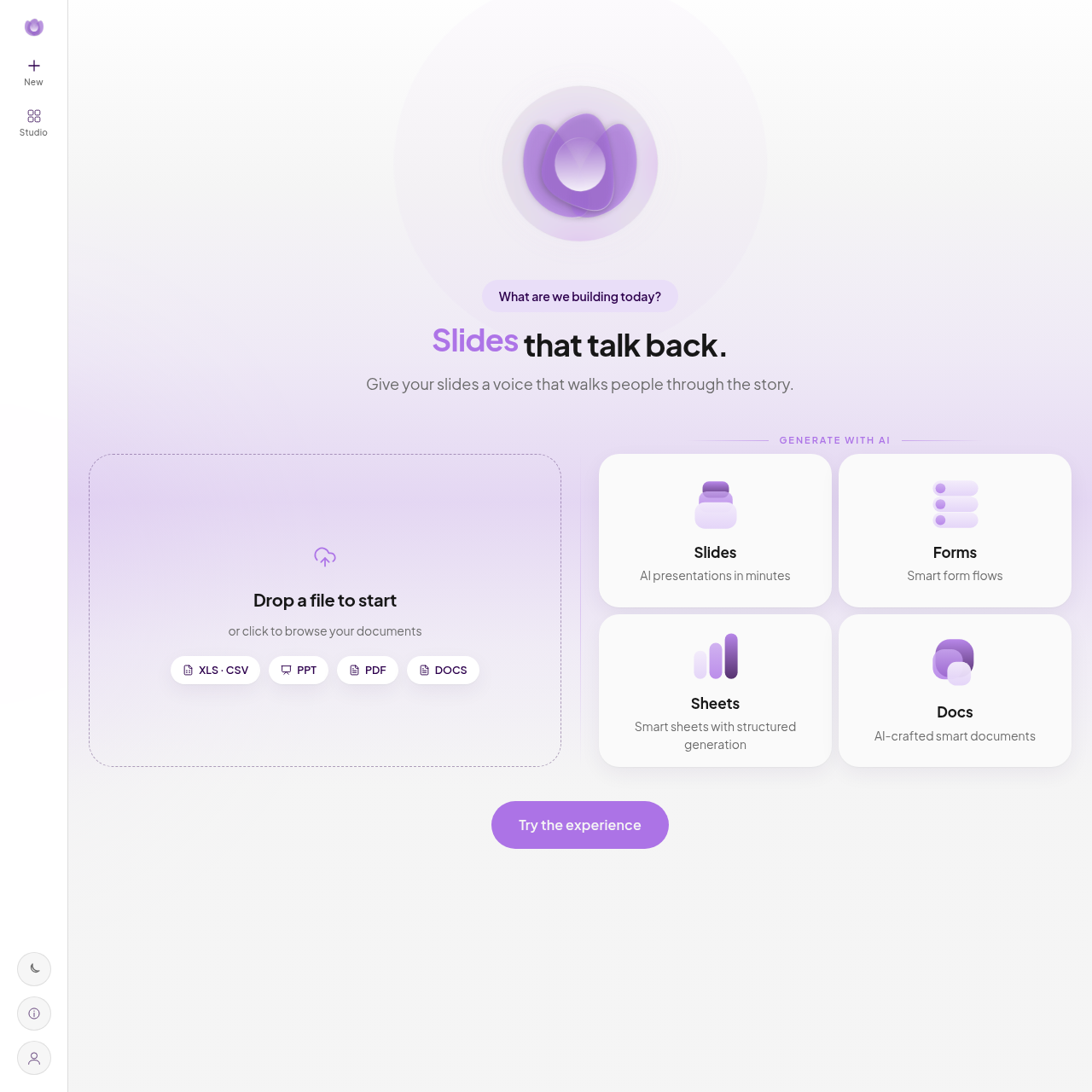
WZRD is a web-based AI platform that converts uploaded files or text descriptions into interactive slides, forms, sheets, and documents capable of verbally explaining their content and answering audience inquiries.

Slides & PresentationsGenerates interactive slides,…Answers user questions and explains…Distributes generated interactive…Interactive Conversational Documents…
WZRD product interface screenshot
Estimated monthly visits
2K
Data period:
Listed on AIToolly

What Is WZRD? Product Overview

What the product does and how it is positioned

WZRD is an AI content generation platform designed to produce conversational documents, presentations, spreadsheets, and form flows. Instead of starting from a blank page, users begin projects by describing their goals or by uploading existing files such as PDFs, documents, presentations, or spreadsheets.

Generated projects become interactive digital experiences that can speak to viewers and respond to user queries. These experiences operate directly within web browsers across devices without software installation and can be shared publicly or privately through web links, QR codes, or targeted invitations.

What Can You Use WZRD For?

Source-supported ways to use the product

Conversational Proposals and Reports

Users convert business proposals and project reports into interactive experiences that answer client questions about scope, timelines, and terms.

Lead Qualification and Intake Forms

Teams deploy conversational forms to capture client requirements, assess project details, and qualify lead intent automatically.

How to Use WZRD

The documented workflow, where available

  1. 1

    Upload or Describe

    Begin by submitting a conceptual prompt or uploading an existing document in formats such as PDF, DOCS, PPT, XLS, or CSV.

  2. 2

    Generate

    The platform processes the provided input to create an initial working interactive document, presentation, sheet, or form.

  3. 3

    Refine

    Review and adjust the generated draft experience to fine-tune messaging, structure, and interactive behaviors.

  4. 4

    Go Live

    Publish the completed experience and distribute it publicly or privately via a browser link, QR code, or direct invitation.

Interactive Content and Experience Generation

WZRD provides a framework for creating dynamic digital content from static source inputs. Users can upload standard file formats, including spreadsheets, presentation decks, and text documents, or enter descriptive text prompts. The platform converts these inputs into structured presentations, documents, forms, or sheets equipped with conversational mechanisms.

Rather than requiring audiences to read through static documents sequentially, the generated experiences permit viewers to listen to narrated walkthroughs and ask questions directly. The resulting outputs are hosted online and accessible through standard web browsers, eliminating the need for viewers to download separate client software.

  • Supports file uploads in XLS, CSV, PPT, PDF, and DOCS formats
  • Produces conversational slides, smart form flows, structured sheets, and smart documents
  • Includes voice interaction capabilities for presentations and documents
  • Facilitates distribution through public links, QR codes, or restricted private invites

What to Test Before Choosing WZRD

Checks to run with your own material and workflow

  • Confirm that source documents in PDF, PPT, DOCS, XLS, or CSV formats parse accurately during experience creation.
  • Verify whether conversational voice and text responses accurately reflect the factual details contained in your source files.
  • Check that public link settings and private invite permissions meet your organization's document confidentiality requirements.

WZRD Sources and Last Checked

What was checked and when

Official source
https://wzrd.to/
Last checked

WZRD Frequently Asked Questions

Answers based on the source-checked product record

What types of content can be generated with WZRD?

WZRD generates interactive slides, smart form flows, structured sheets, and AI-crafted smart documents from text prompts or uploaded files.

Which file formats are supported for document upload?

The platform accepts file uploads in XLS, CSV, PPT, PDF, and DOCS formats to initiate project generation.

Does viewing a WZRD experience require installing an application?

No application installation is required because the generated experiences open and operate directly inside web browsers on any device.

How can published experiences be shared with audiences?

Experiences can be shared through public web links, generated QR codes, or private invitations sent directly to specific recipients.

How do audiences interact with WZRD presentations and documents?

Audiences can listen to spoken walkthroughs and ask questions directly using text or voice to receive explanations about the material.

Explore other recently added tools in the same category.