Visual Translate by Vozo
Vozo Visual Translate: Automatically Detect, Erase, and Translate On-Screen Text in Videos
Visual Translate is a revolutionary AI-powered tool that localizes video content by detecting, erasing, and rebuilding on-screen text in target languages. Unlike traditional methods that only focus on audio, Visual Translate ensures that slides, labels, titles, and marketing callouts are fully localized without requiring original project files. Trusted by over 7 million creators, it offers a complete localization workflow including side-by-side editing, flexible text styling, and seamless integration with dubbing and lip-sync tools. Whether for training videos, product promos, or slide-based presentations, Visual Translate provides enterprise-grade security and professional editing control to help brands reach global audiences effortlessly.
2026-03-12
579.0K
Visual Translate by Vozo Product Information
Visual Translate: The Ultimate Solution to Translate On-screen Text in Videos
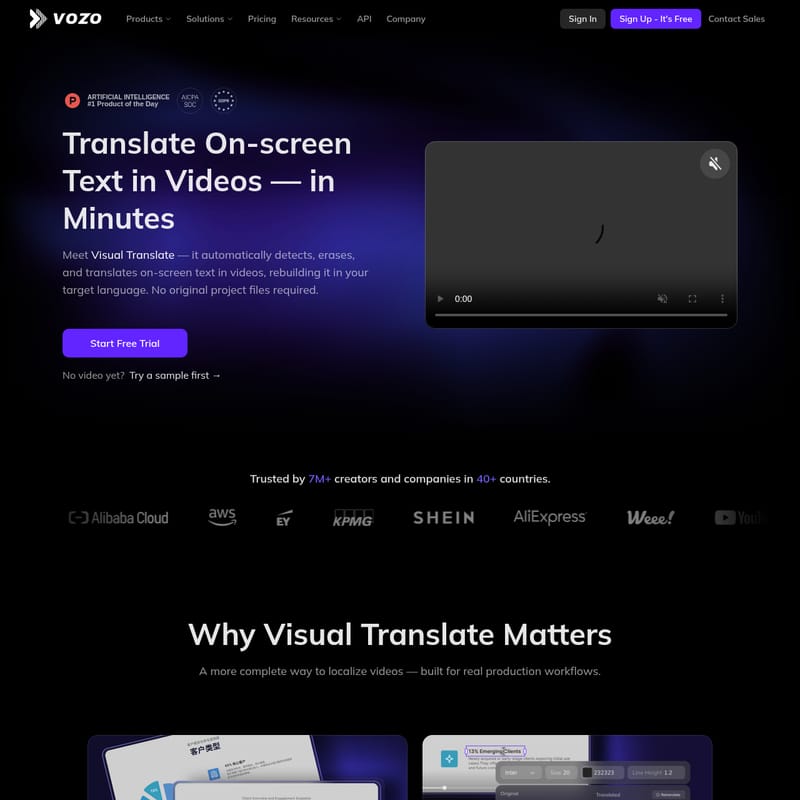
In the era of global content consumption, traditional video localization often falls short by only addressing audio or subtitles. Visual Translate changes the game by offering a more complete way to localize videos. Voted as the #1 Product of the Day, Visual Translate automatically detects, erases, and translates on-screen text in videos, rebuilding the visual layer in your target language within minutes.
What sets Visual Translate apart is that it requires no original project files. Whether you are a creator or an enterprise, you can now ensure that what your viewers read is just as localized as what they hear.
What's Visual Translate?
Visual Translate is an advanced AI-powered tool designed to localize the visual elements of a video. While most "video translation" services focus strictly on audio or captions, Visual Translate identifies visual text—such as slide titles, charts, and annotations—removes the original content, and replaces it with accurate translations in the target language.
Trusted by over 7 million creators and companies across 40+ countries, Visual Translate is built for real production workflows. It provides an editable and controllable environment where users can refine translations before export, ensuring total consistency and professional quality.
Key Features of Visual Translate
Detect, Erase, and Rebuild
The core functionality of Visual Translate lies in its three-step automated process:
- Detect On-screen Text: The AI scans the video to find titles, labels, and annotations that viewers read.
- Translate with Context: It localizes meaning and terminology while maintaining the original intent of the video.
- Rebuild & Proofread: The original text is erased and replaced with a new visual layer, allowing you to review the final result in the editor.
Full Editing Control
Visual Translate provides a powerful editor to ensure your localized content meets brand standards:
- Side-by-Side Comparison: Check the original and translated text simultaneously to verify context and placement.
- Flexible Text Styling: Manually adjust the font, size, color, and layout so the translated text matches your brand identity.
- Animation & Timing Control: Sync the text perfectly by fine-tuning exactly when it appears and how it animates.
- Edit & Re-translate: You can update the original text to trigger a re-translation or manually edit the final wording for the perfect tone.
Enterprise-Ready Features
For global teams, Visual Translate offers robust infrastructure:
- Team Workspaces: Manage projects and assign roles securely.
- Security & Compliance: Built with GDPR-aligned data handling and ongoing SOC 2 Type II controls.
- Dedicated Support: Priority assistance for enterprise clients to ensure fast response times.
How to Use Visual Translate
Localizing your video with Visual Translate is a straightforward process designed for speed and efficiency:
- Select Your Scenario: Choose the type of video you are translating (e.g., Slide-based, Training, or Promo).
- Run the Detection: Let the AI identify all on-screen text elements automatically.
- Review the Translation: Use the side-by-side editor to verify the accuracy of the localized text.
- Refine Styling: Adjust fonts and animations to ensure the text fits the scene naturally.
- Export and Continue: Once the visual layer is complete, you can move forward with adding subtitles, dubbing, or lip-syncing.
Use Cases for Visual Translate
Slide-based Videos
Perfect for corporate presentations. Visual Translate localizes slide titles, key points, and charts, ensuring your presentation remains professional for international viewers.
Training Videos
Ensure safety and clarity by translating on-screen instructions, equipment labels, and safety warnings. This allows global teams to follow training protocols accurately in their native language.
Product Promo Videos
Make your marketing connect worldwide. Visual Translate localizes feature highlights, slogans, and callouts, making your promotional content feel native to every market.
Beyond Visual Translate: A Complete Localization Workflow
Visual Translate is not a dead end; it is the first step in a comprehensive localization strategy. After rebuilding your visual text, you can use the platform to:
- Add Subtitles: Enhance accessibility and clarity.
- Add Dubbing: Clone the original voice and translate the audio into the target language.
- Add Lip Sync: Match the speaker’s lip movements to the new audio for a studio-quality finish.
FAQ
What is Visual Translate? It is an AI tool that detects, erases, and translates on-screen text in videos, rebuilding the visual layer in a new language.
Does Visual Translate translate all text in a video? It is designed to find and translate the visual text viewers read, such as slides, labels, and titles.
Does Visual Translate support translating subtitles? While its primary focus is on-screen visual text, the platform also offers a separate Subtitle Translator to complete your project.
Can Visual Translate replicate the original text style and animation? Yes, it allows you to adjust font, size, color, and timing to match the original video's look and feel.
What languages does Visual Translate support? It supports a wide range of languages to help creators reach audiences in over 40 countries.
Do I need to log in to try Visual Translate? You can start a free trial or try a sample video to see the results in minutes.
Can I use Visual Translate for free? Yes, you can Sign Up for free to explore the features and start your trial.
Can I add subtitles, dubbing, or lip sync after using Visual Translate? Absolutely. Visual Translate is designed to work seamlessly with other localization tools like Voice Studio and Lip Sync.