Tabstack Browser Automation
Tabstack /automate: The Ultimate Browser Automation API for Efficient Web Workflows
Tabstack /automate is a revolutionary Browser Automation API that allows developers to execute complex web tasks using plain language. By utilizing a unique accessibility-tree engine instead of vision-based screenshots, Tabstack reduces token costs by 60-80%. This Mozilla-backed platform manages the browser and model infrastructure, enabling one-call automation for JS-heavy, dynamic, and authenticated pages with built-in human-in-the-loop capabilities and strict privacy guardrails.
2026-07-03
6.0K
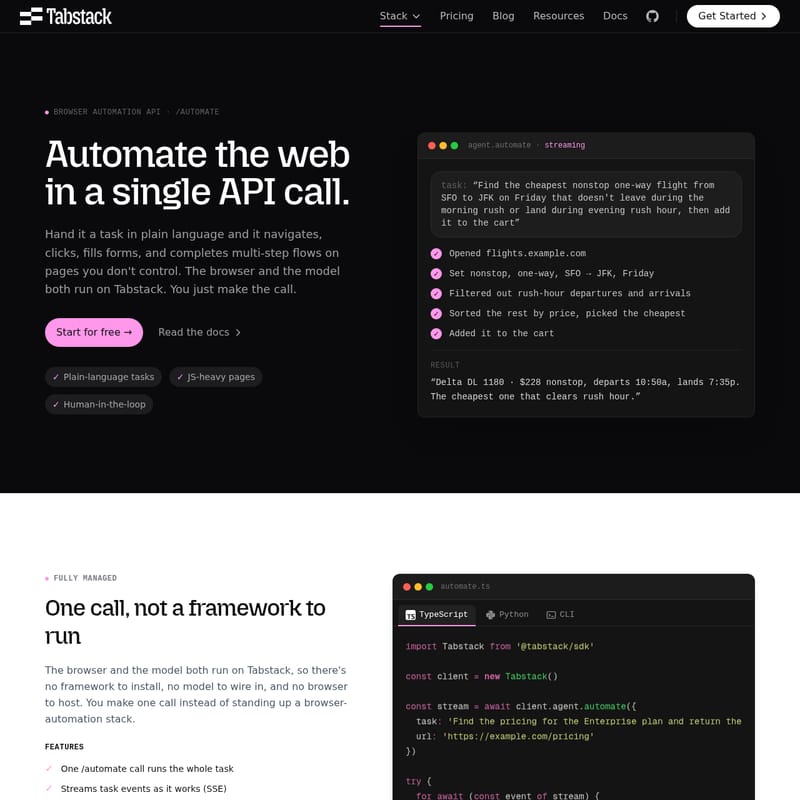
Tabstack Browser Automation Product Information
Tabstack /automate: The High-Performance Browser Automation API for Modern Developers
In the evolving landscape of web development, the ability to interact with and extract data from complex websites is paramount. Tabstack /automate emerges as a leading-edge Browser Automation API designed to simplify web interactions by converting plain-language instructions into actionable browser steps. Whether you need to navigate multi-step flows, fill out forms, or handle JavaScript-heavy pages, the Tabstack /automate endpoint provides a fully managed solution that removes the burden of hosting browsers or wiring together complex AI models.
What is Tabstack /automate?
Tabstack /automate is a powerful Browser Automation API that allows users to automate the web with a single API call. Unlike traditional frameworks that require extensive setup and maintenance, Tabstack hosts both the browser and the underlying model. You simply provide a task in plain language—such as "Find the cheapest nonstop flight" or "Log in and check my balance"—and the agent navigates, clicks, and completes the multi-step process on your behalf.
This API is built for reliability and scale, ensuring that even pages you do not control can be automated efficiently. By using the Tabstack /automate tool, developers can bypass the fragility of traditional scraping scripts and leverage the power of agentic workflows that act on the web rather than just gathering data from it.
Key Features of Tabstack Browser Automation
1. One-Call Task Execution
A single call to the /automate endpoint runs the entire task from start to finish. There is no framework to install and no infrastructure to manage. Tabstack handles the heavy lifting, providing a seamless experience for developers who want to focus on their core product rather than browser maintenance.
2. Accessibility-Tree Engine for Cost Efficiency
One of the standout features of the Tabstack Browser Automation API is its use of the accessibility tree rather than high-resolution screenshots. While traditional screenshot agents consume thousands of vision tokens, Tabstack uses compact, structured text. This approach results in 60-80% fewer tokens per action, offering a significant cost reduction at scale without sacrificing accuracy.
3. Real-Time Streaming and SSE
Tabstack supports Server-Sent Events (SSE), allowing the API to stream task events as it works. This provides transparency into the agent's progress, enabling developers to monitor actions like opening pages, filtering results, and final task completion in real-time.
4. Handling JS-Heavy and Dynamic Pages
The Tabstack /automate agent is designed to navigate the most difficult corners of the web. It handles JavaScript-heavy, dynamic, and authenticated pages that often cause brittle automation scripts to fail. Built on the open-source Pilo engine, it ensures robust performance across diverse web environments.
5. Interactive Mode: Human-in-the-Loop
For tasks requiring sensitive information or manual intervention—such as logging into a bank account or solving a unique prompt—Tabstack features an Interactive Mode. When set to interactive: true, the agent pauses to ask for human input instead of guessing or failing, keeping the user in full control.
How to Use Tabstack /automate
Implementing the Tabstack Browser Automation API is straightforward, with support for TypeScript, Python, and CLI. Below is an example of how to implement a basic task using the TypeScript SDK.
Basic Task Implementation
import Tabstack from '@tabstack/sdk'

const client = new Tabstack()
const stream = await client.agent.automate({
  task: 'Find the pricing for the Enterprise plan and return the monthly cost and what is included',
  url: 'https://example.com/pricing'
})

try {
  for await (const event of stream) {
    if (event.event === 'task:completed') {
      console.log(event.data.finalAnswer)
    }
    if (event.event === 'error') {
      console.error(event.data.error.message)
    }
    if (event.event === 'done') break
  }
} catch (err) {
  console.error(err)
}
Using Interactive Mode for Logins
When a task requires credentials, you can use the interactive event flow to provide data securely:
const stream = await client.agent.automate({
  task: 'Log in and check my account balance',
  url: 'https://example.com/login',
  interactive: true
})

// Handle the interactive request
if (event.event === 'interactive:form_data:request') {
  await client.agent.automateInput(data.requestId, {
    fields: [
      { ref: 'username', value: '[email protected]' },
      { ref: 'password', value: process.env.PASSWORD! }
    ]
  })
}
Practical Use Cases
Tabstack /automate is utilized by teams to handle a variety of complex, multi-step web jobs:
- Booking & Scheduling: Complete real-world reservations and bookings end-to-end without manual intervention.
- Form Automation & RPA: Fill and submit complex forms across third-party sites you do not control.
- QA & Monitoring: Run sophisticated multi-step flows to verify that critical web pages and funnels remain functional.
- Agentic Workflows: Create autonomous agents that perform active jobs on the web, such as price comparison and automated procurement.
Privacy and Security: The Mozilla-Backed Difference
Tabstack is a Mozilla-backed platform, ensuring that your data remains private and secure. Unlike many AI-driven tools, Tabstack follows strict data practices:
- No Model Training: Your data is never sold or used to train AI models.
- Data Retention: Requests and visited pages are retained only as long as needed to run the task and support the user, then they are purged.
- Guardrails: You can scope the actions the automation is allowed to take, ensuring the agent remains within your defined parameters.
- Transparency: Tabstack complies with robots.txt by default and maintains Mozilla-documented data practices.
Pricing and Subscription Tiers
Tabstack offers a variety of plans to suit different needs, starting with a Free Trial that includes 10,000 free credits.
- Individual Plan ($0/month): Pay-as-you-go at $0.35 / 1k credits. Includes access to all API endpoints and standard rate limits.
- Team Plan ($99/month): Includes 500,000 credits. Features fast and balanced research modes with an overage rate of $0.30 / 1k credits.
- Pro Plan ($499/month): Includes 3,000,000 credits. Offers the highest rate limits and an overage rate of $0.25 / 1k credits.
- Enterprise Plan: Custom pricing, dedicated support, and SLAs for high-volume production workloads.
FAQ
Q: How does Tabstack reduce costs compared to other automation agents? A: Tabstack uses an accessibility-tree engine instead of taking full-page screenshots. This results in compact structured text that uses 60-80% fewer tokens than vision-based models.
Q: Can the API handle websites with logins? A: Yes. By using the
interactive: trueflag, the agent can pause and request credentials or multi-factor authentication details from a human user.
Q: Is Tabstack suitable for production-scale RPA? A: Absolutely. With the Pro and Enterprise plans, users get access to the highest rate limits and concurrent task execution, making it ideal for scaling web automation.
Q: Does Tabstack follow web crawling standards? A: Yes, Tabstack maintains robots.txt compliance by default as part of its commitment to transparency and ethical web automation.