Superset 2.0
Superset: The Advanced Code Editor for Orchestrating 100+ AI Coding Agents in Parallel
Superset is the premier code editor for the AI era, designed to orchestrate 100+ coding agents simultaneously. Featuring universal agent compatibility, isolated Git worktrees, and seamless IDE integration, Superset allows developers to run parallel tasks like bug fixes and feature development without merge conflicts. Supporting Claude Code, Cursor, and more, it is the ultimate environment for AI-driven software engineering.
2026-05-08
192.0K
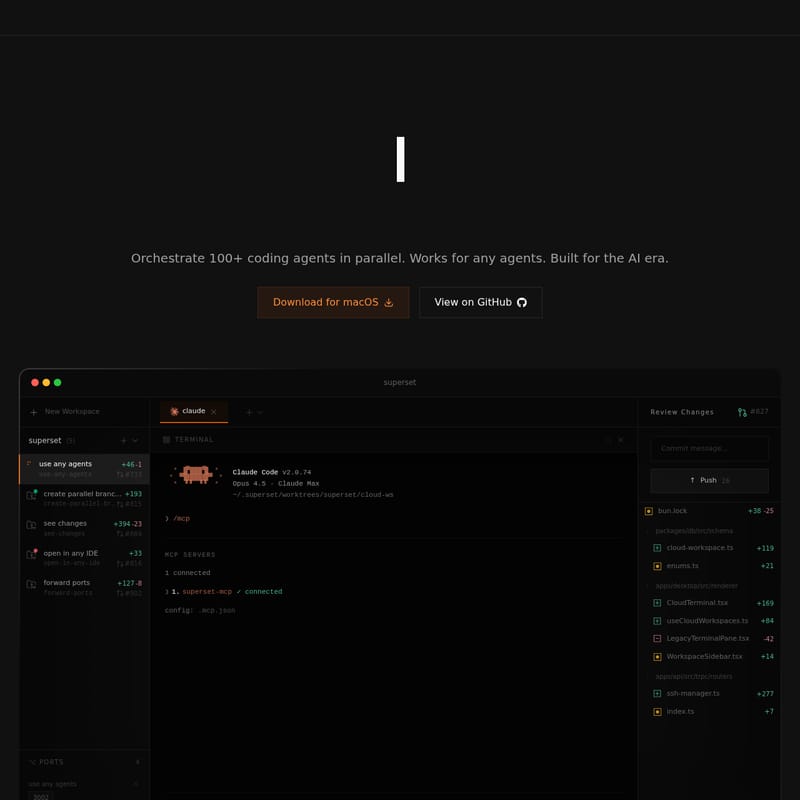
Superset 2.0 Product Information
Superset: The Ultimate Code Editor for AI Agents
In the rapidly evolving landscape of software development, Superset emerges as the definitive Code Editor for AI Agents. Built specifically for the AI era, Superset empowers developers to orchestrate 100+ coding agents in parallel, transforming how software is built, refactored, and maintained. Whether you are a founding engineer or a CTO, Superset provides the infrastructure to leverage AI agents at scale, ensuring your development workflow remains fast, isolated, and highly efficient.
What’s Superset?
Superset is a sophisticated development environment and orchestration platform designed to manage multiple AI coding agents simultaneously. Unlike traditional editors, Superset is agent-agnostic, meaning it works seamlessly with any CLI-based agent. It acts as a central hub where builders can launch dozens of agents across various tasks, from complex feature implementation to routine bug fixing.
At its core, Superset is built to solve the bottlenecks of AI-driven development. By providing a GUI-oriented approach to parallel execution, Superset allows you to monitor, review, and merge changes from various AI tools in one unified interface. It is trusted by industry leaders and builders from companies like Webflow, Cloudflare, and OpenAI to push the boundaries of what is possible with automated coding.
Key Features of Superset
Parallel Execution and Scalability
Superset allows you to run dozens, or even hundreds, of agents at once. This capability is essential for modern workflows where multiple features or experiments need to happen concurrently.
- Orchestrate 100+ coding agents in parallel.
- Work on features, fix bugs, and refactor code simultaneously without waiting for one task to finish before starting another.
- High-performance management of parallel branches for maximum productivity.
Universal Agent Compatibility
One of the strongest advantages of Superset is its universal compatibility. It is strictly agent-agnostic, supporting any CLI-based coding tool available today.
- Works with Claude Code (including versions like Claude Code v2.0.74, Opus 4.5, and Claude Max).
- Supports OpenCode, Codex, Gemini, and Cursor Agent.
- Easy switching between different agents within the same environment to utilize the best tool for each specific task.
Isolation via Git Worktrees
To prevent the chaos of overlapping changes, Superset utilizes a robust isolation system. Every agent runs in its own isolated Git worktree.
- Zero Merge Conflicts: Because changes are isolated, agents do not step on each other's code.
- Clean Review Process: You can review and merge work only when it is ready, maintaining a stable main branch.
- Parallel Branches: Create and manage multiple branches effortlessly within the Superset interface.
Open Anywhere: IDE Integration
While Superset provides a powerful terminal and management GUI, it understands that developers have preferred environments.
- One-Click Launch: Open any worktree in your favorite IDE with a single click.
- Supported Editors: Full integration with VS Code, Cursor, Xcode, Sublime Text, JetBrains IDEs, and the standard Terminal.
- Finder Integration: Quickly locate files and directories within the macOS environment.
Advanced Review and Port Forwarding
Superset provides a PR-like experience within the editor to ensure code quality.
- Side-by-Side and Inline Diffs: View changes clearly before committing.
- Integrated Port Forwarding: Forward ports (e.g., 3000, 3001, 3002) to test applications in real-time as agents work on them.
- MCP Servers: Connect to MCP (Model Context Protocol) Servers to extend agent capabilities and context.
Use Cases for Superset
High-Velocity Feature Development
Engineering teams use Superset to accelerate their product roadmaps. A single developer can launch one agent to build a new "Enterprise Order Management" module while another agent refactors the "Bioinformatics Tools" and a third agent sets up "Cursor Rules."
Parallel Experimentation
For data scientists and researchers, Superset is ideal for running parallel experiments. For example, you can launch multiple PyTorch MNIST experiments simultaneously across different worktrees to compare results without manual environment switching.
Infrastructure and Maintenance
Use Superset to handle the tedious aspects of maintenance. Launch agents to fix PR comments, update dependency locks (like bun.lock), or refactor legacy terminal panes while you focus on high-level architecture.
How to Use Superset
Superset is designed for ease of use through both its GUI and its command-line interface. Follow these steps to maximize your AI-driven workflow:
- Initialize a Workspace: Open the Superset terminal and type
superset newto begin a new task. - Environment Setup: Superset will automatically set up a new parallel environment, create a worktree, and install the necessary dependencies.
- Deploy Agents: Choose your agent (e.g.,
/mcpto connect servers or select Claude) and type a task for the agent to perform. - Monitor Progress: Use the "In Progress" tab to see agents generating code in real-time.
- Review Changes: Once an agent moves to "Ready for Review," open the Review Changes pane. Use the side-by-side diff to inspect the code.
- Commit and Push: Write your commit message directly in Superset and push the changes to your repository.
- IDE Sync: If you need manual control, use the "Open in" menu to jump into VS Code or Cursor instantly.
FAQ
Q: I already use an IDE like Cursor; is Superset for me?
A: Yes! Superset is designed to complement your existing IDE. While Cursor is a powerful editor, Superset excels at orchestrating multiple agents in parallel worktrees, something a standard IDE isn't built to do. You can use Superset to manage the agents and then open the specific worktree in Cursor for manual adjustments.
Q: Which AI coding agents are supported by Superset?
A: Superset is agent-agnostic. It supports Claude Code, OpenCode, Codex, Gemini, Cursor Agent, and any other CLI-based agent.
Q: How does the parallel agent system work in Superset?
A: It uses Git worktrees to create isolated environments for every task. This allows Superset to run 100+ agents simultaneously without them interfering with each other's code or causing merge conflicts.
Q: Is Superset free to use?
A: Please refer to the Pricing section on the official Superset website for the most current information regarding free tiers and enterprise subscriptions.
Q: Can I use my own API keys with Superset?
A: Yes, Superset allows you to bring your own configuration and keys to ensure you have full control over the models and agents you deploy.
Q: Is Superset available for Windows or Linux?
A: Currently, Superset offers a dedicated Download for macOS.