
Emdash
Emdash: The Open-Source Agentic Development Environment for Parallel Coding Agents
Emdash is a powerful, open-source agentic development environment and dashboard that allows developers to orchestrate multiple coding agents in parallel using isolated Git worktrees.
2026-05-22
44.0K
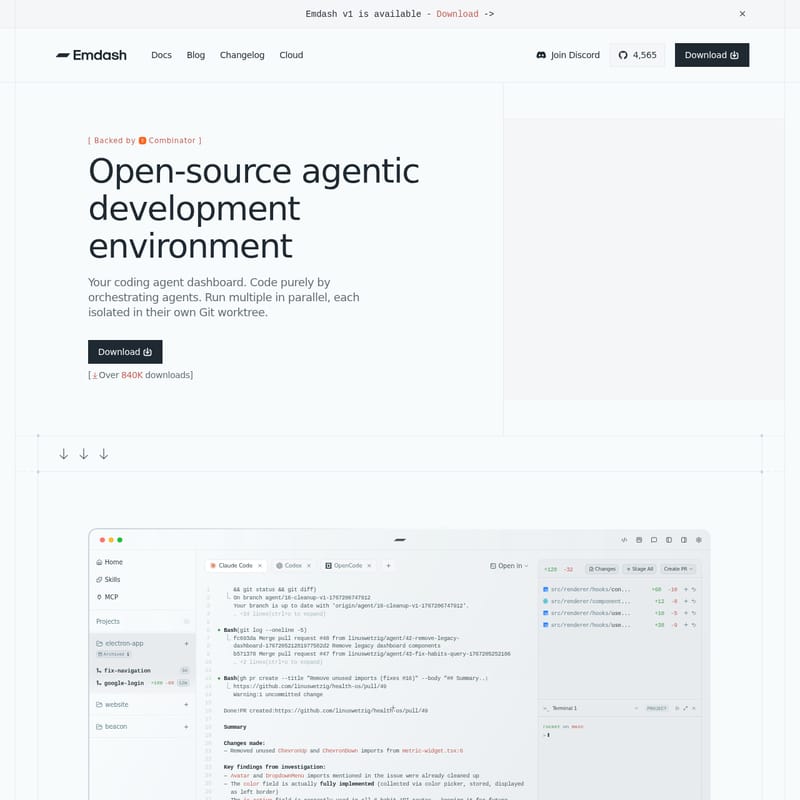
Emdash Product Information
Emdash: The Premier Open-Source Agentic Development Environment
In the rapidly evolving world of software engineering, Emdash has emerged as a revolutionary open-source agentic development environment. Designed to serve as a comprehensive coding agent dashboard, Emdash allows developers to transcend the limitations of traditional IDEs by orchestrating multiple AI agents simultaneously. Backed by Y Combinator and boasting over 840,000 downloads, Emdash is setting a new standard for how developers interact with autonomous coding tools.
What's Emdash?
Emdash is a desktop application specifically built for the modern era of AI-assisted programming. At its core, it is an agentic development environment that enables you to run multiple coding agents in parallel. Unlike standard interfaces that limit you to one conversation at a time, Emdash provides a cockpit where you can manage various "brains" across different tasks, with each agent operating in its own isolated Git worktree.
As an open-source platform with a growing community of over 4,500 GitHub stars, Emdash bridges the gap between raw AI capabilities and practical developer workflows. It is designed for engineers who want to embrace an async development future, giving individual contributors the scale of an entire engineering team through the power of parallel agents.
Key Features of Emdash
1. Parallel Agent Orchestration
The standout feature of Emdash is its ability to orchestrate multiple coding agents in parallel. You are no longer tethered to a single process. With Emdash, you can have one agent refactoring your Tailwind configuration while another improves email sending logic, all while you monitor the progress from a single dashboard.
2. Isolated Git Worktrees
To ensure stability and prevent code conflicts, Emdash runs every agent in its own isolated Git worktree. This means that the changes made by one agent won't interfere with another until you are ready to review and merge them. This architecture allows for a clean, organized, and risk-free development process.
3. Comprehensive Issue Integration
Emdash integrates seamlessly with the tools you already use. You can pull issues directly from:
- Linear
- Jira
- GitHub
- GitLab
- Asana
Once an issue is imported, you can pass it directly to your coding agents, providing them with the full context needed to solve the problem.
4. Bring Your Own Infrastructure
Emdash offers incredible flexibility regarding where your code runs. It supports ephemeral infrastructure, allowing you to use provision and teardown scripts to spin up isolated workspaces on demand. Key specs include:
- Allocation of compute (e.g., 4 vCPU, 8 GB RAM).
- Encrypted workspace mounting (ext4).
- Support for Remote SSH, enabling agents to run on any machine, cloud VM, or GPU box.
5. Multi-Agent Compatibility
Emdash is not locked into a single AI model. It works with over 25+ coding agents, allowing you to mix and match based on the specific requirements of your task. Supported agents include:
- Claude Code
- Codex
- Cursor
- Gemini
- Pi
- Hermes
- Support Droid
6. Built-in Tools for Faster Shipping
The platform includes a built-in file editor and a dedicated diff view. This allows you to write code, review changes, commit, and push without ever switching tools. By integrating these features into the Emdash dashboard, the friction of moving between a browser, a terminal, and an IDE is completely removed.
7. MCP Server Support
Connect your tools through the Model Context Protocol (MCP). Emdash allows you to connect to MCP servers without the need for extra glue code, further extending the capabilities of your coding agents.
Use Case Scenarios
Async Engineering Scale
For an individual developer, Emdash provides "engineering scale." You can assign three different bug fixes to three different agents. While they work asynchronously in their respective Git worktrees, you can focus on high-level architecture or review the PRs they generate.
Complex Refactoring
When dealing with a large-scale refactor, such as updating a tailwind config or cleaning up unused imports across a massive repository, Emdash can automate the heavy lifting. You can monitor the BashSummary of changes and investigate key findings through the integrated terminal and log views.
Cross-Platform Development
Developers building for macOS, iOS, or web platforms can use Emdash to manage platform-specific branches simultaneously. The "designer-friendly" interface makes it easy to track visual changes and code updates in one place.
How to Use Emdash
Getting started with Emdash is straightforward, thanks to its high level of automation.
- Download and Install: Download the desktop application for your supported platform.
- CLI Auto-detection: Emdash features CLI auto-detection. It will automatically find your installed agent CLIs (like Claude Code or Cursor) with no manual setup checklist required.
- Provision Workspace: Use the
provision.shscript to set up your environment. This will pull the necessary base layers, toolchains, and runtimes (such as Node.js or Pnpm). - Connect to Issues: Link your Linear, Jira, or GitHub account to pull in tasks.
- Assign Agents: Select an agent and assign it to a specific branch or issue. Emdash will spawn a Git worktree and begin the task.
- Review and Ship: Use the built-in diff view to inspect the agent's work. Once satisfied, use the "Commit & Push" feature to ship your code.
FAQ
Q: What is Emdash? A: Emdash is a desktop app designed for running and orchestrating multiple coding agents in parallel, utilizing isolated Git worktrees for each task.
Q: Is Emdash open source? A: Yes, Emdash is proudly open source. You can view the source code and contribute on GitHub.
Q: Which agents are supported? A: Emdash supports over 25+ agents, including Claude Code, Codex, Cursor, Amp, Gemini, and more.
Q: Is my code private? A: Emdash provides a secure environment where you can run agents on your own infrastructure or remote servers via SSH, ensuring you maintain control over your codebase.
Q: Do I need API keys? A: Yes, depending on the agents you choose to use, you will generally need the corresponding API keys for those specific AI services.
Q: What platforms are supported? A: Emdash is primarily a desktop application. While a Windows installer bug was noted in early logs, it is designed for major desktop environments to facilitate local and remote agent orchestration.







