Sketch To
Sketch To: AI Image to Sketch Converter and Sketch to Image Generator
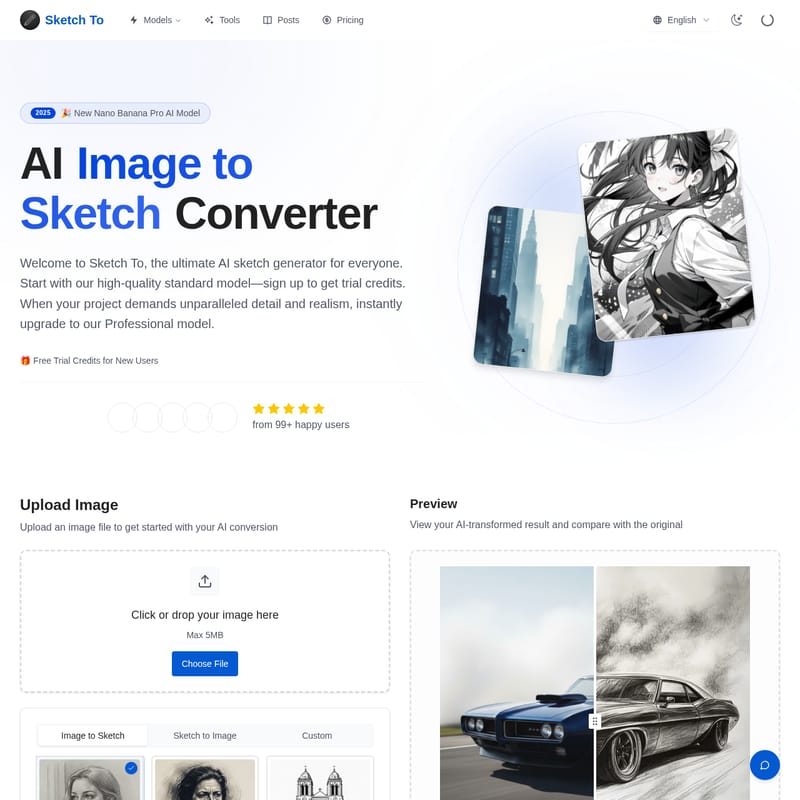
Sketch To is a powerful AI tool designed to convert images to sketches and sketches to images. Featuring the advanced 2025 Nano Banana Pro AI Model, it offers both Standard and Professional models for hobbyists and commercial creators. With instant processing and high-resolution output, Sketch To simplifies the creative process for over 500,000 users worldwide.
2026-01-25
60.0K
Sketch To Product Information
Sketch To: The Ultimate AI Image to Sketch Converter
In the modern digital landscape, the intersection of traditional artistry and artificial intelligence has created groundbreaking opportunities for creators. Sketch To stands at the forefront of this revolution, offering a sophisticated online image to sketch converter that caters to both casual hobbyists and seasoned professionals. Whether you need to convert photo to sketch for a school project or generate high-fidelity realistic images from simple drawings, Sketch To provides the tools necessary to bring your vision to life.
What's Sketch To?
Sketch To is a powerful AI tool that converts images to sketches and sketches to images. Built with advanced AI technology, including the 2025 New Nano Banana Pro AI Model, it serves as a comprehensive bridge between raw photography and artistic illustration. This platform is designed to be accessible to everyone, offering a seamless interface where users can transform their digital assets into various artistic styles, such as pencil, charcoal, or ink sketches.
Key Features of Sketch To
Sketch To is packed with features that ensure high-quality output and user satisfaction. Here are the core functionalities that make it a leader in the AI art space:
Image to Sketch Conversion
At its heart, Sketch To is a premier photo to pencil sketch tool. It allows users to convert photos to beautiful sketches instantly, making it perfect for artists, designers, and social media enthusiasts who want to add a hand-drawn touch to their images.
Sketch to Image AI
Beyond just creating drawings, the platform features a sketch to realistic image ai capability. This allows you to take a basic sketch and transform it into a realistic image with incredible detail and accuracy, powered by the Pro model.
Professional Quality and High Resolution
The Sketch To Professional model is engineered for commercial use. It delivers superior detail, texture, and realism, ensuring that the high resolution output is suitable for print and professional design work.
Multiple Artistic Styles
Users are not limited to a single look. The tool offers a variety of styles, including:
- Pencil Sketch
- Charcoal Sketch
- Ink Sketch
- Colored Pencil
- Comic Sketch
- Concept Sketch
- Figure Sketch
- Watercolor
- Digital Sketch
Instant Processing
Time is of the essence for creators. Sketch To utilizes a powerful cloud-based AI processing infrastructure to ensure that your image to sketch or sketch to image conversions are completed in just seconds.
Use Case Scenarios
Sketch To is a versatile tool with applications across various industries and hobbies:
- Social Media Content: Use the image to sketch feature to create unique profile pictures or engaging posts for Instagram and Pinterest.
- Commercial Design: Graphic designers use the Pro model for client projects, leveraging the sketch to image ai to mock up realistic concepts from rough drafts.
- Educational Projects: Students can utilize the Standard model and free trial credits to enhance school assignments with artistic flair.
- Hobbyist Art: Personal creators can explore different mediums like watercolor or charcoal without needing physical supplies.
How to Convert Photo to Sketch in 3 Simple Steps
Transforming your visuals with our online image to sketch converter is easy and efficient:
- Upload Your File: Drag and drop your photo or sketch file onto the canvas. Sketch To supports multiple formats including JPG, PNG, and WEBP (Max 5MB).
- Choose Your Style & Model: Select your desired artistic style. The Standard Model is selected by default for quick conversions (using 1 credit). For ultimate quality and commercial detail, select the Professional Model.
- Generate & Download: Click 'Generate'. Our AI will process your request instantly. Preview the result using the drag-to-compare tool and download your creation in high resolution.
Benefits: A Model for Every Creator
Standard Model: Perfect for Everyday Creativity
The Standard Model is ideal for social media posts, creative hobbies, and school projects. New users receive trial credits to explore the features and see the power of our photo to pencil sketch tool firsthand.
Pro Model: World-Class Realism
When your project demands unparalleled detail, the Pro model is the answer. It is specifically designed for commercial use, providing industry-leading results that are 75% cheaper per image when billed annually.
Pricing Plans
Sketch To offers flexible plans to fit your creative needs:
- Basic ($7.99/mo billed annually): Includes 2400 credits per year, access to Standard Generation, image history, and standard quality downloads.
- Pro ($15.99/mo billed annually): The best value for power users. Includes 9600 credits, Commercial License, priority support, and the highest level of detail.
FAQ
What's the difference between the Standard and Professional models? Our Standard model is perfect for general use and hobbies. The Professional model uses advanced AI for superior detail and realism, making it ideal for commercial projects.
How much does Sketch To cost? The Standard model uses 1 credit per conversion. You can start with trial credits or choose a Basic or Pro plan starting from $7.99/month.
What are the best practices for how to convert photo to sketch? Using a clear, well-lit, high-resolution photo will produce the best results. Strong contrast helps the AI define clear lines and textures.
What file formats are supported? We support JPG, PNG, WEBP, and more, with a maximum file size of 5MB for uploads.
Can I use Sketch To for commercial purposes? Yes, the Professional model includes a commercial license, perfect for client work and business branding.
How long does it take to process an image? Most conversions are completed within seconds thanks to our powerful cloud-based AI processing.