Replay QA
Replay QA: Streamline Your Application Quality Assurance with Intelligent Chat-Based Setup and Coding Agent Integration
Replay QA is a powerful platform designed to simplify the quality assurance process for web applications. By utilizing a chat-based interface and simple URL entry, Replay QA allows developers to quickly establish QA protocols, track project insights, and integrate with AI coding agents.
2026-07-22
14.0K
Replay QA Product Information
Replay QA: The Comprehensive Guide to Modern App Quality Assurance
In the fast-paced world of software development, ensuring the quality and stability of your application is paramount. Replay QA emerges as a streamlined solution for developers and teams looking to automate and simplify their quality assurance workflows. By focusing on ease of use and intelligent integration, Replay QA transforms how teams approach testing and project monitoring.
What’s Replay QA?
Replay QA is a specialized platform built to help users set up quality assurance (QA) for their applications with minimal friction. Unlike traditional testing frameworks that require extensive manual configuration, Replay QA utilizes an interactive approach. At its core, Replay QA is designed to walk users through the setup process via a quick chat interface, ensuring that the specific needs of the application are met during the initialization phase.
Whether you are managing a single application or a large portfolio of tools, Replay QA provides the infrastructure to organize your testing efforts through dedicated sections for projects and insights. The platform is designed to be accessible, allowing users to sign in and begin their QA journey by simply providing their app's URL.
Features of Replay QA
Replay QA offers a suite of features focused on efficiency, data-driven decision-making, and seamless integration with modern development tools. Below are the primary features that define the Replay QA experience:
1. Interactive QA Setup
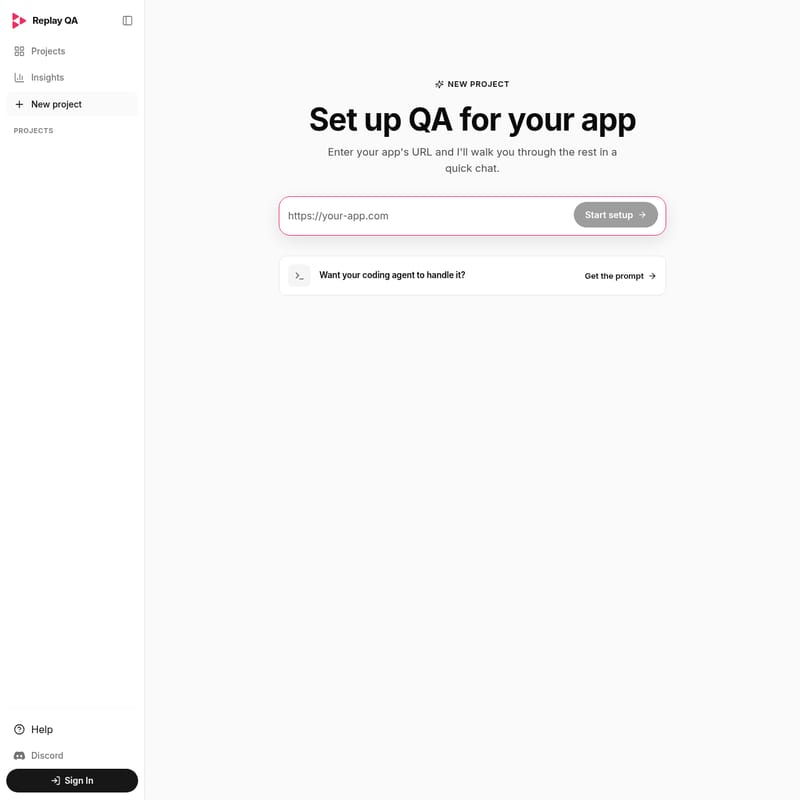
The hallmark of Replay QA is its user-friendly setup process. Instead of complex forms, users enter their app's URL, and Replay QA initiates a quick chat to guide them through the rest of the configuration. This ensures that the QA environment is tailored to the specific functional requirements of the app.
2. Comprehensive Projects Management
Within the Replay QA dashboard, the Projects section allows users to manage multiple applications simultaneously. This central hub is essential for keeping track of different testing environments and ensuring that every app in your stack is accounted for.
3. Actionable Insights
Replay QA provides an Insights tab dedicated to providing high-level data and overviews of your QA progress. These insights help teams understand the health of their applications and identify areas that may require further attention or testing.
4. Coding Agent Prompts
For teams utilizing AI-driven development workflows, Replay QA provides a unique feature: the ability to get a specific prompt for a coding agent. This allows your coding agent to handle the QA setup or execution directly, bridging the gap between manual oversight and autonomous development.
5. Community and Support Integration
Replay QA fosters a collaborative environment by providing direct links to Discord and a dedicated Help section. This ensures that users can find support, share feedback, and stay updated on the latest platform improvements.
How to Use Replay QA
Getting started with Replay QA is a straightforward process designed to get your testing environment up and running in minutes. Follow these steps to utilize Replay QA effectively:
- Sign In: Access the Replay QA platform by signing into your account.
- Start a New Project: Navigate to the New Project section to begin the setup for a fresh application.
- Enter App URL: On the setup screen, enter the URL of the application you wish to test.
- Engage in the Chat: Click on Start setup. Replay QA will walk you through a quick chat to gather necessary details about your app's QA requirements.
- Utilize the Prompt (Optional): If you prefer to have a coding agent handle the technical aspects, select the option "Want your coding agent to handle it?" and click Get the prompt.
- Monitor Insights: Once the setup is complete, regularly check the Insights and Projects tabs to monitor your app's quality status.
Use Case for Replay QA
Replay QA is versatile enough to support various development scenarios. Here are common use cases where Replay QA excels:
- Rapid Prototyping: For developers building MVPs, Replay QA provides a fast way to ensure core features work as intended without spending days on test scripts.
- AI-Assisted Development: Teams using coding agents can use Replay QA prompts to automate the creation and maintenance of their QA suites, significantly reducing manual labor.
- Project Oversight: Technical leads can use the Insights section of Replay QA to maintain a bird's-eye view of all active projects and their respective quality metrics.
- Collaborative Testing: Small teams can use the Discord community and the Projects dashboard to synchronize their testing efforts and troubleshoot issues collectively.
FAQ
Q: What do I need to start using Replay QA? A: All you need is the URL of your web application. Replay QA will handle the rest through its interactive chat setup.
Q: Can I manage more than one application? A: Yes. The Projects section in Replay QA is designed specifically for managing multiple app setups in one place.
Q: How does the coding agent integration work? A: Replay QA provides a specific prompt that you can copy and give to your AI coding agent. This prompt instructs the agent on how to handle the QA tasks for your app.
Q: Where can I find help if I get stuck? A: You can access the Help section directly within the Replay QA interface or join the Discord community for real-time support and discussions.
Q: Is there a way to track the history of my QA projects? A: Yes, the Insights and Projects tabs allow you to view the ongoing status and historical context of your application's quality assurance journey within Replay QA.