Picsart Persona & Storyline
Picsart AI Creative Platform: Build AI Characters and Generate Professional Content
Picsart is the ultimate AI creative platform designed for over 150 million creators to turn ideas into scroll-stopping content. With specialized tools like Picsart Persona, Storyline, and Aura, users can build consistent AI characters once and generate endless content. The platform offers a comprehensive suite of AI-powered features including image generation, trend-driven video effects, makeup try-ons, and animated story creation to help users achieve any vibe or professional look effortlessly.
2026-03-06
17300.0K
Picsart Persona & Storyline Product Information
Experience the Power of the Picsart AI Creative Platform
In the modern digital landscape, the demand for high-quality, engaging visual media is at an all-time high. Picsart stands as the premier AI creative platform for over 150 million creators worldwide. Whether you are a professional designer or a hobbyist, the Picsart ecosystem provides the tools necessary to turn any idea into scroll-stopping content that truly captures your unique vibe.
What's Picsart?
Picsart is a comprehensive AI-driven content creation suite that empowers users to generate, edit, and animate visuals using cutting-edge technology. It is a platform where creativity meets automation, allowing users to build an AI character once and create content with them forever. From generating stunning AI imagery to producing professional-grade videos with Picsart Flow and Picsart Aura, the platform simplifies complex design tasks into a few clicks.
Core Features of Picsart
Picsart offers a robust selection of AI tools designed to cater to every aspect of digital creation:
Picsart Persona
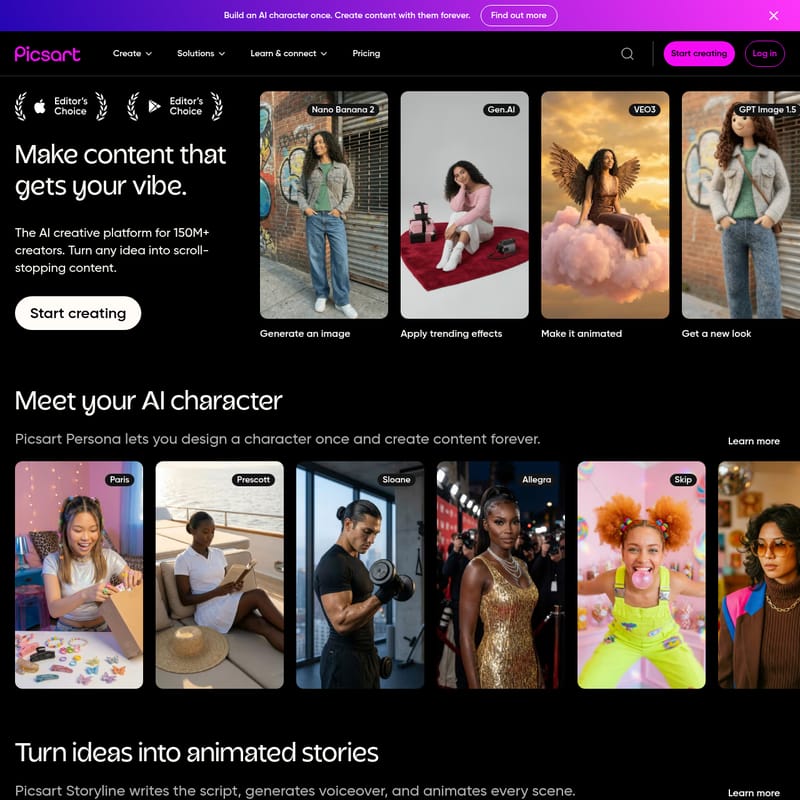
This revolutionary feature allows you to Meet your AI character. With Picsart Persona, you can design a consistent character—such as Paris, Sloane, Allegra, or Momo—once and use them across all your future content, ensuring brand or personal consistency.
Picsart Storyline
Transform your static ideas into dynamic animated stories. Picsart Storyline handles the heavy lifting by writing the script, generating the voiceover, and animating every scene for you.
Picsart Aura
If you can dream it, you can chat it into existence. Picsart Aura transforms your vision into stunning visuals through simple text-based interactions. Whether you want a "Liquid chrome sludge" or a "Noir rural editorial" look, Aura delivers.
Advanced Image and Video Tools
- Nano Banana 2 & Gen.AI: High-level image generation capabilities.
- VEO3: Apply trending effects to your visuals effortlessly.
- GPT Image 1.5: Advanced tools to get a new look or change the scene entirely.
- Flux 2: Swap clothing or experiment with a new hairstyle instantly.
- Picsart Flow: Design a creative flow that automates your aesthetic.
Trending AI Video Effects
Picsart stays ahead of the curve with a massive library of video effects, including:
- Kling 3.0 Motion Control for social virals.
- Hand-Drawn Anime and Cartoonify Magic.
- Celestial Couture Wings and Hollywood Red Carpet Diva styles.
- Paparazzi Frenzy and Realistic Glass Shatter effects.
Use Cases for Picsart
Picsart is versatile enough to be used across various industries and personal projects:
Social Media Growth
Creators use Picsart to generate trending videos like the "Giant City Walk" or "CCTV Trend Video" to capture audience attention and go viral.
Professional Branding
Use the Professional Profile and Makeup Try-On with AI features to create polished, high-end headshots and promotional materials for your business.
Creative Storytelling
Authors and content creators utilize Picsart Storyline to build narrative-driven content with voiceovers and animations without needing a full production team.
E-commerce and Fashion
With tools like Swap clothing and Makeup, mastered, fashion brands can visualize different looks and products on AI characters like Sage or Penny before a single photo is taken.
How to Use Picsart
- Start Creating: Log in to the platform or get the free app to access the dashboard.
- Design Your Persona: Use Picsart Persona to choose or generate your base AI character (e.g., Prescott, Sloane, or Pretzel).
- Generate Visuals: Use Picsart Aura to chat your vision into a visual. Type in your prompt, such as "Tropical surreal background swap," and hit generate.
- Apply Trends: Browse the "Trending videos in a click" section to apply specific vibes like Neon Cyberpunk or Dragon Gaze to your projects.
- Animate: Use Picsart Storyline to turn your prompts into a fully voiced and animated video sequence.
- Export and Share: Once your scroll-stopping content is ready, export it for use on any social platform.
FAQ
Q: What is the main benefit of Picsart Persona?
A: It allows you to build an AI character once and use that same character consistently across all your future content, saving time and maintaining a cohesive look.
Q: Does Picsart offer tools for video editing?
A: Yes, Picsart provides extensive video tools, including Kling 3.0 Motion Control, frame transitions, and specialized AI video effects like "Into the Eye" and "Time-lapse."
Q: Is there an app for Picsart?
A: Yes, you can get the free app to create with any model and access AI tools on the go.
Q: Can I change my character's appearance?
A: Absolutely. Using features like Flux 2, you can change hairstyles, swap clothing, or apply a Makeup Try-On to refresh your character's vibe at any time.