Permute 4.0
Permute 4: The Ultimate All-in-One Media Converter for macOS and Apple Silicon
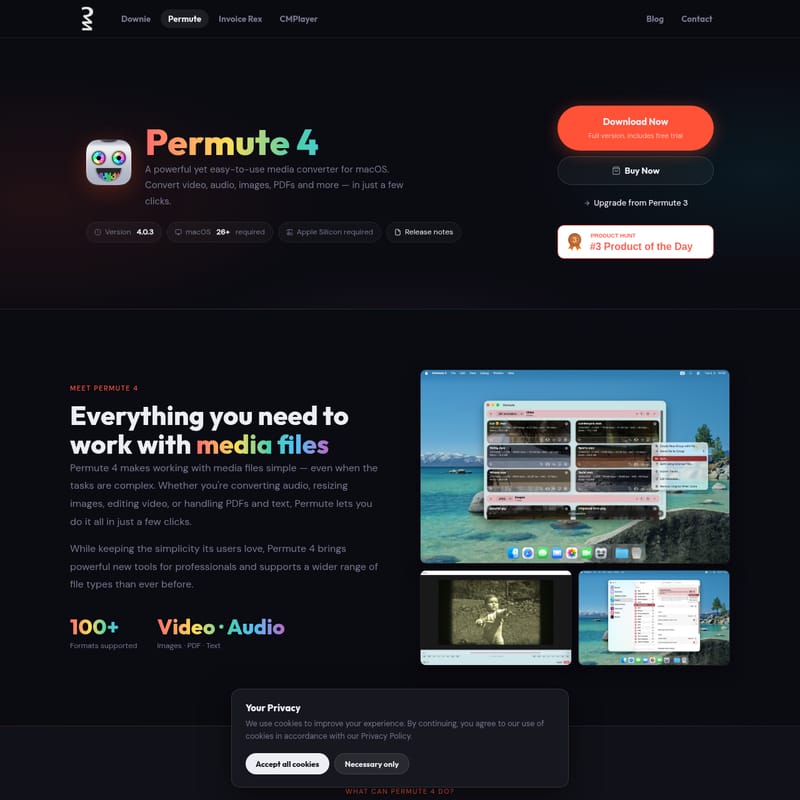
Permute 4 is a powerful, native macOS media converter designed specifically for Apple Silicon. Supporting over 100 formats, it allows users to convert, edit, and adjust video, audio, images, and PDFs with ease. Featuring advanced tools like OCR, text-to-audio narration, and hardware-accelerated ProRes encoding, Permute 4 simplifies complex media tasks into a few clicks. Whether you need to batch resize images or repair IP-camera files, Permute 4 provides a comprehensive, high-performance solution for all your media conversion needs on macOS 26 and later.
2026-06-16
120.0K
Permute 4.0 Product Information
Permute 4: The Most Powerful and Easy-to-Use Media Converter for macOS
In the world of digital media, compatibility is often a hurdle. Permute 4 emerges as the definitive solution for Mac users, offering a seamless and efficient way to handle virtually any file format. As a native macOS application, Permute 4 is designed to provide a powerful yet simple experience, allowing you to convert video, audio, images, and even PDF files in just a few clicks. Optimized specifically for Apple Silicon, this version of Permute ensures that your media conversion tasks are handled with maximum speed and reliability.
What's Permute 4?
Permute 4 is an all-in-one media conversion tool built exclusively for the Mac ecosystem. It is the latest evolution of the acclaimed Permute series, maintaining the simplicity that long-time users love while introducing a suite of professional-grade tools. At its core, Permute 4 is about removing complexity. Whether you are a casual user looking to change a video format for your phone or a professional editor needing specific encoding for a project, Permute 4 makes working with media files simple, even when the underlying tasks are highly complex.
This version requires macOS 26 and Apple Silicon, ensuring it takes full advantage of the latest hardware and software advancements from Apple. With a focus on a native Mac experience, Permute 4 features a clean interface, drag-and-drop functionality, and a robust processing engine that can handle over 100 different formats.
Key Features of Permute 4
Permute 4 is packed with features that go far beyond simple file conversion. It is a comprehensive media Swiss Army knife for your Mac.
1. Extensive Format Support
Permute 4 supports more than 100 formats across various media types. This includes:
- Video: AVI, WMV, MP4, HEVC, ProRes, WebM, AV1, and more.
- Audio: MP3, AAC, FLAC, and more.
- Images: HEIC, AVIF, WebP, and standard formats.
- Miscellaneous: PDF and Text files.
2. Precision Editing & Adjustments
Conversion is just the beginning. With Permute 4, you can:
- Trim and Crop: Use the precision crop editor and visual trim editor to get exactly the segment you need.
- Resize and Rotate: Adjust the dimensions or orientation of your files individually or in bulk.
- Bulk Actions: Apply changes to an entire queue of files simultaneously to save time.
- Audio Tweaks: Swap audio tracks, adjust volume levels, or change playback speed.
- Target Size: Set a specific target output file size, and let Permute 4 handle the technical settings to meet that goal.
3. Combine, Split, and Extract
Managing complex file structures is easy with Permute 4:
- Stitch Files: Merge multiple media files into a single continuous file.
- Split Files: Break files down by time or use EDL/CUE files for precise splitting.
- Track Extraction: Export individual audio, video, or subtitle tracks without the need for full re-encoding, preserving original quality.
4. Smart and Innovative Tools
Permute 4 introduces several "Smart Tools" that automate unique workflows:
- Text to Audio: Convert text into high-quality audio narration.
- OCR (Optical Character Recognition): Convert images containing text into editable text files.
- Ringtone Creator: Easily create custom ringtones for your iPhone.
- Slideshows: Create audio-backed video slideshows from your image collections.
- Frame Export: Automatically export video frames at custom intervals.
5. Advanced Professional Features
For those who need more control, Permute 4 offers professional-level capabilities:
- Hardware Acceleration: Benefit from hardware-accelerated ProRes encoding.
- HLS Stream Manifests: Create manifests for HTTP Live Streaming.
- IP-Camera Repair: Specialized tools to fix file issues common with IP-camera recordings.
- Raw FFmpeg Commands: Use the Advanced Custom preset to run your own FFmpeg strings directly within the Permute interface.
Use Cases for Permute 4
Permute 4 is versatile enough to fit into many different professional and personal workflows:
- Content Creators: Quickly convert high-quality ProRes footage into WebM or MP4 for web sharing, or trim clips for social media using the visual editor.
- Office Productivity: Use the OCR feature to extract text from scanned documents or convert PDF pages into image formats for presentations.
- Home Media Management: Organize your personal library by converting older AVI or WMV files into modern HEVC or AV1 formats to save space without losing quality.
- Mobile Optimization: Create custom iPhone ringtones or convert audio files into AAC for better compatibility with mobile devices.
- Professional Archiving: Use the stitching tool to combine several video segments into one archive or extract subtitles for translation workflows.
How to Use Permute 4
Using Permute 4 is designed to be intuitive, following standard Mac interface conventions:
- Add Files: Simply drag and drop your files into the main conversion queue. You can also use designated "Drop Zones" for even faster processing.
- Select a Preset: Choose from a huge library of built-in format presets or create your own custom group of settings.
- Edit if Necessary: Use the per-file action menu to access the precision crop editor or visual trim editor. You can also adjust metadata or add subtitles at this stage.
- Convert: Click the conversion button and let Permute 4 handle the rest. Its Apple Silicon optimization ensures the process is completed quickly.
FAQ
Q: What are the system requirements for Permute 4? A: Permute 4 requires macOS 26 or later and an Apple Silicon processor. For users on older Intel-based Macs or macOS 11–15, Permute 3 is available and includes a free upgrade to Permute 4 once you upgrade your hardware and software.
Q: Is Permute 4 a subscription-based app? A: No. You can purchase a permanent license for Permute 4 directly for $14.99. This is a one-time purchase that you own forever. Alternatively, it is available via a Setapp subscription for users who prefer that model.
Q: Can I use Permute 4 on multiple computers? A: Please refer to the EULA provided at purchase for specific licensing details regarding multi-computer use.
Q: I already own Permute 3. How do I upgrade? A: Users of Permute 3 are eligible for an upgrade. If you are currently on macOS 11–15, you can continue using Permute 3, and your license will allow for a free upgrade to Permute 4 when you move to a system running macOS 26 and Apple Silicon.
Q: What is the benefit of the Downie 4 + Permute 4 Bundle? A: The bundle offers a significant discount, providing both Permute 4 and Downie 4 (the premier video downloader for Mac) together for $26.99, rather than $35.00 when purchased separately.
Q: Is there a student discount available? A: Yes, student discounts are available. Interested students should contact the developer directly to arrange for a discounted license.
Q: Can Permute 4 handle PDF files? A: Yes, Permute 4 can export PDF pages as images, making it a versatile tool for document management alongside its video and audio capabilities.