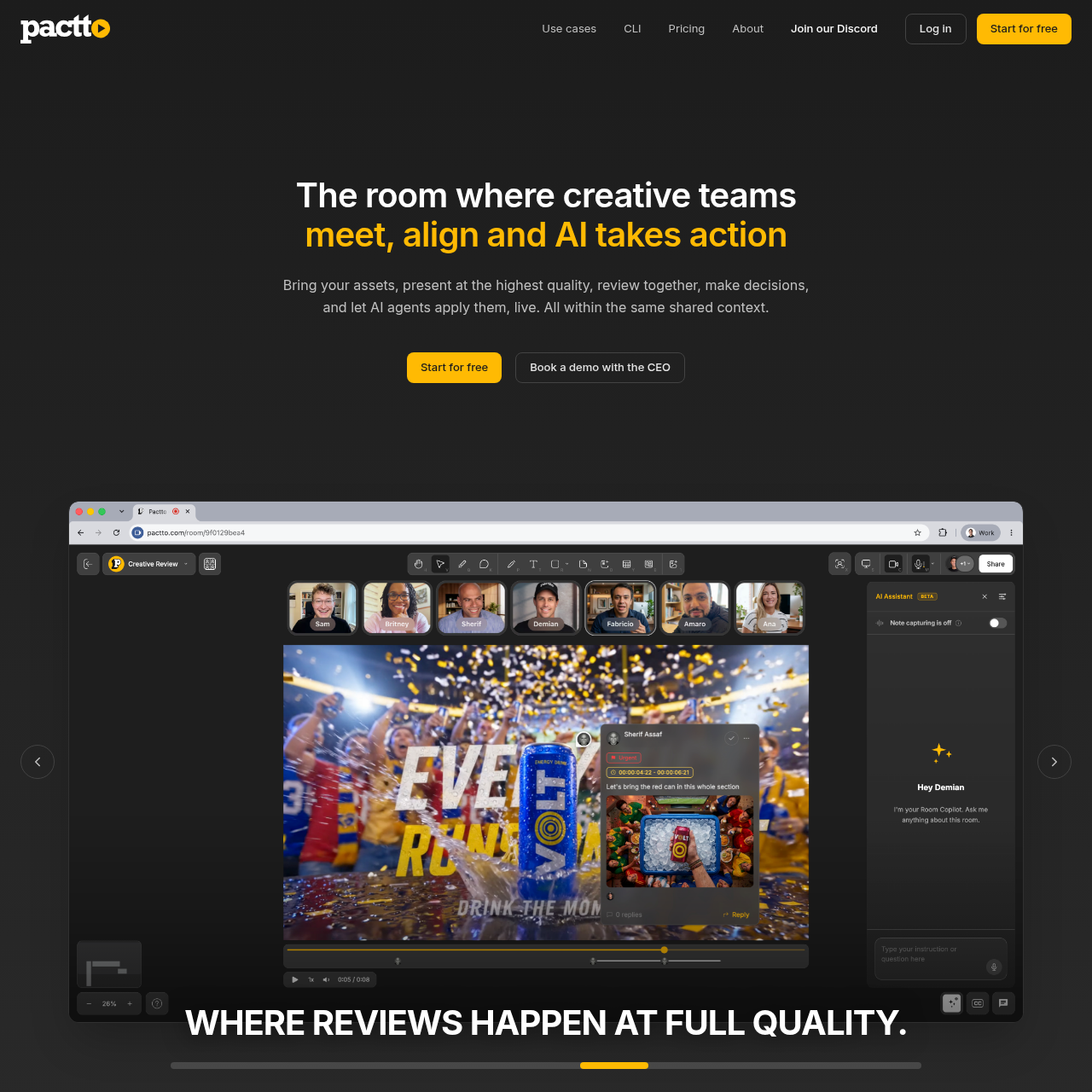
Pactto provides persistent creative rooms featuring a multi-format canvas, synchronized media playback, multilingual transcription, and AI-driven review tools.
Creators ToolkitPlaying video synchronously across…Sharing multiple user screens…Transcribing spoken speech and…Pinning voice or text comments directly…
Listed on AIToolly
What Is Pactto? Product Overview
What the product does and how it is positioned
Pactto is an AI-native collaboration platform designed for creative teams to present, review, and approve digital assets in real time. Each project operates inside a persistent virtual room equipped with a multi-format canvas that accommodates video, images, PDFs, SVGs, audio tracks, documents, and simultaneous multi-screen shares.
Within each workspace, an integrated AI assistant transcribes spoken dialogue with speaker tags and timestamps, translating conversations live across eleven languages. The system maintains contextual memory across recurring meetings, enabling teams to capture frame-specific feedback, update documentation, and execute asset revisions directly in the browser.
What Can You Use Pactto For?
Source-supported ways to use the product
Creative Agency Production
Agencies organize multi-format campaign assets on a single canvas, review revisions across video and still media, and track approval states across persistent sessions.
Sports and Movement Coaching
Coaches analyze athletic technique through frame-accurate video playback, draw visual annotations on specific frames, and maintain ongoing training logs per athlete.
Multilingual Production Reviews
Distributed global teams conduct live reviews where participants speak in different languages while receiving real-time translated transcripts with speaker attribution.
Architectural and Design Presentations
Designers and architects present high-resolution plans and renderings, mark up drawings collaboratively, and record client change requests in a centralized project room.
How to Use Pactto
The documented workflow, where available
1
Present
Place assets onto the interactive canvas and stream synchronized, color-accurate media or launch simultaneous multi-user screen shares.
2
Review
Examine assets collaboratively, mark up frames with drawing tools, provide spoken or written feedback, and let the AI assistant capture structured notes or suggest adjustments.
3
Approve
Confirm decisions during the live session, generate automatic task lists and updated documentation, and preserve project context inside the persistent room.
Synchronized Canvas and Media Annotation
Pactto structures live media review around an interactive canvas that plays video synchronously for all participants without traditional screen-share compression artifacts. The media engine is designed for frame-accurate and color-accurate playback, supporting team members view identical frames at studio quality during discussions.
The platform supports simultaneous multi-screen sharing, allowing team members to display different creative applications concurrently, such as video editing software and UI design tools. Reviewers can annotate directly over visual assets using freehand drawing, lines, shapes, and text, with comments pinned to specific frames or broader frame ranges.
Synchronized, frame-accurate video playback across all room participants.
Concurrent multi-screen sharing from multiple team members.
Drawing tools including lines, shapes, text, and freehand markup tied to frames or frame ranges.
Voice commenting that captures spoken feedback as contextual, timestamped notes.
Persistent Room Memory and In-Session AI Assistance
Pactto workspaces maintain contextual continuity by retaining past meeting transcripts, decisions, and asset iterations across recurring sessions. Rather than resetting context when a call concludes, the room retains documented history so participants and AI agents can resume discussions without retrieving external notes.
During live sessions, the AI assistant monitors spoken dialogue to generate real-time transcriptions segmented by speaker and timestamp. The assistant can translate speech live across eleven supported languages, reorder canvas assets on command, construct task documentation, and suggest direct asset edits within the browser interface.
Persistent workspace memory preserving discussions, decisions, and asset histories across calls.
Real-time speech-to-text transcription with speaker attribution and timestamps.
Live translation across 11 languages including English, Spanish, Japanese, and Arabic.
AI-driven canvas organization, task generation, and browser-based visual adjustments.
What to Test Before Choosing Pactto
Checks to run with your own material and workflow
Confirm that asset formats and file sizes fall within the upload limits of your chosen workspace configuration.
Verify whether your review workflow requires direct asset library integrations such as Adobe Frame.io, Google Drive, or Air.
Check that the 11 supported real-time translation languages match the geographic and linguistic requirements of your team.
Review whether your development or automation pipeline requires CLI access for terminal and coding agent integrations.
Answers based on the source-checked product record
What types of media assets can be loaded into a Pactto room?+
Pactto supports videos, images, PDFs, SVGs, audio tracks, and documents, and allows multiple participants to broadcast screen shares simultaneously onto the shared canvas.
How does Pactto handle live translation across international teams?+
The platform transcribes spoken dialogue in real time with speaker and timestamp attribution, translating speech live across eleven supported languages including English, Portuguese, Spanish, French, Chinese, Japanese, Korean, German, Indonesian, Italian, and Arabic.
How does room memory operate across different workspace tiers?+
On the standard free plan, room memory recalls context from only the single most recent session. Upgraded Pro rooms provide compounding, persistent memory that retains notes, decisions, and feedback across all historical sessions.
What asset management integrations are available in Pactto?+
Users can drag and drop local files directly into the room. Pro workspaces add direct cloud integrations with Adobe Frame.io, Google Drive, and Air, with Dropbox support indicated as coming soon.
What security mechanisms protect assets and meeting data in Pactto?+
Pactto implements end-to-end encryption for session communications, secures stored assets using encrypted AWS S3 buckets, and has SOC 2 compliance verification in progress.
More Creators Toolkit AI tools
Explore other recently added tools in the same category.