note.md
note.md: A Private-First Minimalist Workspace and Academic IDE for Deep Focus and Knowledge Management
note.md is a minimalist, private-first workspace designed for academic synthesis and deep focus. Functioning as an "Academic IDE," it combines literature management, structured writing, and local AI-powered research tools. With features like the Reading Studio for dual-pane PDF interaction, Graph View for visualizing a "Second Brain," and Semantic Search for meaning-based queries, note.md keeps your data secure on your local machine while empowering your writing process.
2026-05-25
5.0K
note.md Product Information
note.md: The Ultimate Minimalist Workspace for Academic Synthesis
In an era of constant digital distractions, note.md emerges as a sanctuary for deep focus and structured thought. Designed as a minimalist, private-first workspace, note.md serves as a specialized Academic IDE for students, researchers, and creators who prioritize privacy and clarity. Whether you are managing complex literature or synthesizing new ideas, note.md provides a seamless environment to think in layers and write with absolute clarity.
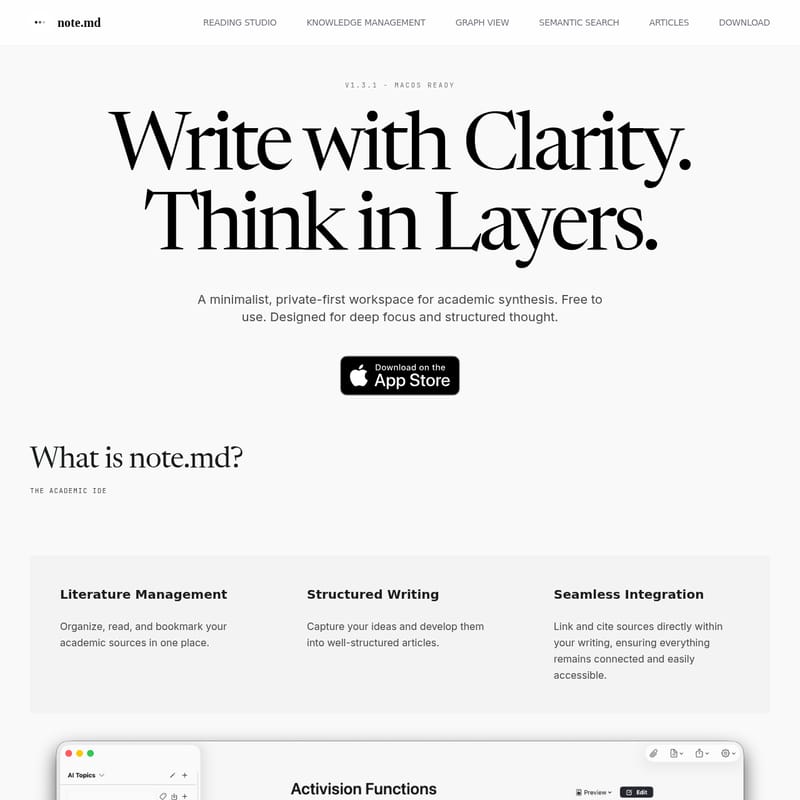
Currently v1.3.1 - macOS Ready, this tool is a canvas for your masterpiece, offering a distraction-free experience that dissolves the interface to let your output take center stage. note.md is free to use for individual creators, ensuring that high-quality knowledge management is accessible to all.
What's note.md?
note.md is more than just a note-taking application; it is a comprehensive literature management and structured writing tool. It is built on the principle of "The Foundation of Thought," where your notes are stored in a Local and Private Vault. This ensures that your thoughts never leave your machine, maintaining your privacy at all times.
As an Academic IDE, note.md excels in three primary areas:
- Literature Management: It allows you to organize, read, and bookmark your academic sources within a single, unified interface.
- Structured Writing: You can capture fleeting ideas and develop them into robust, well-structured articles.
- Seamless Integration: The platform enables you to link and cite sources directly within your writing, ensuring that every piece of information remains connected and easily accessible.
Features
note.md is packed with features designed to enhance your research and writing workflow while maintaining a minimalist aesthetic.
Reading Studio
The Reading Studio is designed for intentional reading. It features a Side-by-Side Reading mode, providing a dual-pane interface where you can view your PDF sources and your note editor simultaneously.
- Smart Citations: Automatically generate BibTeX or APA citations directly from PDF metadata, saving you time and ensuring academic rigor.
- High-Contrast Typography: Utilize high-contrast serif typography for a comfortable reading experience that reduces eye strain.
Knowledge Management
Efficiently manage your library by importing scientific papers and complex PDFs directly into your note.md workspace.
- Source Management: View all your PDFs and sources at once, structuring them by topic for easy retrieval.
- Automatic Indexing (Premium): This feature automatically extracts figures, charts, and tables from your PDFs and allows you to insert them directly into your articles.
- Metadata Export: Fill in source metadata and export your entire bibliography as a .bib file for use in other academic tools.
Graph View
Build a "Second Brain" with the Graph View feature. By using bidirectional links, you can connect disparate thoughts and visualize the network of your knowledge.
- Relations: See how your articles and sources are connected in one interactive, visual graph.
- Neo4j Support: For those who need advanced graph analysis, note.md supports exporting your graph in a Neo4j-friendly format.
Semantic Search (Premium)
Powered by local AI models, the Semantic Search feature allows you to search your workspace by meaning rather than just exact phrasing.
- Search by Meaning: Find relevant passages even if your query doesn't match the exact wording of the source text.
- Time Saver: Skip manual hunting across dozens of files and jump straight to the material you need, all while keeping your data private on your own device.
Articles and Formatting
note.md fully supports GitHub Flavored Markdown, complex tables, and LaTeX math, making it the perfect tool for technical and scientific writing. By using markdown as the fundamental storage format, your data remains portable, readable, and future-proof with no proprietary lock-in.
Under the Hood: How note.md Works
note.md is built with a commitment to transparency. There are no "black boxes." Every feature is powered by sophisticated local AI architecture that runs entirely on your Mac.
- On-Device Indexing: Your PDFs are turned into a local knowledge index without sending a single byte of data off your machine.
- Hybrid Semantic Search: A fusion of meaning-based and keyword-based search ensures the most accurate retrieval of information.
- Matrix Extraction: Local AI helps you fill research tables by extracting data across multiple sources automatically.
- Evidence Scan: This tool allows you to find support and contradictions for any claim within your library, facilitating a deeper level of academic synthesis.
How to Use note.md
To maximize your productivity with note.md, follow these steps to integrate it into your academic workflow:
- Set Up Your Vault: Create a local folder on your Mac to serve as your private vault. All your markdown notes and PDFs will be stored here.
- Import Your Sources: Drag and drop your scientific papers and PDFs into the workspace. Use the Knowledge Management tools to fill in necessary metadata.
- Read and Highlight: Open the Reading Studio to view your PDFs side-by-side with your notes. Use the one-click citation feature to reference your sources as you read.
- Connect Your Thoughts: Use bidirectional links (the
[[link]]syntax) to connect related ideas. Open the Graph View to see your knowledge network grow. - Search with AI: Use Semantic Search to query your notes using natural language. The local AI will surface the most relevant passages from your entire vault.
- Export Your Work: Once your article is complete, you can export your citations as a .bib file or keep your markdown files for use in any other text editor.
Use Case
note.md is specifically tailored for high-stakes academic and creative work:
- PhD Candidates: Use the Reading Studio and smart citations to manage a massive library of literature and draft dissertations without leaving the app.
- Technical Writers: Leverage LaTeX math support and GitHub Flavored Markdown to create complex technical documentation and articles.
- Knowledge Workers: Build a personal "Second Brain" to synthesize information from various sources and discover new perspectives through the Graph View.
- Privacy-Conscious Researchers: Perform AI-assisted research and semantic searches without worrying about data privacy or cloud security leaks.
FAQ
Q: Is my data stored in the cloud? A: No. note.md is a private-first workspace. Your notes and sources are stored in a local vault on your machine and never leave it.
Q: Is note.md free? A: Yes, note.md is free to use for the individual creator. Some advanced features, like Semantic Search and Automatic Indexing, are available as part of a Premium offering.
Q: Does it support citation styles like APA? A: Yes, the Reading Studio can automatically generate citations in both BibTeX and APA formats from your PDF metadata.
Q: What file formats does note.md use? A: It uses standard Markdown (.md) for notes, ensuring your data is portable and future-proof. It also supports PDF imports and .bib exports.
Q: Can I see the technical details of the AI? A: Absolutely. note.md provides technical deep-dives into its local AI architecture, documenting chunk sizes, ranking math, and model parameters.