Meta Image
Meta Image: Comprehensive AI Image and Video Generation Studio with Muse Image
Meta Image is an independent AI-powered creative studio offering advanced image and video generation tools. Featuring Muse Image for text-to-image and photo editing, alongside Meta Video for cinematic video creation using engines like Kling 3.0 and Gemini Omni, Meta Image provides 100 free credits to get started.
2026-07-17
1.0K
Meta Image Product Information
Meta Image: The Ultimate Independent AI Image and Video Generator
In the rapidly evolving landscape of digital creativity, Meta Image emerges as a premier independent AI generator studio. Designed for creators, marketers, and designers, Meta Image provides a unified workspace where AI image generation and AI video production coexist seamlessly. By integrating the powerful Muse Image and Meta Video technologies, the platform offers a comprehensive suite of tools that includes text-to-image, sophisticated photo editing, and professional-grade AI video creation.
Meta Image is an independent platform, not affiliated with Meta Platforms, Inc., ensuring a unique and focused environment for high-quality content generation. With 100 free credits available upon sign-up and no credit card required, Meta Image makes advanced AI tools accessible to everyone.
What’s Meta Image?
Meta Image is a versatile AI-driven creative studio that functions as both an AI image generator and an AI video generator. It serves as the primary hub for two core technologies: Muse Image and Meta Video.
- Muse Image is the engine behind agentic image generation and natural-language editing. It allows users to create stunning visuals from scratch or modify existing photos with simple text commands.
- Meta Video is the integrated video capability within the platform. It enables the conversion of text prompts or still images into short, high-quality MP4 clips, utilizing industry-leading engines like Kling 3.0, Seedance 2.0, and Gemini Omni.
As an independent AI generator, Meta Image prioritizes user experience by providing a transparent credit system and a variety of third-party model integrations to ensure the best results for every specific project.
Key Features of Meta Image
Meta Image is packed with features designed to streamline the creative process and produce professional results. Below are the core functionalities that make this platform a standout AI image and video solution.
Muse Image: Advanced Image Generation and Editing
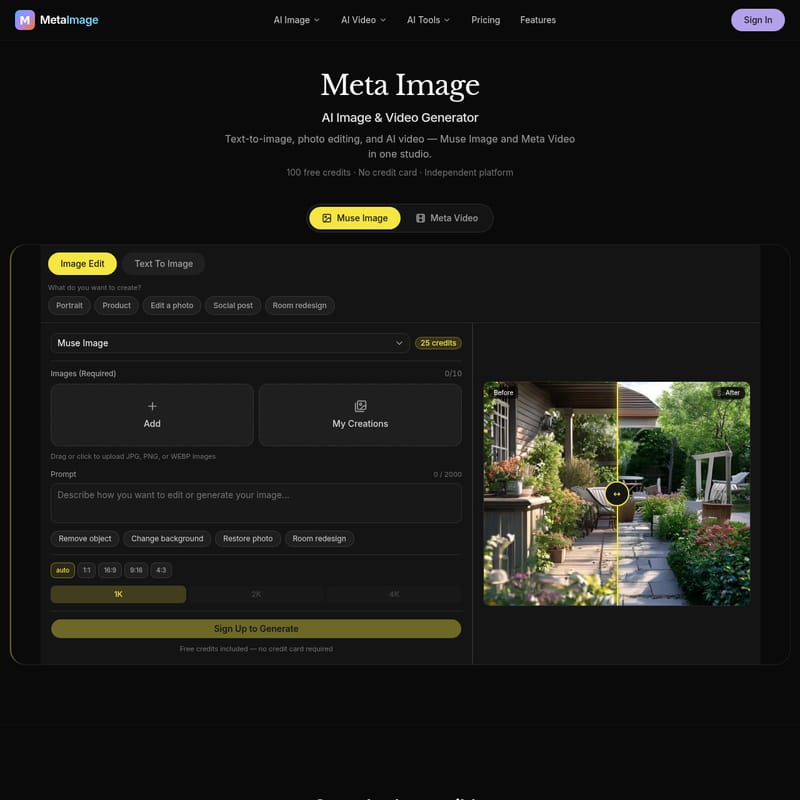
Muse Image brings natural-language processing to the world of image creation. Whether you are starting with a blank canvas or an existing photo, Muse Image provides tools like:
- Text to Image: Generate high-resolution visuals from descriptive prompts.
- Image Editing: Use AI to modify specific elements of your photos.
- Remove Object: Clean up your images by removing unwanted elements with precision.
- Change Background: Instantly swap out backgrounds to fit a new context.
- Restore Photo: Use AI to breathe new life into old or low-quality images.
- Room Redesign: A specialized tool for interior design and architectural visualization.
Meta Video: High-End AI Video Production
Meta Video allows users to bypass complex editing software and generate video content directly from prompts. Its core features include:
- Text to Video: Describe a scene, motion, and camera angles to generate a clip.
- Image to Video: Animate static photos, with the option to provide an end frame for more control over the animation.
- Multiple Engine Support: Choose the right engine for the job, including Kling 3.0 (cinematic with audio), Seedance 2.0 (realism and end frames), and Gemini Omni (4–10s clips).
- Upcoming Muse Video: A flagship model currently in development to further enhance video capabilities.
Technical Specifications and Quality Control
Meta Image offers granular control over output settings to meet professional standards:
- Resolution: Generate content in 1K, 2K, or 4K quality.
- Aspect Ratios: Choose from various formats including 1:1, 16:9 (widescreen), 9:16 (vertical/social), and 4:3.
- Credit Transparency: Credits required for a job are displayed before you click "Create," and failed jobs result in automatic credit refunds.
Use Case Scenarios
Meta Image is designed to cater to a wide range of creative and commercial needs. Here are several ways to leverage the power of the platform:
- Portrait Creation: Generate cinematic portraits with specific lighting, such as "soft golden hour light," for personal or professional use.
- Product Photography: Create minimal, high-end product shots on premium surfaces like marble, perfect for e-commerce and catalogs.
- Social Media Marketing: Design social ad graphics for brands, such as coffee companies, with optimized text and layout.
- Interior Design: Use the "Room Redesign" feature to visualize a modern living room with warm ambient light, helping clients see potential changes before they happen.
- Content Creation for Video: Use Meta Video to create short, engaging MP4 clips for social media or marketing campaigns without needing a dedicated video editing team.
How to Use Meta Video
Creating professional AI videos on Meta Image is a straightforward four-step process designed for efficiency.
- Pick a Mode: Start by deciding your input. Use "Text to Video" if you only have a descriptive prompt. Use "Image to Video" if you have a starting frame you want to animate.
- Choose an Engine: Select the AI model that fits your needs. Use Kling for cinematic quality and audio, Seedance for realism and specific end frames, or Gemini for quick 4–10 second clips.
- Set Output Options: Define your aspect ratio, duration, and quality (up to 4K). You can see the credit cost update live based on your selections.
- Download Your MP4: Once the generation is complete, preview the result on the right side of the studio. If you are satisfied, download your MP4 file immediately.
FAQ: Frequently Asked Questions
What is Meta Image? Meta Image is an independent AI studio that combines image generation (Muse Image) and video generation (Meta Video) in one platform.
Is Meta Image affiliated with Meta Platforms? No. Meta Image is an independent platform and is not affiliated with Meta Platforms, Inc. (the parent company of Facebook and Instagram).
How do credits work? Users receive 100 free credits upon signing up with no credit card required. Each generation costs a certain amount of credits, which is shown before you start the task. If a generation fails, credits are automatically refunded.
Which video engine should I use: Kling 3.0 or Seedance 2.0? Use Kling 3.0 if you want cinematic results with audio integration. Choose Seedance 2.0 if you require high realism and the ability to define a specific end frame for your video.
What is an end frame in Meta Video? An end frame is a secondary image used in the image-to-video process to tell the AI exactly how the video should look at its conclusion, allowing for more precise animation control.
How long does video generation take? Generation times vary based on the engine and quality settings selected, though the platform is optimized for rapid delivery. Gemini Omni typically produces 4–10 second clips quickly.
Can I reuse a frame from a previous video? Yes, frames from previous creations can be used as starting points for new image-to-video or editing tasks within the workspace.