Kirki
Kirki: The Ultimate Freeform Visual Website Builder for WordPress with Infinite Canvas and Built-in CMS
Kirki is a reimagined WordPress website builder, formerly known as Droip, offering an infinite freeform canvas, built-in CMS, and advanced interaction tools for limitless design freedom.
2026-05-19
32.0K
Kirki Product Information
Kirki: The Comprehensive Freeform Visual Builder for WordPress
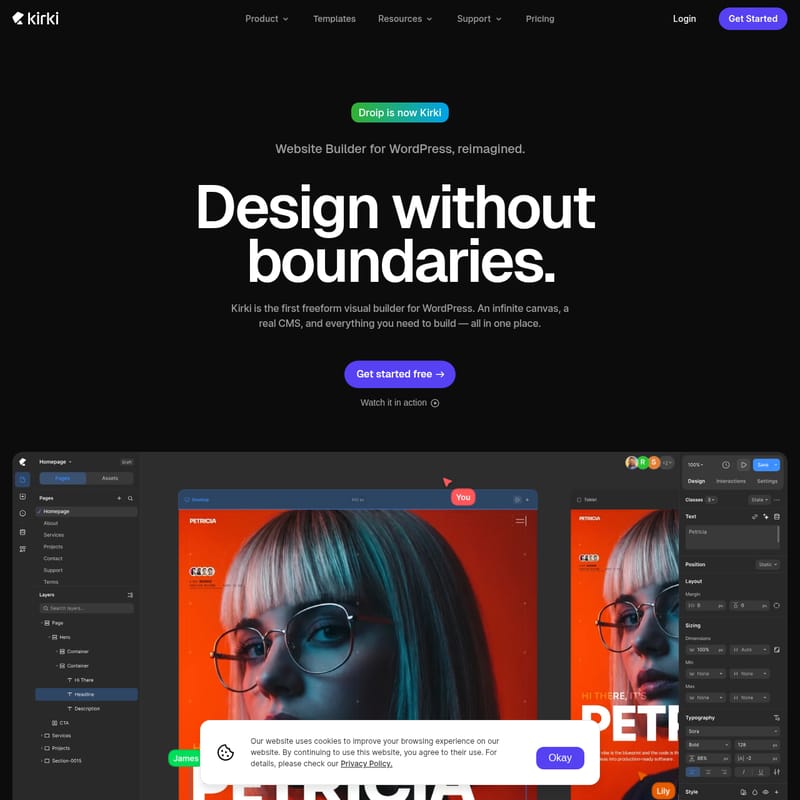
Building professional websites on WordPress has traditionally meant working within rigid structures. Kirki, formerly known as Droip, represents a total reimagining of the WordPress website builder. It is the first freeform visual builder for WordPress, designed to provide an infinite canvas, a real CMS, and all the essential tools you need to build high-performance websites in one centralized location.
With Kirki, you can stop compromising on design and start building the way you think. Whether you are a designer looking for total creative freedom or a developer needing clean markup and powerful collaboration tools, Kirki offers a seamless, reimagined experience for the modern web.
What’s Kirki?
Kirki is a groundbreaking visual builder for WordPress that breaks the mold of traditional layouts. Most page builders force users into a strict hierarchy of Section → Row → Column → Element. Kirki removes these boundaries by providing an infinite freeform canvas. This means you are no longer building inside boxes; you are designing on a blank slate where your creativity is the only limit.
Originally launched as Droip, Kirki has been rebuilt to offer more power, more flexibility, and a more intuitive workflow. It combines the ease of a visual editor with the power of a professional Content Management System (CMS), making it a comprehensive solution for anyone looking to create premium WordPress sites without the bloat of third-party plugins.
Core Features of Kirki
Kirki is built differently by design. It focuses on four core pillars that distinguish it from any other tool in the WordPress ecosystem: Design Freedom, a Built-in CMS, Realtime Collaboration, and an Advanced Interaction Timeline.
1. Design Freedom and Infinite Canvas
The standout feature of Kirki is its infinite freeform canvas. This allows designers to place elements anywhere without the restrictions of traditional grid systems.
- Unlimited Breakpoints: Ensure your site looks perfect on every device by creating as many custom breakpoints as your design requires.
- CSS Variable Design System: Maintain consistency across your entire project with a robust system for managing CSS variables.
- 100+ Template Kits: If you don’t want to start from scratch, you can choose from over 100 modern, interactive template kits. Each kit is fully customizable on the freeform canvas and includes both light and dark versions.
2. A Powerful Built-in CMS
Kirki is not just a page builder; it is a full-scale content management solution. The built-in CMS allows you to manage complex data structures with ease.
- Content Manager & Custom Fields: Create and organize content precisely how you need it.
- Reference & Multi-reference: Build relationships between different content types for sophisticated data displays.
- Dynamic Templates: Design a single template that automatically populates with content from your CMS collections.
- Collection Filter & Pagination: Give your users the ability to sort through large amounts of content seamlessly.
- Schedule Posts: Plan your content strategy in advance by scheduling posts directly within the Kirki interface.
3. Realtime Collaboration
Modern web design is often a team effort. Kirki facilitates this with advanced collaboration features usually found only in high-end design software like Figma.
- Multiple Editors, One Canvas: Work simultaneously with team members on the same design without overwriting changes.
- Design Comments: Leave feedback and communicate directly on the design canvas.
- Staging Mode & Publish History: Test changes in a safe environment and track every version of your site’s history.
- Client View-Only Links: Share your progress with clients through secure, view-only links.
- Dev Mode: Hand over projects to developers with full CSS visibility and clean, structured markup.
4. Advanced Interaction Timeline
Static websites are a thing of the past. Kirki includes a visual keyframe timeline editor that allows you to create complex animations without writing a single line of code.
- Trigger-Based Animations: Create interactions based on scroll, click, hover, and mouse movement.
- Interaction Presets: Use pre-built animation styles to save time.
- Text Animations: Make your typography stand out with specialized text effects.
- Lottie File Support: Seamlessly integrate high-quality Lottie animations into your site.
Use Cases for Kirki
Kirki is versatile enough to handle a wide variety of web projects, from simple landing pages to complex, data-driven portals.
- Creative Agencies: Use the realtime collaboration and Dev mode to streamline the handoff between designers and developers.
- Freelance Designers: Leverage the Figma to Kirki import tool to turn your high-fidelity designs into live WordPress sites instantly, preserving styles, spacing, and layouts.
- Content Marketers: Utilize the built-in CMS and SEO tools to manage blogs, portfolios, and resource centers without needing external plugins.
- Small Business Owners: Start with a template kit and use the free version of Kirki to build a professional online presence with no credit card required.
Why Choose Kirki Over Other Builders?
One of the biggest advantages of Kirki is its ability to reduce "plugin chaos." Most WordPress sites rely on dozens of third-party plugins for forms, popups, and SEO, which can lead to conflicts and slow performance. Kirki includes these features natively.
- Seamless Migration: Import content from HTML, other builders, or Figma while keeping your design integrity intact.
- Built-in Apps: Access over 20 integrated apps, including Mailchimp and Google Search Console, without third-party setup.
- Faster Sites: By replacing external plugins for forms, popups, maps, and icons, Kirki ensures fewer vulnerabilities and faster loading times.
FAQ
Q: Is Kirki really free?
A: Yes! You can install, build, and publish with Kirki for free. There is no credit card required and no time limit on the free version. There are also premium plans available for those who need advanced features.
Q: What happened to Droip?
A: Droip is now Kirki. The product has been rebranded and reimagined to offer an even better visual building experience on WordPress.
Q: Can I import my designs from Figma?
A: Absolutely. The Figma to Kirki feature allows you to import designs directly, preserving all your styles, spacing, and layouts exactly as you designed them in Figma.
Q: Does Kirki require coding knowledge?
A: No. Kirki is a visual builder designed for those who want to design without boundaries. However, it does offer a Dev mode for those who want full CSS visibility and clean markup.
Q: How does Kirki handle SEO?
A: Kirki has built-in SEO features, reducing your reliance on additional SEO plugins and ensuring your site is optimized for search engines from the ground up.
Get Started with Kirki Today
Stop building inside the box. Experience the design freedom of an infinite freeform canvas and the power of a professional CMS. Whether you are starting from a blank canvas or using one of the 100+ template kits, Kirki provides everything you need to build the WordPress site you imagined.
Kirki is the first freeform visual builder for WordPress. Design without boundaries.