gpt image 2 japan
AIToolly product video
See gpt image 2 japan in motion
GPT Image 2: Professional AI Image Generation and Editing Tool for High-Resolution Visuals and Ads
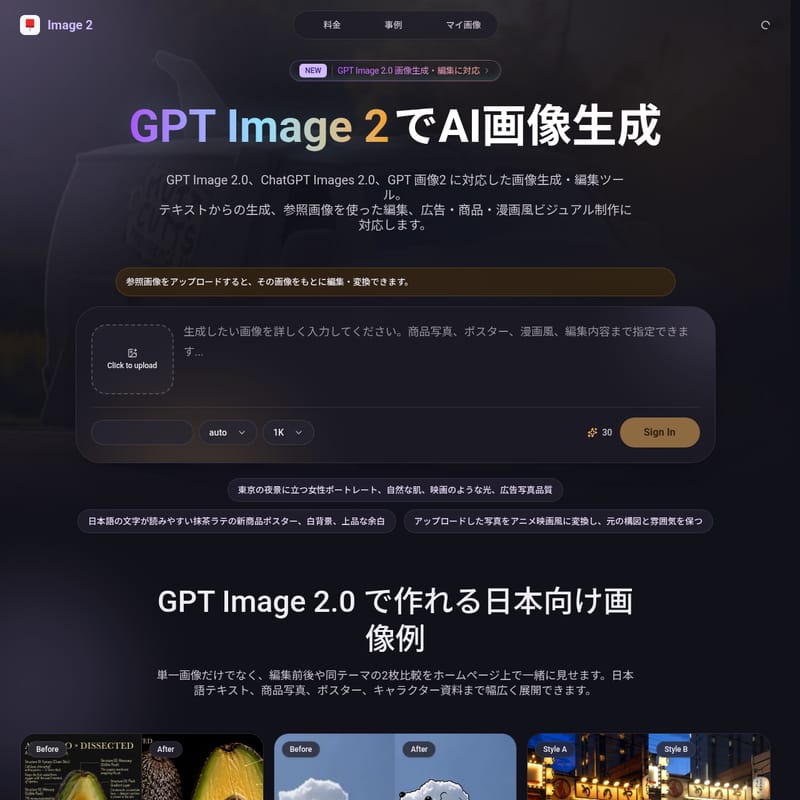
GPT Image 2 is a versatile AI platform for generating and editing high-quality images, supporting GPT Image 2.0 and ChatGPT Images 2.0 workflows. It offers Text-to-Image and Image-to-Image capabilities with resolutions up to 4K. Optimized for commercial use and Japanese creative standards, it excels in producing marketing materials, product photos, and artistic concepts while ensuring privacy and professional quality.
2026-04-29
0.6K
gpt image 2 japan Product Information
GPT Image 2: The Next Generation of AI Image Generation and Editing
In the rapidly evolving landscape of digital creativity, GPT Image 2 emerges as a premier solution for high-quality visual production. Whether you are a professional designer, a marketing expert, or a creative enthusiast, this tool integrates the powerful capabilities of GPT Image 2.0 and ChatGPT Images 2.0 to transform simple text prompts and reference images into stunning, high-resolution works of art. From commercial advertisements to intricate manga-style visuals, GPT Image 2 is designed to meet the rigorous demands of the modern creative industry.
What is GPT Image 2?
GPT Image 2 is a comprehensive AI-driven image generation and editing tool. It serves as an advanced interface for GPT Image 2.0, offering users the ability to create entirely new visuals from text or modify existing photos through sophisticated image-to-image workflows. Often referred to as GPT 画像2 in Japanese markets, it is specifically optimized for localized creative needs, including the generation of accurate Japanese text within images and the recreation of culturally specific aesthetics, such as Tokyo streetscapes or traditional Japanese motifs.
This platform stands out by offering a seamless bridge between Text to Image and Image to Image processing. Users can upload a reference image to edit its style, composition, or subject matter while maintaining the original essence, or they can start from scratch using the highly responsive ChatGPT Images 2.0 engine.
Key Features of GPT Image 2.0
GPT Image 2 is packed with features that prioritize quality, flexibility, and professional utility. Below are the core highlights of the GPT Image 2.0 ecosystem:
Multi-Resolution Output (1K, 2K, 4K)
Depending on your project needs, you can choose from various output qualities.
- 1K Resolution: Ideal for quick drafts and social media posts.
- 2K Resolution: Perfect for evaluating advertising concepts and product photography.
- 4K Resolution: The gold standard for high-definition finishes, suitable for print and professional web design.
Dual Generation Modes
GPT Image 2 offers two primary workflows:
- Text to Image: Generates high-fidelity visuals based purely on your descriptive text prompts.
- Image to Image: Allows you to upload a reference photo (JPG, PNG, WebP up to 10MB) to serve as a structural or stylistic guide for the AI.
Optimized for Japanese Creative Projects
The tool is uniquely tuned for the Japanese market. It handles Japanese language prompts with high accuracy and can generate images containing readable Japanese characters—a feature often requested for posters and logos.
Professional Workflow Tools
- Commercial Use: All images generated on the platform are intended for commercial projects.
- No Watermarks: Your creations are clean and ready for immediate professional use.
- Private Generation: Your uploads and generations are kept private, ensuring your intellectual property remains secure.
- Showcase Comparison: The interface allows for a "Before and After" comparison, making it easy to track changes in edited images.
How to Use GPT Image 2
Using GPT Image 2.0 is an intuitive process designed for efficiency. Follow these steps to maximize your creative output:
- Select Your Mode: Choose between creating a new image from text or uploading a reference photo for an Image-to-Image task.
- Upload (Optional): If you are using the Image-to-Image feature, click to upload your JPG, PNG, or WebP file (ensure it is under 10MB).
- Enter Your Prompt: Write a detailed description of what you want to see. For better results, specify the subject, composition, lighting, color palette, and any text you want included.
- Set Quality: Select your desired resolution (1K, 2K, or 4K).
- Generate: Let the GPT Image 2 engine process your request.
- Review and Compare: Use the comparison feature to view variations or analyze the transformation from your original upload.
Pro Tip: To get the most stable results, separate your prompt into categories: Subject, Composition, Lighting, Background, and Elements to Avoid.
Use Cases for ChatGPT Images 2.0
GPT Image 2 is versatile enough to support a wide range of industries and creative tasks.
EC (E-commerce) Product Images
Easily swap backgrounds for product photos, create seasonal campaign visuals, or generate lifestyle shots for platforms like Amazon or Rakuten. You can take a standard product photo and place it in a high-end setting or a clean, white-background studio environment.
SNS Advertising and A/B Testing
Quickly generate multiple variations of an ad for Instagram, X (Twitter), or TikTok. By changing the mood, color, or text layout, you can create a variety of assets for A/B testing in record time.
Manga and Anime Planning
Generate character reference sheets, costume variations, and background art. GPT Image 2.0 is excellent for creating key visuals or title logos for manga projects, allowing creators to visualize their concepts before starting the drawing process.
Marketing Posters and Flyers
Create professional-grade posters for events, exhibitions, or seminars. The tool allows for ample white space for headings and ensures that Japanese text elements are integrated seamlessly into the design.
Presentation and Branding Materials
Enhance your presentation slides with custom visuals that match your brand’s world-view. From logo ideas to mockup designs of delivery vans or packaging, GPT Image 2 helps visualize abstract ideas for clients and internal teams.
Pricing Plans
GPT Image 2 offers flexible pricing based on a credit system (1K=30, 2K=50, 4K=80 credits).
- Lite Plan: Ideal for personal use and prototyping. Includes 59,400 credits per year, supporting up to 1,980 4K images.
- Pro Plan: Best for active creators. Includes 179,400 credits per year, allowing for up to 5,980 4K images.
- Premium Plan: Designed for teams and high-volume production. Includes 299,400 credits per year, supporting up to 9,980 4K images and featuring priority support.
FAQ
Q: What can I do with GPT Image 2? A: You can generate images from text, edit uploaded photos, convert styles, and produce professional-grade visuals for ads, products, and manga.
Q: Does it support GPT Image 2.0 and ChatGPT Images 2.0? A: Yes, the system is fully compatible with these latest AI models and keywords to ensure cutting-edge performance.
Q: How are uploaded images handled? A: Uploaded images are used for Image-to-Image processing. Files are uploaded directly to secure R2 storage for privacy and speed.
Q: Is commercial use allowed? A: Yes, the workflow is designed for commercial projects. However, users should always verify rights when including specific trademarks or third-party materials.
Q: Can I create images with Japanese text? A: Yes, GPT Image 2 is optimized to include Japanese headings and short copies directly in the generated visuals.
Q: What happens if generation fails? A: The system allows you to check the status of your generation. Credit issues are resolved based on generation logs; simply contact support with your generation ID if a problem occurs.