Cursor for iOS
Cursor for iOS: The Premier AI Coding Agent for Professional Software Development
Discover Cursor for iOS, the agent-native development platform by Anysphere. Launch AI coding agents, review sandbox demos, and ship code directly from your iPhone using frontier AI models.
2026-07-02
597600.0K
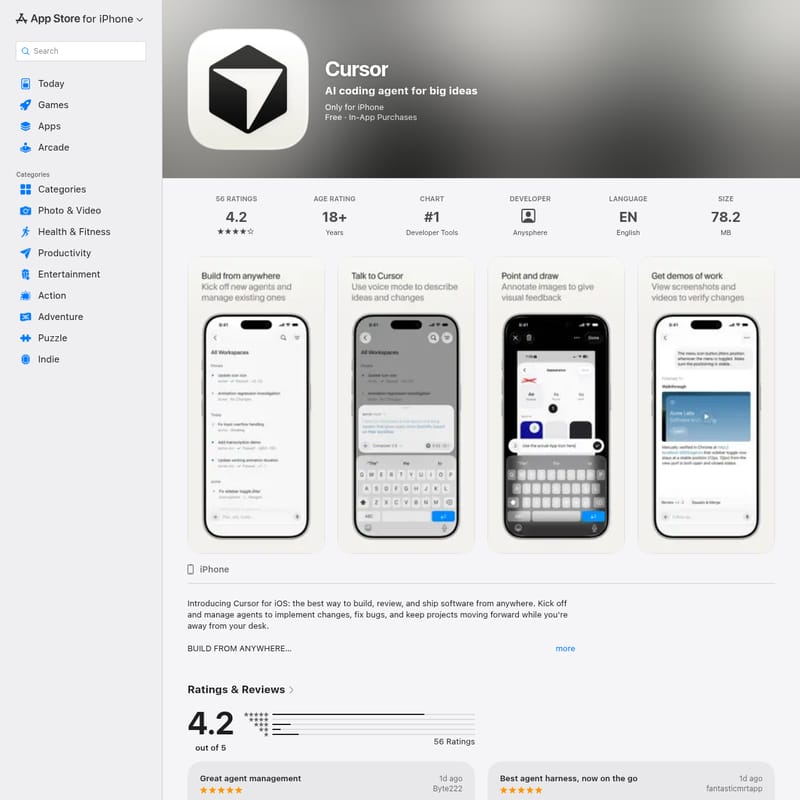
Cursor for iOS Product Information
Cursor: The Ultimate AI Coding Agent for Mobile Software Development
In the modern era of programming, efficiency and mobility are paramount. Cursor is the revolutionary AI coding agent that brings the power of agent-native software engineering to your pocket. Developed by Anysphere, Inc., the Cursor app for iPhone and iOS is designed for developers who need to build, review, and ship ambitious software from anywhere. Whether you are at your desk or on the move, Cursor ensures that your development pipeline never stops.
What is Cursor?
Cursor is an AI coding agent platform that redefines the software development lifecycle. It is described as an "agent-native" way to build software, allowing developers to kick off multiple agents in parallel to handle various engineering tasks. Unlike standard code editors, Cursor leverages deep understanding of your codebase to help you think through complex problems and implement changes autonomously.
Available on iPhone, iPad, and even Apple Vision, Cursor is more than just a mobile code viewer. It is a full-featured development environment that utilizes frontier models from OpenAI, Anthropic, and Google. At its core is Composer, Cursor’s proprietary agentic model, which provides frontier-level intelligence while being optimized for speed and token-efficiency. This makes it the premier tool for modern software teams building the next generation of applications.
Key Features of Cursor
Cursor is packed with features that empower developers to maintain high productivity levels regardless of their location.
Agent-Native Development
Launch as many AI coding agents as you need in parallel. These agents can investigate issues, answer questions about your codebase, and implement features. This allows for a massive increase in productivity as you can manage multiple engineering workstreams simultaneously right from your iPhone.
Secure Sandbox Testing
One of the standout features of Cursor is the ability for agents to validate their own work. Agents operate in their own virtual machines with full development environments. They can:
- Test changes in a secure sandbox.
- Iterate on code until the output is validated.
- Produce artifacts like videos, screenshots, and logs. These features allow you to verify work quickly and ensure that every PR is merge-ready.
Point and Draw Visual Feedback
Cursor bridges the gap between visual design and code. By taking a screenshot and circling an issue, you can provide visual feedback directly to the AI coding agent. The agent understands these annotations and uses them as context to make precise UI updates or fix visual bugs. This "Point and Draw" system significantly speeds up the iteration process for design and UI refinements.
Focused Mobile Diff Experience
Reviewing code on a mobile device is often a challenge, but Cursor provides a focused diff experience designed specifically for iOS. You can easily:
- Inspect changes through a mobile-optimized view.
- Move between files and commits seamlessly.
- Merge high-quality code with total confidence.
Voice Conversations
For those moments when you are on the go and cannot type, Cursor offers a voice mode. You can talk to the agent to brainstorm ideas, explain complex bugs, or plan out entire features. Cursor turns these conversations into actionable engineering work, helping you stay in your creative flow.
How to Use Cursor on iOS
To get the most out of Cursor for your software development projects, follow these steps:
- Launch Your Agents: Start by kicking off agents from your phone to address specific bugs or feature requests.
- Monitor Progress: Track and manage active engineering work. You can even check the status of your agents from your lock screen.
- Provide Visual Context: Take a screenshot of a UI issue, annotate it by drawing, and send it to the agent for a fix.
- Review Demos: Watch the videos and look at the screenshots produced by the agents in their sandbox to verify the implementation.
- Inspect and Merge: Use the diff viewer to review pull requests and merge the changes into your main branch.
- Navigate Your Codebase: Use the AI's intelligence to understand unfamiliar parts of your codebase faster than ever before.
Use Case Scenarios
Cursor is versatile and fits into many professional workflows:
- Emergency Fixes: When a production bug is reported while you are away from your laptop, use Cursor to investigate the codebase, launch an agent to fix it, and ship the PR immediately.
- On-the-Go Brainstorming: Use the Voice Mode to talk through a difficult technical challenge and have the AI coding agent draft a plan or initial implementation.
- UI Refinement: Use the "Point and Draw" feature to capture visual inconsistencies in your app and have Cursor make the necessary CSS or layout adjustments.
- Managing Side Projects: Keep your side projects moving forward during small gaps in your day by reviewing work and tracking agent progress.
"Being able to manage both cloud agents and remotely connect to local machines is such a game changer! App is very polished, simple, and puts the key functionality right at the front!"
FAQ
Q: What are the system requirements for Cursor?
A: Cursor requires iOS 26.0 or later for iPhone and visionOS 26.0 or later for Apple Vision Pro. It is currently available in English.
Q: Is there a cost associated with Cursor?
A: The app is free to download, but it offers In-App Purchases for premium features. Subscription tiers include:
- Pro: $25.99
- Pro+: $77.99
- Ultra: $259.99
Q: Who developed Cursor?
A: The app is developed and sold by Anysphere Incorporated.
Q: What is the age rating for the app?
A: The app is rated 18+.
Q: Does Cursor protect my privacy?
A: According to the developer, Anysphere, certain data like location, contact info, and user content may be collected and linked to your identity for analytics and app functionality. For full details, you should consult the Privacy Policy.
Q: Can I use Cursor on my Mac?
A: While there is a desktop version, the information provided focuses on the iOS and iPhone experience, which brings the core functionality of the agent harness to a mobile-native environment.
For more information, visit the official Cursor website.