CraftBot
CraftBot: A Personal AI Assistant for Autonomous Task Planning and Execution
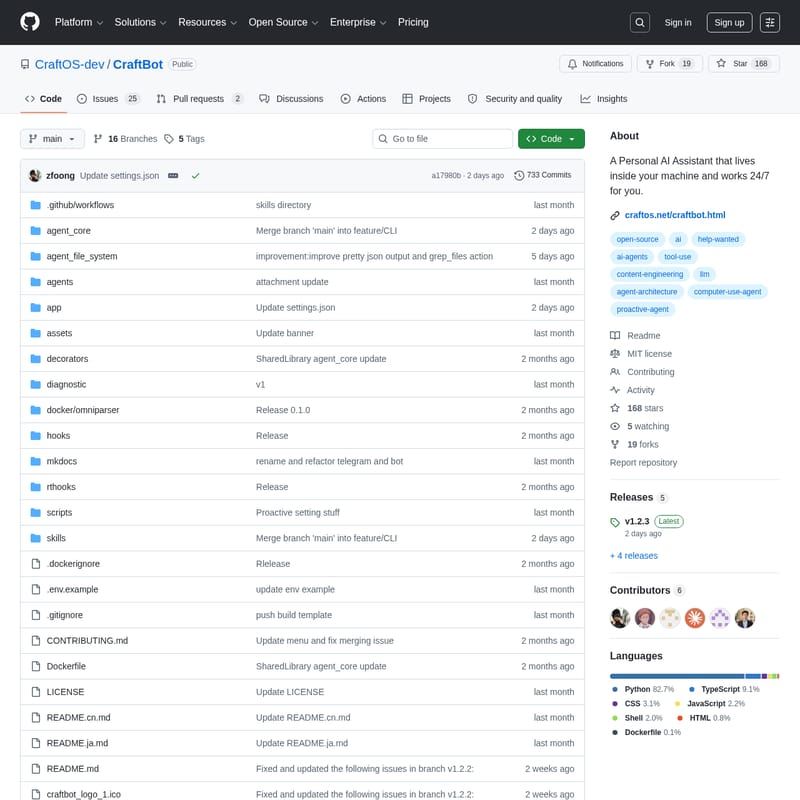
CraftBot is a sophisticated Personal AI Assistant designed to operate 24/7 directly on your machine. It autonomously interprets tasks, plans complex actions, and executes them to achieve your specific life goals. With a focus on personalization, CraftBot learns your habits and preferences to proactively suggest improvements. It features a robust architecture including a memory system, Bring Your Own Key (BYOK) LLM support, and integration with major platforms like Google Workspace, Slack, and Notion via MCP and Skills frameworks.
2026-04-20
615200.0K
CraftBot Product Information
CraftBot: Your 24/7 Personal AI Assistant for Autonomous Life Management
CraftBot is a powerful, autonomous Personal AI Assistant that lives directly inside your machine. Unlike standard chatbots, CraftBot is designed to work for you 24/7, interpreting complex tasks, planning strategic actions, and executing them to help you achieve your professional and personal goals. By learning your preferences and habits, CraftBot becomes a proactive agent in your digital life, initiating tasks to keep you on track.
What's CraftBot?
CraftBot is more than just a software tool; it is an intelligent agent architecture that combines the power of Large Language Models (LLMs) with deep system integration. It is designed to be your primary digital companion, capable of managing external apps, performing research, and handling system-level operations.
At its core, CraftBot utilizes a "Bring Your Own Key" (BYOK) model, allowing you to choose your preferred LLM provider while the agent handles the heavy lifting of execution. Whether it is summarizing your day at midnight or managing your communications across multiple platforms, CraftBot remains dedicated to your objectives.
Features of CraftBot
Multi-LLM Support (BYOK)
CraftBot provides a flexible LLM provider system. You can easily switch between top-tier models including:
- OpenAI
- Google Gemini
- Anthropic Claude
- BytePlus
- Local Ollama models
Advanced Memory System
To provide a truly personalized experience, CraftBot features a memory system that distills and consolidates daily events at midnight. Using a RAG-based semantic memory with ChromaDB, it handles chunking, embedding, and retrieval to ensure it never forgets your preferences.
Proactive Agency
One of the standout features of CraftBot is its ability to learn your habits and life goals. It doesn't just wait for commands; it performs planning and initiates tasks (with your approval) to help you improve your daily productivity.
Extensive Tool & App Integration
CraftBot connects seamlessly to the tools you use every day, including:
- Google Workspace (Gmail, Calendar, Drive)
- Slack & Discord
- Notion & LinkedIn
- Zoom & Telegram
Model Context Protocol (MCP) & Skills
Through the MCP integration and an extensible Skill framework, CraftBot can perform task planning, deep research, code reviews, and Git operations. These pluggable skills are injected directly into the agent context for maximum efficiency.
Cross-Platform & Interface Modes
CraftBot is fully compatible with Windows and Linux. It offers multiple ways to interact:
- Browser Mode: The recommended modern web interface (requires Node.js).
- TUI Mode: A Terminal User Interface for dependency-free interaction.
- CLI Mode: A lightweight command-line interface.
- GUI Mode: An experimental mode for desktop automation and visual feedback.
Use Case Scenarios for CraftBot
- Professional Workflow Automation: Use CraftBot to monitor your Slack messages, summarize Notion documents, and schedule Zoom meetings automatically.
- Personal Research Assistant: Task the agent with performing deep web research and organizing findings into a structured report.
- Developer Productivity: Leverage CraftBot for code reviews and managing complex Git operations within your local environment.
- Life Goal Tracking: Allow the proactive agent to analyze your habits and suggest scheduling changes to help you meet long-term fitness or learning objectives.
How to Use CraftBot
Prerequisites
- Python 3.10+
- Git
- API Key (OpenAI, Gemini, or Anthropic)
- Node.js 18+ (Required for Browser Mode)
Quick Installation
- Clone the repository:
git clone https://github.com/zfoong/CraftBot.git - Navigate to the directory:
cd CraftBot - Install dependencies:
python install.py - Run the agent:
python run.py
Running as a Background Service
To ensure CraftBot is always available, you can install it as a background service:
python service.py install
This registers the agent to auto-start upon login and provides a desktop shortcut for quick access to the browser interface.
Connecting Services
Once CraftBot is running, you can connect your external accounts using simple commands:
/google login- Connect Google Workspace/slack invite- Connect Slack/notion invite- Connect Notion
FAQ
Q: Does CraftBot require a specific LLM? A: No, CraftBot supports multiple providers including OpenAI, Anthropic, Gemini, and local Ollama models via its BYOK system.
Q: Can I run CraftBot without Node.js?
A: Yes. While Browser mode requires Node.js, you can run CraftBot in TUI mode using python run.py --tui or CLI mode using python run.py --cli with no extra dependencies.
Q: Is the GUI mode stable? A: The GUI mode is currently in an experimental phase. It allows for screen automation but may encounter issues as the developers continue to refine the feature.
Q: How does the memory system work? A: CraftBot uses ChromaDB for RAG-based semantic memory. It periodically consolidates events to learn your habits and goals over time.
Q: Can CraftBot be used for screen automation?
A: Yes, by using the --gui flag, CraftBot can interact with your desktop environment using OmniParser for UI element detection.