Cardboard
Cardboard: A Creative Digital Studio Platform for Design and Collaboration
Cardboard is an innovative digital studio accessible directly through your web browser, designed to streamline the creative process. By providing a user-friendly interface for both individuals and teams, Cardboard allows users to transform their digital workspace into a professional creative environment. With seamless integration options like Google login and a simple account setup process, it serves as a central hub for builders, designers, and creators to bring their ideas to life. Whether you are working on personal projects or professional collaborations, Cardboard provides the foundational tools needed to start creating immediately without the need for complex software installations.
2026-03-13
71.0K
Cardboard Product Information
Cardboard: Transforming Your Browser into a Creative Studio
In the modern digital landscape, the tools we use define the boundaries of our creativity. Cardboard emerges as a powerful solution designed to turn your standard web browser into a fully functional creative studio. Whether you are an independent creator or part of a larger team, Cardboard provides the necessary infrastructure to bridge the gap between initial ideation and final execution.
What’s Cardboard?
Cardboard is a digital platform built for creators who value accessibility and efficiency. At its core, Cardboard is an online environment that eliminates the need for heavy software downloads by leveraging the power of web technology. When you log in to Cardboard, your browser is no longer just a window to the internet—it becomes a dedicated studio space for your projects.
By focusing on a seamless user experience, Cardboard allows users to sign up using traditional email methods or through integrated providers like Google. This flexibility ensures that you can move from the landing page to the creation phase in just a few clicks. The platform is designed to learn about you during the onboarding process, ensuring that the Cardboard experience is tailored to your specific creative needs.
Key Features of Cardboard
Cardboard is packed with features that prioritize ease of use and professional results. Here are the core highlights of the platform:
Browser-Based Studio Access
One of the standout features of Cardboard is its accessibility. You don’t need high-end hardware or complex installations; if you have a browser, you have a studio. This makes Cardboard a highly portable and versatile tool for creators on the go.
Simplified Account Management
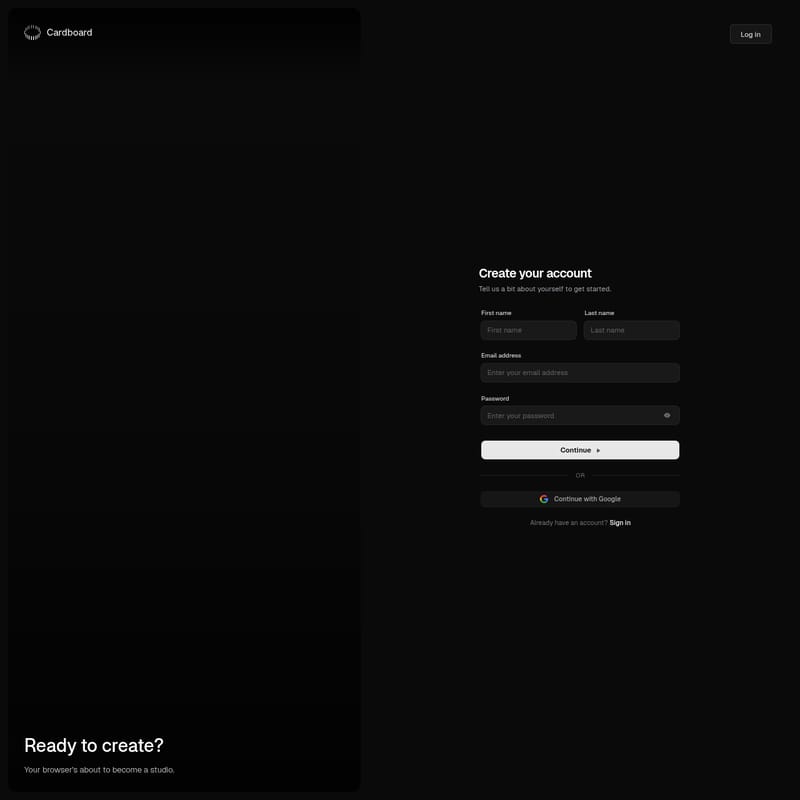
Setting up your Cardboard account is straightforward. The platform requests basic information to personalize your journey:
- First and Last Name: For personalized workspace identification.
- Email Integration: Standard email registration or one-click Google authentication.
- Secure Passwords: Ensuring your creative assets remain protected within the Cardboard ecosystem.
User-Centric Onboarding
Cardboard doesn't just give you a blank slate; it asks questions to understand your background. By telling Cardboard a bit about yourself, the platform can better align its environment with your creative goals.
Seamless Social Integration
With the "Continue with Google" feature, Cardboard reduces friction, allowing for faster logins and better integration with your existing digital identity.
Use Case Scenarios for Cardboard
How can you best utilize Cardboard in your daily workflow? Here are several ways the platform serves different types of users:
Individual Creators and Hobbyists
For those just starting their creative journey, Cardboard offers a low-barrier entry point. You can set up a Cardboard account and begin experimenting with ideas without investing in expensive suite software. It is the perfect "sandbox" for testing new concepts.
Professional Designers
Professionals can use Cardboard as a secondary studio for quick edits or collaborative sessions. Because Cardboard lives in the browser, sharing progress and logging in from different machines is effortless.
Collaborative Teams
By using the structured account system, teams can ensure everyone is on the same page. Cardboard acts as the central hub where the first name, last name, and email of each contributor help organize the workflow within the studio environment.
How to Use Cardboard
Getting started with Cardboard is a simple process designed to get you creating as fast as possible. Follow these steps to unlock your new studio:
- Navigate to the Platform: Open your preferred web browser and head to the Cardboard login page.
- Choose Your Sign-Up Method:
- Select "Create your account" to register with your email address.
- Alternatively, select "Continue with Google" for an instant setup.
- Provide Your Details: Enter your first name, last name, email, and a secure password.
- Tell Your Story: Complete the brief profile section so Cardboard can understand your creative background.
- Enter the Studio: Once your account is verified, log in and watch your browser transform into a Cardboard studio space.
Pro Tip: If you already have a Cardboard account, simply click "Sign in" to resume your previous projects exactly where you left off.
FAQ (Frequently Asked Questions)
What is Cardboard exactly?
Cardboard is a digital studio platform that runs directly in your web browser, allowing you to create and manage projects without needing to install external software.
Do I need to pay to create a Cardboard account?
To get started, you simply need to provide your name and email or use a Google account to sign up and explore the Cardboard environment.
Can I use Cardboard on different devices?
Yes! Since Cardboard is browser-based, you can log in to your account from any device with internet access and a compatible web browser.
Is my data safe on Cardboard?
Cardboard requires a password for email-based accounts and offers secure Google authentication to ensure that your studio and your personal information are protected.
How do I get back into my Cardboard studio?
If you have an existing account, simply go to the login page and click on the "Sign in" link to enter your credentials and access your Cardboard dashboard.