BrowserAct
BrowserAct: The Stealth Browser Layer for AI Agents to Access and Automate the Web Without Blocks
BrowserAct is an advanced browser runtime designed for AI agents, offering stealth fingerprints, automated CAPTCHA solving, and residential proxies to navigate blocked pages and return clean, structured web data.
2026-06-27
134.0K
BrowserAct Product Information
BrowserAct: The Advanced Browser Layer for Seamless AI Agent Web Automation
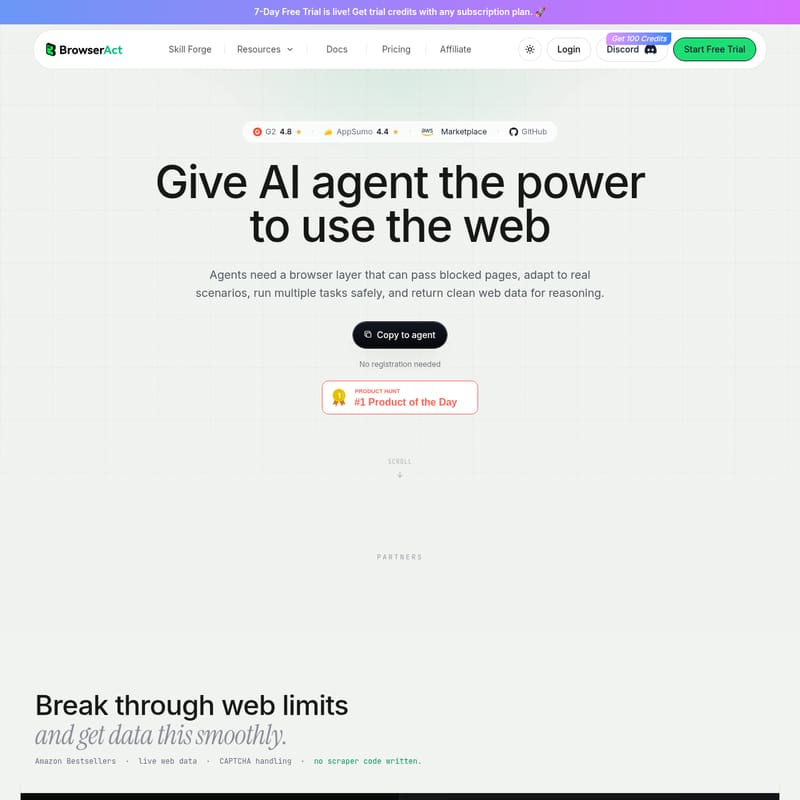
In the evolving landscape of artificial intelligence, agents require more than just reasoning capabilities; they need the ability to interact with the live web effectively. BrowserAct provides this essential browser layer, giving AI agents the power to navigate blocked pages, adapt to real-world scenarios, and execute complex tasks safely. By returning clean, structured web data, BrowserAct empowers agents to reason over the web with unprecedented efficiency.
Rated 4.8 on G2 and 4.4 on AppSumo, BrowserAct is a trusted solution integrated with major cloud providers including AWS, Microsoft Azure, Google Cloud, Oracle, Alibaba Cloud, Huawei Cloud, BytePlus, and Baidu AI Cloud.
What is BrowserAct?
BrowserAct is a purpose-built browser runtime and environment layer designed specifically for AI agents and LLMs (Large Language Models). It acts as a bridge between the agent and the complex web, ensuring that web blocks, CAPTCHAs, and bot detection systems do not hinder the agent's performance.
With over 500 million pages automated and 10 million CAPTCHAs solved, BrowserAct has established itself as the go-to infrastructure for developers building reliable browser skills. It allows agents to "browse and act like a real user," utilizing stealth fingerprints and residential proxies to ensure that every session remains undetected by security layers.
Core Features of BrowserAct
1. Breakthrough Web Limits and Anti-Blocking
BrowserAct is engineered to bypass even the most sophisticated web limits. It employs a multi-layered approach to security evasion:
- Stealth Fingerprints: Every session uses unique browser fingerprints to mimic human-like behavior.
- TLS Rotation: Regular rotation of TLS signatures prevents detection by server-side security.
- Built-in Residential Proxies: BrowserAct pairs sessions with matched fingerprint profiles and residential IP routes, ensuring that most security checks are never triggered.
- 30+ Fingerprint Attributes: This includes specialized configurations for User Agent (UA), WebRTC, Canvas, WebGL, and more.
2. Automated CAPTCHA Handling
The Execution Layer of BrowserAct is designed to pass human-verification challenges automatically. The solve-captcha feature handles popular challenges such as:
- reCAPTCHA
- Cloudflare Turnstile
- DataDome
- HUMAN Security
3. Multiple Browser Modes
BrowserAct offers flexibility through three distinct operational modes to suit any scenario:
- Local Chrome Reuse: Agents can work inside your actual logged-in sites, reusing cookies, SSO, extensions, and trusted sessions from your local machine.
- Stealth Private Mode: Ideal for bulk scraping. It uses fresh fingerprints and rotating proxy IPs for every task, leaving no trace after the data is extracted.
- Stealth Fixed-Identity Mode: Designed for multi-account scale. Every account is bound to a fixed browser fingerprint and static residential proxy for long-term stability.
4. Agent-Native Runtime
Unlike standard browsers, the BrowserAct Agent-Native Browser Runtime is optimized for LLM reasoning:
- Clean Web Data: Instead of raw DOM, it returns page structures as clean, low-token, indexed data.
- Agent Command Execution: Agents can run commands like
click,type,wait,upload, andnavigateagainst stable action targets. - Semantic Browser Memory: BrowserAct describes each browser session in natural language, allowing agents to identify and reuse the correct identity later.
- Safety Confirmations: Sensitive setups, proxy changes, or profile imports require human confirmation by default to ensure safe operations.
How to Use BrowserAct
BrowserAct is designed for ease of use, allowing you to run your first "Skill" in as little as 30 seconds. Below are the primary ways to integrate it into your workflow:
Using the BrowserAct CLI
You can connect BrowserAct to agents like Claude Code or Cursor through a simple terminal interface.
- Install the Skill: Connect the
browser-actskill to your agent (e.g.,[email protected]). - Launch the Browser: Open the browser in stealth mode.
- Execute Tasks: Use natural language commands. For example: "Scrape the top 80 Amazon Electronics bestsellers—price, rank, reviews—and export a clean CSV."
- Data Extraction: BrowserAct will visit the page, solve any CAPTCHAs, scrape the listings, and export the file (e.g.,
bestsellers.csv) in minutes.
Cloud Workflows and API
- Workflow Canvas: Build visual automation steps like "Visit URL," "Click Button," and "Extract Data" to turn any website into a structured API.
- API / MCP Integration: Call BrowserAct through API or MCP to trigger tasks from your own system or connect through third-party tools like Make, n8n, and Zapier.
BrowserAct Use Cases
Bulk Web Scraping
With unlimited concurrency, BrowserAct allows you to run multiple agents in parallel. You can scrape thousands of pages without interference or state pollution, as each session operates with its own identity and workspace. This is perfect for gathering competitive intelligence, such as tracking Amazon bestsellers.
Multi-Account Social Media Management
By using fixed profiles and static residential proxies, BrowserAct allows for stable multi-account scaling. Each account (e.g., LinkedIn, X) remains tied to a specific fingerprint, preventing bans and ensuring a consistent digital presence.
AI Research Workflows
BrowserAct provides the "missing layer" for AI research. Persistent browser context and clean data output allow agents to navigate complex dashboards and research-heavy sites to return synthesized information rather than raw code.
Frequently Asked Questions (FAQ)
Q: Does BrowserAct require registration to try? A: You can copy the skill to your agent and start without immediate registration. There is also a 7-Day Free Trial available that provides trial credits with subscription plans.
Q: What happens if a CAPTCHA is too difficult for the AI?
A: BrowserAct includes a Human Layer called remote-assist. If a hard stop occurs (like 2FA), it creates a live link for a human to take over on a mobile or desktop device. Once the hurdle is cleared, control is returned to the agent.
Q: Can I use my existing Chrome login info? A: Yes. The Local Chrome mode allows BrowserAct to reuse your local login state, including cookies and extensions, so your agent can perform tasks within authenticated sessions.
Q: Is BrowserAct compatible with automation tools like Zapier? A: Absolutely. BrowserAct can be integrated via API into stack-standard tools like Zapier, Make, and n8n, allowing you to plug browser tasks directly into your existing business product stack.
Q: How does BrowserAct handle data privacy? A: BrowserAct allows for private modes that clear data after tasks. Each session is isolated, ensuring no state pollution or account mixups occur during parallel processing.
"BrowserAct redefines expectations of what free open-source tools can accomplish. It allows me to turn virtually any website into an API, saving hundreds of hours." — User Testimonial