Bluedot 2.1
Bluedot 2.1: A privacy-first, bot-free AI note taker for transcribing and summarizing meetings across all major platforms.
Bluedot 2.1 is a comprehensive AI meeting note taker designed to capture, transcribe, and summarize conversations without intrusive bots. Supporting over 100 languages, it offers GDPR-compliant, SOC 2-certified security for entrepreneurs and enterprise teams alike. With seamless integrations for CRMs, Notion, and ATS platforms, Bluedot transforms meetings into actionable insights across Zoom, Google Meet, and in-person settings.
2026-05-29
585.0K
Bluedot 2.1 Product Information
Bluedot 2.1: The Ultimate Privacy-First, Bot-Free AI Note Taker
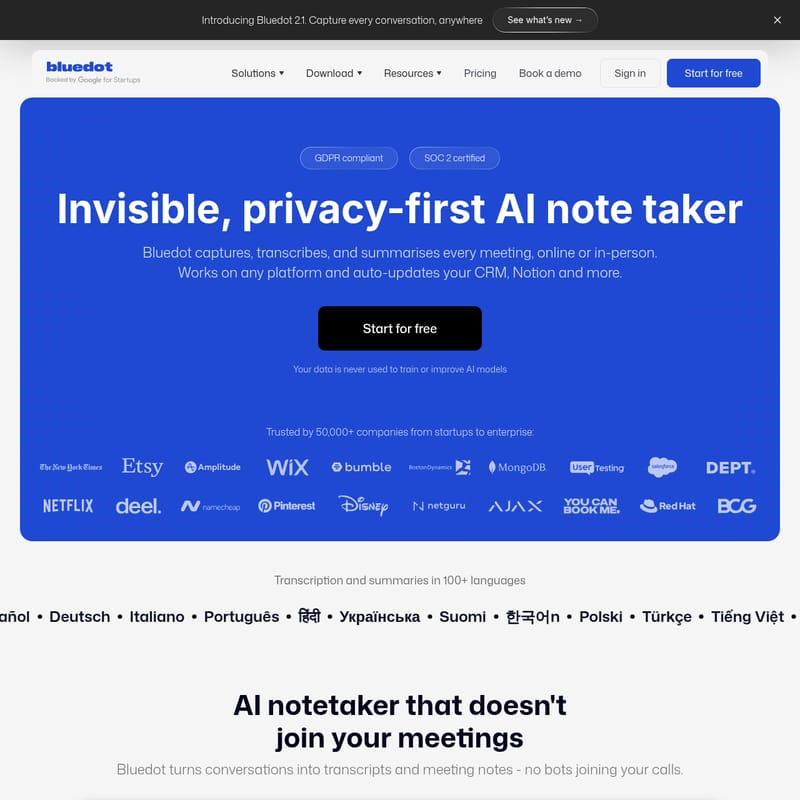
In the modern professional landscape, the ability to capture every detail of a conversation is vital. Introducing Bluedot 2.1, an invisible, privacy-first AI note taker designed to help you capture, transcribe, and summarize every meeting—whether it happens online or in person. Trusted by over 50,000 companies ranging from agile startups to global enterprises, Bluedot is the go-to solution for those who need a reliable, secure, and non-intrusive way to manage meeting documentation.
What is Bluedot 2.1?
Bluedot 2.1 is a sophisticated AI meeting note taker that turns your conversations into high-quality transcripts and meeting notes without the need for bots to join your calls. Unlike traditional recording tools that can disrupt the flow of a meeting, Bluedot operates invisibly in the background. It is built with a focus on privacy, ensuring your data is never used to train or improve AI models.
As a GDPR compliant and SOC 2 certified platform, Bluedot provides a secure environment for capturing sensitive information across various industries, including Sales, Recruitment, Engineering, Legal, and Finance. It acts as a shared memory for your team, allowing you to revisit, search, and share meeting insights with ease.
Key Features of Bluedot
Bluedot is packed with powerful features that make it the best AI note taker for teams of all sizes.
Bot-Free AI Meeting Notes
The most significant advantage of Bluedot is its bot-free approach. Most note-taking apps require a bot to join the meeting or ask for calendar access, which can make participants feel uneasy. Bluedot uses a Chrome extension or a dedicated desktop app to capture audio and video directly from your browser or system, keeping the conversation natural and focused.
Highly Accurate Transcription in 100+ Languages
Bluedot offers exceptional accuracy, even with technical terms, abbreviations, and speaker identification. It supports transcription and summaries in over 100 languages, including:
- English, Español, Deutsch, Italiano, Português
- Nederlands, Français, Polski, Türkçe, Tiếng Việt
- 日本語, 中文, 한국어, Suomi, Українська, and more.
Post-Meeting Automation
Efficiency doesn't stop when the meeting ends. Bluedot automatically syncs your meeting notes, transcripts, and action items to your favorite tools via the Bluedot API & MCP. Whether you use a CRM, Notion, or an ATS, Bluedot ensures your documentation is always up to date without manual entry.
Instant Answers with AI Chat
Use the built-in AI chat to interact with your meeting data. You can ask questions, find specific key insights, and reference information across multiple meetings. This feature turns a library of recordings into a searchable, interactive knowledge base.
Multi-Platform Compatibility
Bluedot is one of the most versatile note-taking apps available. It works across:
- Web & Chrome: One-click capture for Google Meet and browser-based calls.
- Desktop Apps: Native support for Mac and Windows, perfect for Zoom, Microsoft Teams, and Slack huddles.
- Mobile & On-site: Record in-person interviews and face-to-face meetings using the iOS app, Android app, or even your Apple Watch.
How to Use Bluedot
Getting started with Bluedot is simple and requires no complex setup. Here is how you can begin capturing your meetings:
- Installation: Depending on your workflow, install the Bluedot Chrome extension for browser calls or download the desktop app for Windows or Mac.
- Capture: When your meeting starts (on Zoom, Google Meet, Teams, or Slack), click to start recording. For in-person meetings, simply open the Bluedot mobile app and hit record.
- Review: Once the meeting concludes, Bluedot instantly generates a structured transcript and a tailored summary.
- Sync & Share: Use the post-meeting automation features to send your notes to your CRM or Notion workspace. You can also share specific moments via links or create video clips of important highlights.
- Upload Files: If you have existing recordings, you can upload MP4, MP3, or M4A files to Bluedot for instant transcription and analysis.
Use Case: Tailored Solutions for Every Team
Bluedot's AI meeting note taker provides actionable summaries tailored for specific use cases:
- Sales & Customer Success: Automatically capture customer check-ins and sales notes. Sync insights directly to your CRM to keep the whole team aligned.
- Recruiters: Record and transcribe interviews to ensure no candidate detail is missed. Share highlights with hiring managers easily.
- Entrepreneurs & Managers: Manage team huddles and strategy sessions. Use Bluedot as a shared memory to keep track of action items and decisions.
- Engineers: Capture technical discussions and requirements accurately, ensuring complex terms and abbreviations are recorded correctly.
- Legal & Finance: Benefit from high-level security and privacy while documenting sensitive consultations and client meetings.
Frequently Asked Questions (FAQ)
How is Bluedot different from other AI note takers? Unlike most competitors, Bluedot never invites a bot to your meeting or asks for calendar access. It uses a Chrome extension or desktop app for a discreet, non-intrusive recording experience.
Do I need to be the meeting host to record? No. As long as you are a participant, you can use Bluedot to capture notes and highlights. No host permissions or special recording rights are required.
Does Bluedot work with Google Meet, Zoom, and Microsoft Teams? Yes. Since Bluedot captures audio/video from your browser or desktop, it is compatible with Zoom, Google Meet, MS Teams, Webex, Slack, and even phone calls.
Can I record in-person meetings? Absolutely. You can use the Bluedot mobile app on iOS or Android to record and transcribe face-to-face interviews and team huddles.
Can I use Bluedot’s AI meeting note taker free of charge? Yes! The Free plan allows you to try all core features for your first 5 meetings as a lifetime trial. Afterward, you can upgrade for unlimited recording and transcription.
Can I upload and transcribe existing files? Yes. Bluedot supports common formats like MP4, MP3, and M4A, generating structured summaries in any of the 100+ supported languages.
Do I need to get consent to record? While Bluedot is discreet, privacy laws vary. We recommend informing participants that you are using an AI assistant for note-taking to ensure transparency and maintain trust.