Architect by Lyzr
Architect: Build Custom AI Agents to Automate Repetitive Tasks and Reclaim Productivity
Architect is a sophisticated AI development platform designed to help users build, orchestrate, and deploy autonomous agents that automate complex business workflows. By utilizing Plan Mode, an Agentic Layer, and Production App generation, Architect transforms simple prompts into full-scale applications with integrated UI and real-time features. Whether you need a customer service agent, a stock analysis tool, or a multi-agent marketing team, Architect provides Guided and One Shot modes to streamline the creation process, ensuring your AI works specifically for your unique professional needs.
2026-02-22
8.0K
Architect by Lyzr Product Information
Architect: Build AI That Works for You
In the modern professional landscape, repetitive tasks often consume the majority of the workday. Architect is designed to change that narrative. As a comprehensive platform for building and deploying intelligent agents, Architect empowers users to reclaim lost hours by automating the boring and repetitive tasks that hinder productivity. Whether you are an individual developer or part of an enterprise team, Architect provides the tools necessary to design, orchestrate, and launch production-ready AI applications.
What’s Architect?
Architect is an advanced AI development studio that allows you to build custom AI agents tailored to your specific workflow requirements. It serves as an end-to-end solution that takes a conceptual idea and transforms it into a functional production application. Architect bridges the gap between simple AI prompts and complex, multi-layered agentic workflows.
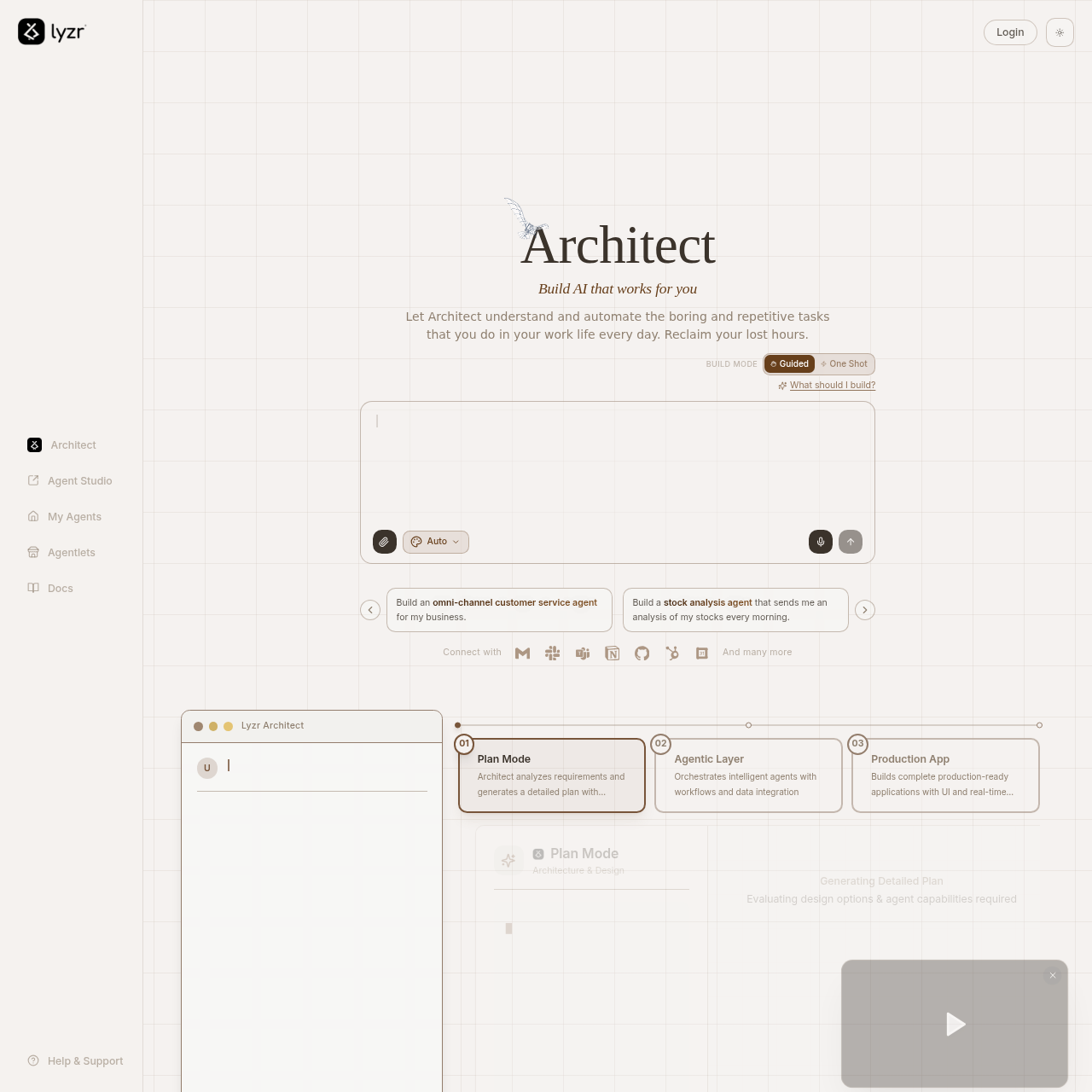
At its core, Architect utilizes a three-step process to bring AI agents to life:
- Plan Mode: Architect analyzes your specific requirements to generate a detailed plan and wireframes.
- Agentic Layer: This layer orchestrates intelligent agents using sophisticated workflows and data integration.
- Production App: Finally, Architect builds a complete, production-ready application featuring a user interface and real-time capabilities.
Key Features of Architect
Architect is packed with features designed to make AI development accessible yet powerful. By focusing on both design and execution, Architect ensures that every agent built is robust and effective.
Diverse Build Modes
Architect offers flexibility in how you create your agents through two primary modes:
- Guided Mode: This mode walks you through the building process step-by-step, ensuring every detail of your agent is fine-tuned to your needs.
- One Shot Mode: For those who need speed, One Shot mode creates an agent instantly from a single, descriptive prompt.
Comprehensive Development Environment
Inside the Architect Agent Studio, users have access to a suite of management tools:
- My Agents: A dashboard to manage and monitor your existing AI agents.
- Agentlets: Modular components for specialized tasks.
- Docs & Support: Comprehensive documentation and help resources to guide your development journey.
Plan Mode: Architecture & Design
Before a single line of code is finalized, Architect enters Plan Mode. During this phase, the AI performs a deep analysis of your requirements. It evaluates design options and determines the specific agent capabilities required to fulfill the task, providing a clear roadmap for the build.
Real-Time Production Apps
Unlike simple chatbots, the agents created by Architect are part of a full Production App. This includes a dedicated UI and real-time features, allowing the AI to integrate seamlessly into your business environment.
Architect Use Cases
The versatility of Architect allows it to be applied across various industries and departments. Here are some of the primary ways you can implement Architect agents:
Customer Service & Reception
- Omni-channel Customer Service Agent: Build an agent capable of handling customer inquiries across multiple platforms simultaneously.
- Voice AI Receptionist: Create a digital receptionist to manage business calls and schedule appointments.
Financial Analysis
- Stock Analysis Agent: Automate your morning routine by building an agent that sends a detailed analysis of your stocks every single day.
Marketing & Sales
- Marketing Team of Agents: Deploy a coordinated group of agents where one writes content, another performs SEO analysis, and a third generates graphics.
- Product Recommendation Agent: Enhance user experience by building an agent that suggests products and services tailored to individual customer needs.
How to Use Architect
Building with Architect is a streamlined process designed for efficiency. Follow these steps to create your first agent:
- Login: Access the Architect Agent Studio through your account.
- Select Build Mode: Choose between Guided for a manual walkthrough or One Shot for instant generation.
- Describe Your Agent: Use the prompt box to describe what you want to build (e.g., "Build a stock analysis agent").
- Review the Plan: Allow Architect to enter Plan Mode where it will generate wireframes and evaluate agent capabilities.
- Deploy: Once the plan is finalized, Architect orchestrates the Agentic Layer and produces your Production App.
FAQ
What is Architect used for?
Architect is used to build and automate AI agents that handle repetitive tasks, such as customer service, content creation, and data analysis, allowing users to focus on higher-value work.
Does Architect require coding knowledge?
While Architect is a powerful studio, it offers a One Shot mode that can create agents from a single prompt and a Guided mode that walks users through the process, making it accessible for various skill levels.
Can I connect Architect with other tools?
Yes, Architect features an Agentic Layer that handles data integration, allowing your agents to work within your existing ecosystems.
What kind of applications can Architect build?
Architect builds production-ready applications complete with user interfaces and real-time features, rather than just simple text-based bots.
Is my data secure on Architect?
Architect maintains high standards of security and compliance, including a Privacy Policy, Security protocols, and an Anti-Slavery Policy to ensure ethical and safe operation.