Zaro
Zaro: Build Custom AI Agents and No-Code Apps Using Your Team's Own Private Data and Context
Zaro is a unified workspace designed to build custom AI agents and applications from your proprietary data. By creating a shared memory environment where context compounds, Zaro allows teams to transform scattered documents, calls, and tickets into automated tools, dashboards, and trackers without the need for complex coding or vendor lock-in.
2026-06-27
--K
Zaro Product Information
Zaro: The Ultimate Workspace to Build AI Agents and Apps from Your Own Data
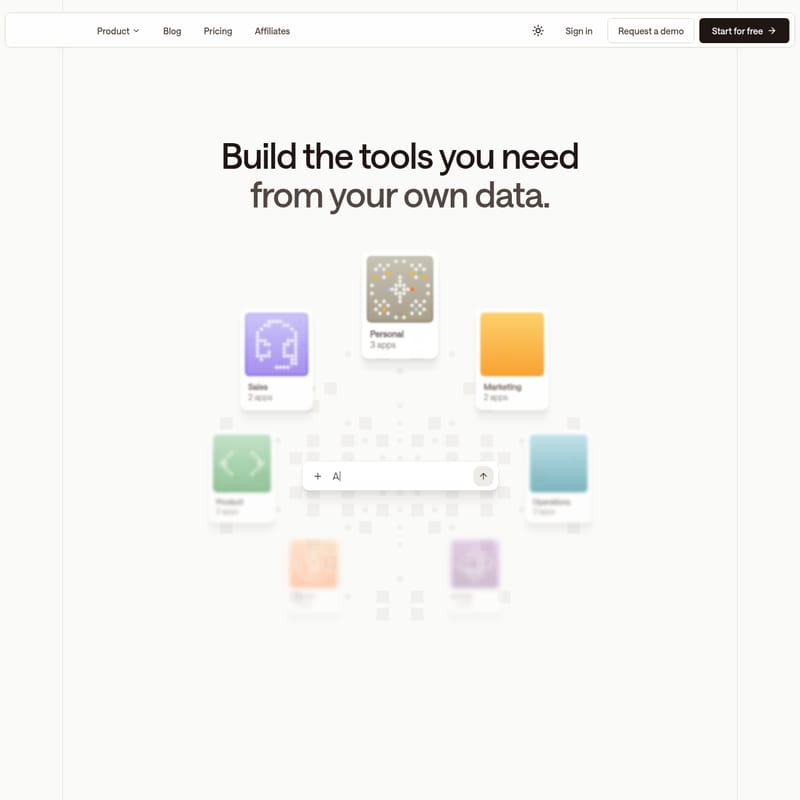
In the modern business landscape, teams are often overwhelmed by fragmented data scattered across various platforms. Zaro offers a transformative solution by providing a single workspace where you can build the agents, applications, and tools your team actually needs, powered entirely by data only you own. Whether you are in Sales, Marketing, Operations, or Finance, Zaro enables you to turn your context into a self-running workspace.
What is Zaro?
Zaro is a comprehensive context infrastructure and development platform that allows users to create custom AI-driven tools. It functions as a unified environment where intelligence compounds over time. Unlike traditional AI tools that treat every interaction as a fresh start, Zaro captures every document, call, decision, and ticket in a single, versioned workspace. This shared memory serves as the foundation for building Zaro Agents and no-code applications that understand your specific business context.
With Zaro, you are not just using AI; you are building a private ecosystem of intelligence. The platform is designed to ensure that your company's intelligence remains your own, offering a portable and vendor-neutral architecture that prevents the common pitfalls of vendor lock-in.
Key Features of Zaro
Zaro is built on a tripartite foundation where the workspace, the agents, and the applications work in harmony to improve efficiency.
Intelligence Compounds with Shared Memory
Most platforms provide AI tools in isolation, meaning context is lost between sessions. In the Zaro workspace, intelligence compounds because the platform shares memory across all functions. Every agent run and every data connection enriches the workspace, making the next operation smarter and more context-aware.
Autonomous Zaro Agents
Zaro Agents are designed to work on your context continuously. Key aspects include:
- Model Flexibility: Use any model or framework to power your agents.
- Open Standards: Built on MCP (Model Context Protocol), the open standard for AI tool connectivity.
- Continuous Learning: Each run reads from your context and writes back to it, ensuring a cycle of constant improvement.
- Vendor Neutrality: You choose the architecture, ensuring you are never tied to a single AI provider.
No-Code Application Building
Zaro allows you to describe what you need and generates it instantly. From pipeline trackers to morning briefings, these apps are:
- Automatically Updated: Connected to your data, they refresh as your work evolves.
- No-Template Required: Build bespoke dashboards without being constrained by rigid templates.
- Cost-Efficient: Avoid per-seat licenses for features you don't use.
Proprietary Model Routing
To ensure reliability and cost-effectiveness, Zaro employs proprietary routing:
- Reliability: If one AI model goes down, the system automatically switches to another so your operations never stop.
- Cost Optimization: The system runs cost-efficient models for routine tasks and reserves frontier models for complex tasks, often resulting in costs that are 10x cheaper than standard frontier model pricing.
How to Use Zaro
Transforming your scattered context into an automated workspace with Zaro is a streamlined four-step process:
1. Set Up Your Workspace
Begin by creating your Zaro workspace. You can define siloed sets of data based on company-wide needs, specific teams (like Sales or Design), or individual use cases. This ensures that permissions are respected and data is organized logically.
2. Connect Your Data
Integrate the files and communication channels your team already uses. This includes:
- Files and specifications.
- Call recordings and transcripts.
- CRM records.
- Slack threads.
Zaro does not require you to change how your team works; it simply captures the output of your existing workflows.
3. Run Agents on Your Data
Once your data is connected, you can schedule or trigger Zaro Agents. You can ask questions like, "Did the team agree on a price for the contract renewal?" and the agent will query your workspace to provide an accurate answer based on your specific records.
4. Generate What You Need
Describe the tool you require, such as a "Pipeline Tracker App" or an "Automated Morning Briefing." Zaro builds it from your files and context, creating a live tool that updates itself automatically as new data enters the workspace.
Use Case: Scaling Europe
One of the most compelling use cases for Zaro involves Seb Johnson, the founder of Scaling Europe. Before using Zaro, Seb spent hours every week manually tracking press releases and tech news across multiple publications and social media platforms.
Within days of using the Zaro beta, he built two custom apps:
- Press Release Tracker: Automatically monitors industry announcements.
- News Monitor: Connected to X (formerly Twitter) and selected tech publications.
Now, the Zaro platform works overnight to deliver a personalized digest via email at 8 am every morning, summarizing the most important stories and saving him hours of manual research.
Why Zaro is Different
| Feature | Traditional Tools | Zaro | | :--- | :--- | :--- | | Memory | Context resets every session and is invisible to other agents. | Every run enriches the same workspace; context compounds. | | Ownership | Intelligence is built inside the vendor's platform. | Intelligence is built in your workspace; portable and versioned. | | Applications | Manual maintenance; dashboards go stale quickly. | Apps update automatically as your data changes. | | Reliability | Workflows stop if the specific model goes down. | Proprietary routing switches models to keep operations running. | | Cost | High costs with multiple subscriptions and frontier pricing. | Cost-efficient routing is up to 10x cheaper. |
FAQ
Q: Do I need a credit card to start with Zaro? A: No, you can get started for free with 5000 free credits and no credit card is required.
Q: Who owns the data and the intelligence built in Zaro? A: You do. Zaro is built so that your company's intelligence stays with your company. It is portable, versioned, and vendor-neutral.
Q: What is MCP? A: MCP stands for Model Context Protocol. It is an open standard for AI tool connectivity that Zaro uses to ensure its agents can connect to various tools without vendor lock-in.
Q: Can I build apps for specific departments? A: Yes, Zaro is designed for use across all departments, including Sales, Product, Marketing, Operations, Design, Engineering, HR, Legal, and Finance.
Q: How does Zaro handle model outages? A: Zaro uses proprietary routing that automatically switches between models if one goes down, ensuring your automated workflows and agents remain reliable.