Scarlett.
Scarlett: The Advanced AI Co-Worker for Seamless Team Automation and Productivity
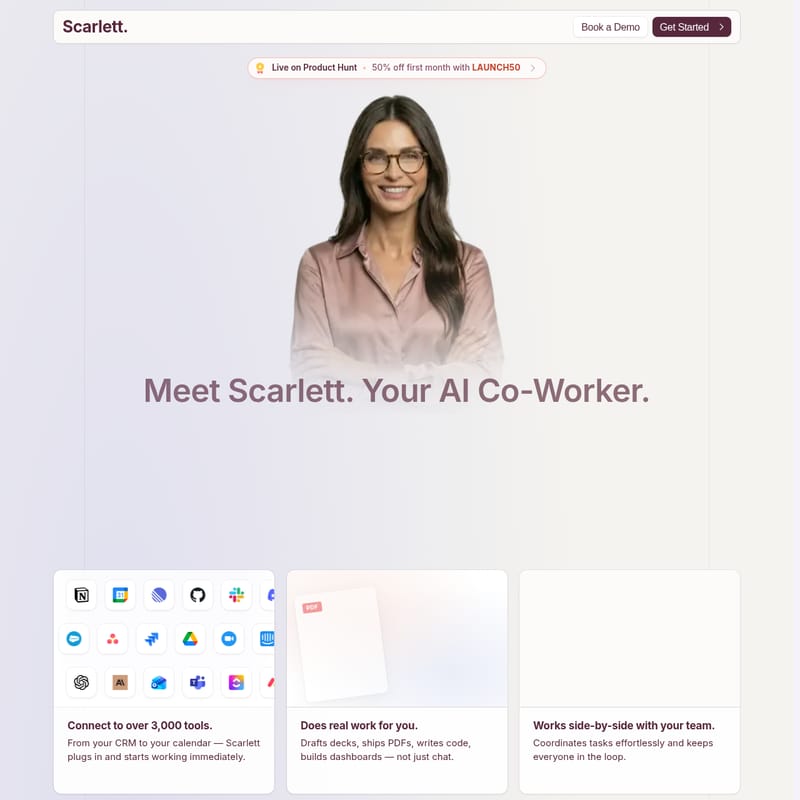
Discover Scarlett, the AI co-worker that goes beyond simple chat to execute real tasks. Integrated with over 3,000 tools, Scarlett drafts documents, writes code, and manages workflows directly within Slack.
2026-07-12
--K
Scarlett. Product Information
Scarlett: The Ultimate AI Co-Worker for Modern Teams
In the rapidly evolving landscape of workplace automation, Scarlett stands out not merely as another AI chatbot, but as a comprehensive AI co-worker. Designed to function as a real colleague, Scarlett works alongside your team to handle complex tasks, manage workflows, and automate business processes with unprecedented efficiency. By integrating directly into your existing ecosystem, Scarlett transforms how teams operate, allowing human employees to focus on high-level strategy while the AI handles the heavy lifting.
What's Scarlett?
Scarlett is a sophisticated AI co-worker that lives within your Slack workspace. Unlike traditional AI tools that are limited to generating text or answering questions, Scarlett is built to do real work. She operates on her own persistent cloud computer, which allows her to write and execute code, browse the web, and interact with various software tools end-to-end.
At her core, Scarlett is powered by advanced models tailored for specific tasks, including Claude Opus for chat-based interactions, Fable for complex planning, and Claude 5.6 for coding assignments. This specialized approach ensures that Scarlett delivers high-quality outputs regardless of the task's complexity. Whether she is drafting decks, shipping PDFs, or building dashboards, Scarlett acts as a senior individual contributor who never sleeps, ensuring your business stays productive 24/7.
Features of Scarlett
Scarlett is packed with features designed to bridge the gap between simple AI assistance and true autonomous work. Below are the primary highlights of what makes Scarlett an essential asset for any team:
- 3,000+ Tool Integrations: Scarlett plugs into your entire tech stack immediately. From CRMs like Salesforce and HubSpot to productivity tools like Notion, Linear, and Jira, Scarlett connects to over 3,000 applications. She also integrates seamlessly with Google Drive, Gmail, Stripe, GitHub, and more.
- Real Task Execution: While other bots just chat, Scarlett performs. She can draft presentations, ship PDFs, write functional code, and build data-rich dashboards.
- Autonomous Cloud Workspace: Scarlett has her own computer in the cloud. This allows her to maintain a persistent workspace where she can run code and complete tasks independently.
- Recurring Automations: You can set Scarlett to wake up every morning to manage customers, grow your business, or run an entire business on autopilot.
- Slack-Native Interface: There is no new software to learn. Scarlett operates within Slack threads and mentions, coordinating tasks effortlessly and keeping the entire team in the loop.
- High-Speed Performance: Benchmarked against alternatives like Claude Tag and Viktor, Scarlett boasts a faster average response time of just 9.8 seconds while maintaining a superior quality score of 92.1.
- Security and Privacy: Each workspace is granted isolated cloud infrastructure. Data is encrypted using AES-256-GCM, and Scarlett only accesses the channels and tools you explicitly authorize.
How to Use Scarlett
Onboarding Scarlett is designed to be as fast as hiring a human is slow. You can have your new AI co-worker set up and ready to work in under three minutes by following these three simple steps:
- Connect: Install Scarlett directly from the Slack App Directory. Once installed, connect her to the tools your team uses daily, such as Stripe, Notion, or Google Ads. This process typically takes about two minutes.
- Ask: Interact with Scarlett exactly as you would with a human colleague. You can give her direct commands in Slack, such as "Build me a revenue dashboard" or "Pull our Meta Ads data and compare it vs. last month."
- Deliver: Scarlett queries your connected tools, analyzes the relevant data, and delivers real outputs. Beyond just answering, she can schedule recurring tasks and propose new automations to further streamline your operations.
Use Case: Maximizing Scarlett's Potential
Scarlett can own various workflows across different departments, acting as a versatile force multiplier for your business. Here are several ways teams are currently utilizing Scarlett:
Team Operations & Management
- Daily Team Brief: Scarlett can pull information from various sources every morning at 7:00 AM to deliver a concise summary to Slack, ensuring everyone is aligned.
- Project Status Digest: By reading team channels and project docs, Scarlett posts a daily status digest that highlights blockers and priorities.
Sales and Marketing
- Inbox Follow-up Sweeper: Scarlett scans Gmail for important conversations that haven't received a reply, drafts the follow-up emails, and sets reminders for the team.
- Weekly Business Report: Every Monday morning, Scarlett can pull revenue, pipeline, and support trends into a comprehensive Slack report.
Engineering and Support
- Engineering Release Notes: Scarlett turns merged GitHub PRs and Linear issues into polished customer-facing release notes and internal changelogs.
- Customer Support Triage: She can scan support tickets and emails, categorize recurring issues, and post the queue to Slack for faster resolution.
Finance and Legal
- Drive Contract Watcher: When new docs are added to Google Drive, Scarlett scans for contracts or invoices and alerts the team when a review is required.
FAQ
How is Scarlett different from Claude Tag? Scarlett is more powerful because she doesn't just reside in a chat thread. While she uses Claude models, she runs tasks on her own cloud computer, allowing her to execute work end-to-end rather than just providing text responses.
What can Scarlett actually do? Scarlett can automate recurring workflows, pull data from thousands of tools, build and deploy small apps, create and edit documents, research competitors, and generate detailed reports.
Is my data secure? Yes. Scarlett uses isolated cloud infrastructure for each workspace. Data is encrypted in transit and at rest. Importantly, your data is not used to train AI models. Credentials for tools are held by a secure proxy and are never seen by the AI model itself.
Can Scarlett make mistakes? While highly capable, Scarlett is not infallible. She is designed to double-check her work and will ask for human confirmation before performing high-stakes actions like deploying code or sending emails.
Does Scarlett have access to all my Slack messages? No. Scarlett only sees the channels she has been specifically invited to. You maintain full control over her access.
What is the pricing for Scarlett? Scarlett offers a Team plan at $50 per month, which includes 25,000 credits, all 3,000+ integrations, and scheduled tasks. An Enterprise plan with custom credit pools and SSO is also available for larger organizations.