Wondershare Dr.Fone
Dr.Fone: Complete All-in-One Mobile Management Toolkit for Data Recovery, System Repair, and Screen Unlocking.
Wondershare Dr.Fone is a premier mobile toolkit offering professional solutions for data recovery, system repair, screen unlocking, and WhatsApp transfer. Supporting Android 16 and iOS 26, it ensures secure mobile management for iPhone 17 and Samsung S26 devices.
2026-06-04
1221.2K
Wondershare Dr.Fone Product Information
Wondershare Dr.Fone: The Ultimate All-in-One Mobile Management Toolkit
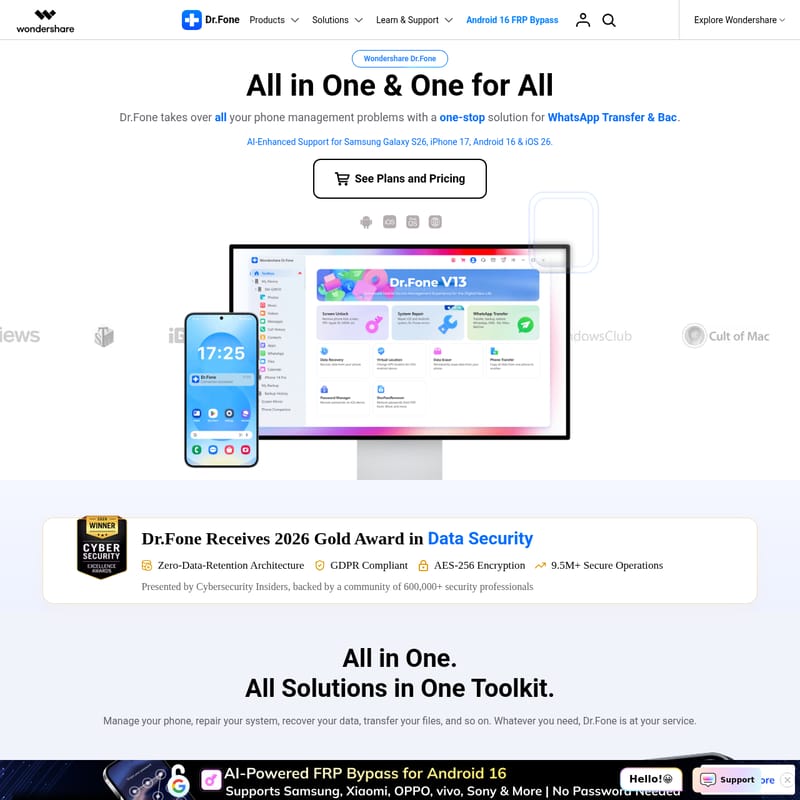
In the rapidly evolving world of mobile technology, maintaining your device's health and security is paramount. Wondershare Dr.Fone stands as the industry-leading, comprehensive mobile solution hub, designed to address every possible smartphone challenge. As an "All in One & One for All" platform, Dr.Fone offers a professional suite of tools that cater to data recovery, system repair, screen unlocking, and seamless data management. Whether you are using the latest iPhone 17 with iOS 26 or the Samsung Galaxy S26 running Android 16, Dr.Fone provides specialized, AI-enhanced support to ensure your mobile experience remains uninterrupted and secure.
What is Dr.Fone?
Dr.Fone is a complete video editing and mobile management ecosystem that provides a one-stop solution for all phone-related problems. Developed by Wondershare, this toolkit is designed to bridge the gap between complex mobile issues and user-friendly resolutions. With over 22 years of experience and a global community of more than 50 million active users, Wondershare Dr.Fone has become the trusted choice for individuals and businesses alike.
The platform is built on a Zero-Data-Retention Architecture, ensuring that your personal information remains private. It is GDPR compliant and utilizes AES-256 encryption, a security standard recognized by over 600,000 security professionals. In 2026, Dr.Fone was honored with the Gold Award in Data Security by Cybersecurity Insiders, highlighting its commitment to protecting the 9.5 million secure operations it performs.
Key Features of Dr.Fone
Wondershare Dr.Fone is packed with specialized modules that address specific mobile needs. From unlocking forgotten passwords to recovering precious memories, the Dr.Fone toolkit is as versatile as it is powerful.
Screen Unlock and FRP Bypass
The Dr.Fone Screen Unlock feature is a robust solution for removing various lock screens across multiple devices. It supports the removal of:
- iPhone Screen Unlock: Bypass screen codes, Apple ID, and iCloud Activation Locks in as little as five minutes without jailbreaking.
- Android Unlock: Effortlessly remove passwords, patterns, and PINs from devices like Samsung and Xiaomi.
- FRP Bypass: Specifically designed to bypass Google Factory Reset Protection (FRP) on Samsung (including the Galaxy S24), Xiaomi, Vivo, and more.
- Specialized Unlocking: Includes MDM removal, Screen Time passcode bypass, and Mi Account lock removal with a simple code.
Comprehensive Data Recovery
Losing data can be a nightmare, but Dr.Fone Data Recovery offers a lifeline. This tool can recover lost Android files, iOS data, and even WhatsApp data from broken phones. Whether it is deleted photos or "View Once" messages on WhatsApp, Dr.Fone employs advanced scanning to retrieve what you thought was gone forever.
Professional System Repair
When your device gets stuck on a black screen, frozen display, or boot loop, Dr.Fone System Repair is the answer.
- iOS System Repair: Fixes common issues during updates, such as the iOS 26 update or downgrading from iOS 26 to iOS 18.
- Android System Repair: Resolves system crashes and update issues for a wide range of Android devices.
WhatsApp Transfer and Business Solutions
For heavy WhatsApp users, Dr.Fone WhatsApp Transfer is a superior alternative to standard tools like Samsung Switch. It allows for the transfer, backup, and restore of chats and attachments between iOS and Android. It also supports WhatsApp Business, Viber, LINE, and WeChat. For marketers, Dr.Fone offers WhatsApp Marketing Solutions to streamline professional communication.
Virtual Location and Screen Mirroring
- Virtual Location: Instantly change your GPS location on both iOS and Android devices, perfect for testing or privacy.
- Screen Mirroring: Mirror your phone screen to a PC or Mac. This feature supports real-time recording and high-quality screenshots, allowing for flexible control and a bigger view of your mobile activities.
Advanced Mobile Management: Dr.Fone Basic
For those looking for an everyday "phone butler," Dr.Fone Basic provides essential management tools that simplify your digital life.
Phone Manager and Verification
Dr.Fone allows you to take care of over 30 types of phone data at once. You can overview photos, music, videos, messages, and call history on one interface. Furthermore, the Phone Verification tool provides an in-depth diagnostic report, including system version, storage condition, and battery life, which is essential for increasing credibility in the used device market.
Wireless and Incremental Backup
Say goodbye to cables with Dr.Fone's wireless backup. Supporting Android 16 and iOS 26, the incremental backup feature only saves new or changed data, saving both time and storage space. You can back up up to 24 different types of data with ease.
Use Cases for Dr.Fone
Wondershare Dr.Fone is designed for a variety of real-world scenarios:
- Device Migration: When upgrading to the iPhone 17 or Samsung S26, use Phone Transfer to move data in one click.
- Forgotten Passwords: If you are locked out of an iPad or a Samsung tablet, Dr.Fone provides remote and local tools to regain access without data loss.
- System Downgrades: Safely revert from a beta software version, like iOS 26, back to a stable version like iOS 18 if you encounter bugs.
- Data Recovery from Damage: Use Broken Android Recovery to extract files from a device with a non-responsive screen.
- Used Phone Sales: Use Data Eraser to wipe your data permanently before selling your old device, ensuring your privacy is protected.
Why Choose Dr.Fone for Your Mobile Needs?
With a massive resource hub of over 3,000 how-to articles and expert tips, Dr.Fone ensures that users are never left without support. The toolkit is designed for simplicity, often requiring just a few clicks or a simple code to solve complex technical hurdles. From Online SIM Unlock for AT&T devices to PDF Password Unlocking, Dr.Fone covers the niche needs that other management tools ignore.
"Dr.Fone takes over all your phone management problems with a one-stop solution. Whether you need to repair, recover, or transfer, Dr.Fone is at your service."
Frequently Asked Questions (FAQ)
Q: Does Dr.Fone support the latest mobile operating systems? A: Yes, Dr.Fone fully supports iOS 26 and Android 16, as well as the latest hardware like the iPhone 17 and Samsung Galaxy S26 series.
Q: Is it possible to transfer WhatsApp from iPhone to Android? A: Absolutely. Dr.Fone is highly rated for its ability to transfer WhatsApp and WhatsApp Business data between different operating systems, even with large data sizes over 40GB.
Q: Can Dr.Fone recover data from a broken phone? A: Yes, the Data Recovery module includes specialized tools for Broken Android Recovery, allowing you to retrieve photos and contacts from damaged devices.
Q: Is my data safe with Wondershare Dr.Fone? A: Yes. Dr.Fone uses AES-256 encryption and a Zero-Data-Retention Architecture. It is also GDPR compliant, ensuring your personal data is never stored or sold.