Webhound
Webhound: An Autonomous Deep Research Engine for AI Agents and Professional Insights
Webhound is a specialized research sidecar designed to solve the "lazy agent" problem by conducting deep, autonomous investigations. It offers pay-as-you-go pricing, detailed claim traces, and integration via MCP, API, or a rich UI for structured data and reports.
2026-07-29
5.0K
Webhound Product Information
Webhound: The Autonomous Research Engine for High-Confidence Results
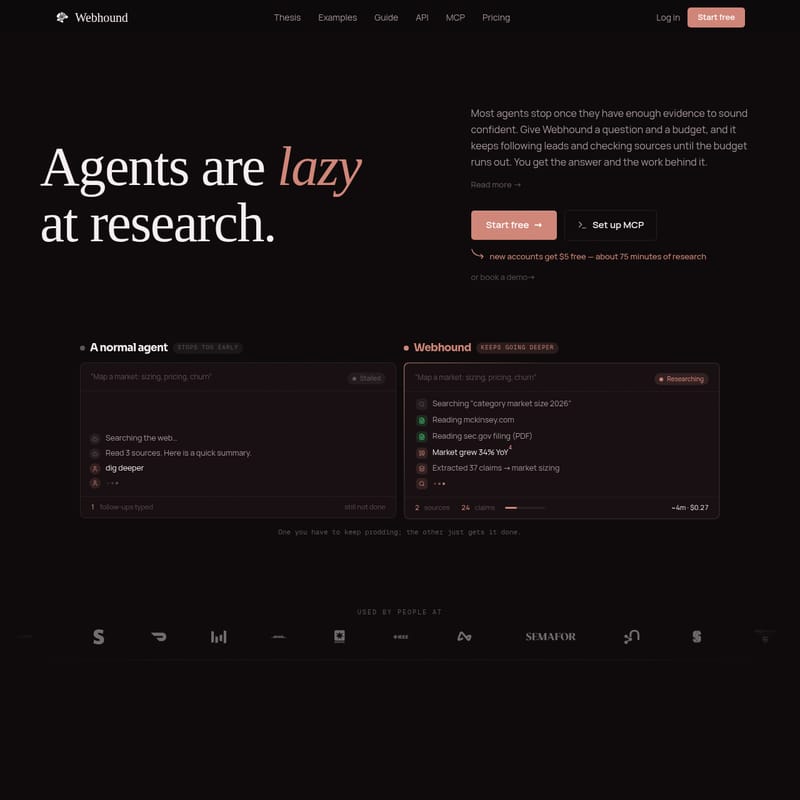
In the evolving landscape of artificial intelligence, most agents suffer from a common flaw: they are lazy at research. Most agents stop once they have gathered just enough evidence to sound confident, often settling for a shallow summary of the top three search results. Webhound changes this paradigm by acting as an autonomous research sidecar that you don't have to babysit.
Whether you are an operator, a developer, or a researcher, Webhound provides a dedicated research engine designed to follow leads, check sources, and keep digging until the job is actually done. By providing Webhound with a question and a budget, the system continues to investigate until the budget runs out, ensuring you get the answer and all the work behind it.
What is Webhound?
Webhound is an autonomous research engine made to be called by an agent and left to run. It is built to bridge the gap between simple web searching and comprehensive research. While a normal agent might "stall" after reading a few sources, Webhound keeps going deeper. It plans research tasks, searches specific domains like SEC.gov or McKinsey, and extracts dozens of claims to provide a complete picture of the requested topic.
At its core, Webhound is a tool for those who need more than just a surface-level summary. It functions as the research backbone for your AI pipeline, offering two primary modes of operation:
- The MCP & API (Default): Designed for autonomous agents to drive. An agent starts research on its own, wires it into a pipeline, and receives results as structured JSON without a human in the loop.
- The UI: Designed for when you want manual control. Users can read and verify facts in a rich interface, steer a run mid-flight, publish results, and explore claim traces by hand.
Key Features of Webhound
Webhound is packed with features designed to maximize the depth and reliability of AI-driven investigations.
1. Autonomous Depth with Budget Control
Research has no natural stopping point. Webhound uses a budget as an honest "stop button." You tell the engine how much a question is worth to you, and it spends that effort on depth—no more, no less. This pay-for-work model ensures that the tool is incentivized to keep digging rather than bailing early with a shallow answer.
2. Machine-Readable Claim Traces
Every fact returned by Webhound is more than just text; it is a machine-readable data point. Every claim comes back with:
- A Confidence Level: High, medium, or low.
- Source URL: Direct links to where the data was found (e.g., 10-K filings).
- Supporting Quote: The exact text from the source.
- Trace Data: A log of the tool calls (search, open page, extract) that produced the fact.
3. Hound 1.0 Engine
Webhound is powered by the Hound 1.0 research harness, which utilizes advanced models like DeepSeek V4 Pro and GPT-5.4. This combination allows for sophisticated thinking and reasoning during the research process.
4. Diverse Output Formats
Webhound provides three distinct types of outputs to suit different needs:
- Reports (Unstructured): Cited long-form analysis where every claim links to a source. These can be exported to Word or HTML.
- Datasets (Structured): Custom tables where every cell is sourced. Users define the columns, and rows are returned in CSV, JSON, or Excel formats.
- Claims + Traces (Agent-Optimized): Facts delivered as JSON so your agent can consume, filter, and cite results directly in code.
How to Use Webhound
Using Webhound is straightforward, whether you are integrating it into a technical workflow or using it as a standalone app.
Setting up the MCP
Webhound runs as a tool call inside various clients such as Claude Code, Codex, and Manus. By setting up the Model Context Protocol (MCP), you can kick off a research job, continue with other work, and read the structured results back without ever leaving your agent environment.
Using the UI
For hands-on research, the Webhound UI allows you to:
- Input a research prompt and set a dollar budget.
- Watch the engine plan and execute tasks in real-time.
- Steer the research if you see a specific lead you want to prioritize.
- Explore the evidence behind every claim via the interactive interface.
Use Cases for Webhound
Webhound is ideal for questions that a "top-of-page" skim often gets wrong.
- Competitive Intelligence: Catch competitor moves that standard searches miss, such as quiet launches, pricing changes, or feature gates buried in changelogs.
- Market Mapping: Build a sourced competitive map or a dataset of hundreds of companies with specific criteria (e.g., companies with interactive demos).
- Literature Reviews for Code: Before building, have Webhound run a survey of current techniques, benchmarks, and failure modes across dozens of sources to ensure you are building on the state of the art.
- Due Diligence: Conduct company teardowns with market maps, red flags, and regulatory exposure where every claim is cited and single-source claims are flagged.
- List Enrichment: Turn a list of companies into sourced rows containing decision-makers, tech stacks, and funding stages, all traceable to the original source.
"Webhound is significantly more effective than the vanilla deep research products I've used." — Lyron
FAQ
Should I use the UI or the MCP? Use the UI when you want to drive, verify, and share research manually. Use the MCP or API when you want an agent to run research autonomously or when building a data pipeline.
What is Hound? Hound is the research harness (currently version 1.0) that powers Webhound, utilizing DeepSeek V4 Pro and GPT-5.4 to conduct investigations.
How much does Webhound cost? Webhound uses a pay-as-you-go model with no subscription. You pay for work done: approximately $1 for 15 minutes of thinking time. New accounts receive $5 free, which is roughly 75 minutes of research.
What sources can Webhound reach? Webhound can access the open web, including SEC filings, PDFs, primary documents, Reddit forums, social channels, and YouTube transcripts.
When does the research stop? The research stops once your set budget is reached. This ensures the depth of the investigation is a dial you control.
What does my agent get back? Agents receive structured JSON containing claims, confidence levels, sources, and the full trace of tool calls used to find the information.