Trellis 3D Model
Trellis 2 Image-to-3D Generator: Create High-Quality 3D Models from Single 2D Images in Minutes
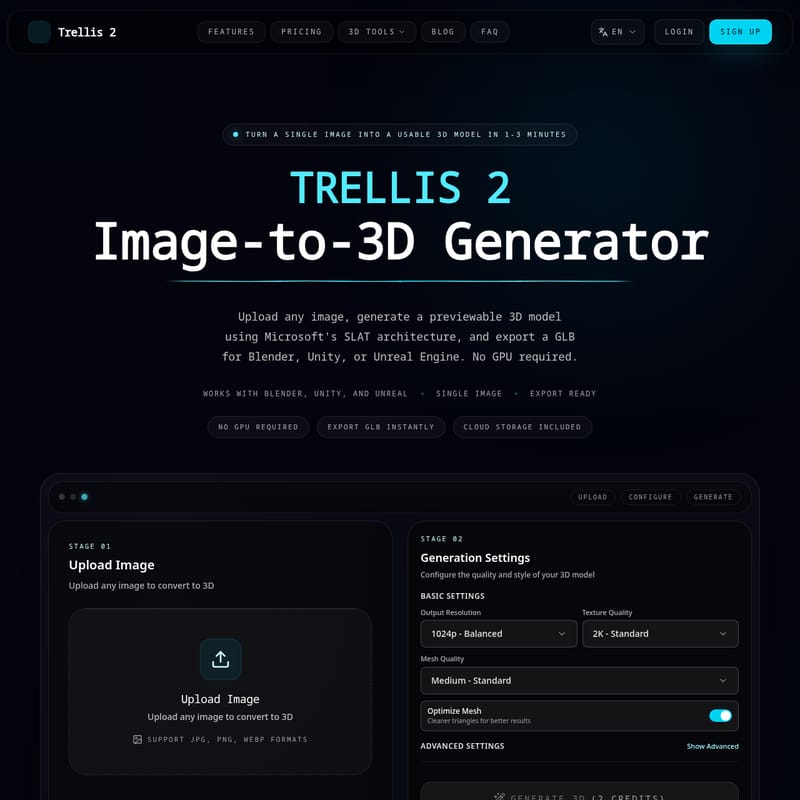
Trellis 2 is a state-of-the-art AI-powered image-to-3D generator built on Microsoft's SLAT architecture. It enables creators to transform any JPG, PNG, or WebP image into a usable 3D model in just 1-3 minutes. By leveraging a cloud-based pipeline with 2 billion parameters, Trellis 2 delivers professional-grade geometry and 4K textures without requiring a local GPU. Users can export models directly in GLB format for seamless integration with Blender, Unity, and Unreal Engine. Whether for game development, 3D printing, or e-commerce, Trellis 2 streamlines the 3D asset creation workflow for over 50,000 generated models and counting.
2026-04-13
22.0K
Trellis 3D Model Product Information
Trellis 2: The Ultimate AI Image-to-3D Model Generator
In the rapidly evolving world of digital creation, Trellis 2 stands at the forefront of innovation as a premier image-to-3D generator. Designed to streamline the transition from 2D concepts to 3D realities, Trellis 2 allows creators to turn a single image into a usable 3D model in just 1 to 3 minutes. By utilizing cutting-edge AI technology, this platform removes the technical barriers traditionally associated with 3D modeling, making high-quality asset generation accessible to everyone.
What is Trellis 2?
Trellis 2 is an AI-powered image to 3D model generator that transforms any 2D image into a high-quality, previewable 3D model. Built on Microsoft Research's Structured LATent (SLAT) architecture, the system is powered by up to 2 billion parameters trained on a massive dataset of over 500,000 diverse 3D objects.
According to Microsoft Research, the SLAT representation is what allows Trellis 2 to produce 3D models with exceptional geometric detail and material fidelity. Unlike traditional methods that require significant manual labor, Trellis 2 automates the pipeline, offering multiple output formats including 3D Gaussians and standard meshes. This ensures that every image to 3D conversion is ready for professional use in industry-standard software.
Key Features of Trellis 2
As a comprehensive image-to-3D solution, Trellis 2 is packed with features designed for speed, quality, and ease of use:
- No GPU Required: Everything runs in the cloud. You can generate complex models from a standard laptop without setting up a heavy local environment, as our servers handle all the GPU compute.
- SLAT Architecture: Leveraging Microsoft's Structured LATent technology for superior shape and material detail.
- 25+ 3D Styles: Customize your output by picking from styles such as photorealistic, cartoon, anime, clay, low-poly, and more.
- High-Quality Textures: Supports up to 4K texture resolution, ensuring your models look professional in any lighting environment.
- Instant GLB Export: Export your models in GLB format in one step for immediate use in external software.
- Cloud Storage Included: All your results are saved automatically, allowing you to revisit, download, and iterate on your designs at any time.
- Fast Turnaround: Most models are ready for inspection within 1-3 minutes, drastically reducing the iteration time for creative projects.
How to Use Trellis 2
The Trellis 2 image to 3D workflow is designed to be simple and repeatable, reducing a complicated process into three easy steps:
Step 1: Upload Your 2D Image
Start by uploading a JPG, PNG, or WebP image. For the best results, it is recommended to use images with clear subjects, stable lighting, and a clean background. A resolution of 512x512 or higher is preferred.
Step 2: Configure 3D Settings
Adjust the generation settings to fit your specific needs. You can choose from the 25+ 3D styles and configure basic settings such as:
- Output Resolution: (e.g., 1024p Balanced)
- Texture Quality: (e.g., 2K Standard)
- Mesh Quality: (e.g., Medium Standard)
- Optimize Mesh: Toggle this for cleaner triangles and better topology.
Step 3: Generate & Download
Once configured, click "Generate 3D." In less than 3 minutes, you can preview the result and download the GLB file to continue your work in your preferred 3D environment.
Use Cases for Trellis 2
Trellis 2 is a versatile tool that fits into various professional and hobbyist workflows:
- Game Development: Convert concept art into 3D assets early in the process. Create props, environment assets, and character prototypes quickly.
- 3D Printing: Start with a photo or sketch and refine the generated base mesh into print-ready geometry for custom figurines or prototypes.
- E-Commerce: Improve product pages with rotatable 3D visuals that show form and detail more clearly than flat images.
- Architecture & Design: Quickly block out furniture and decor objects from sketches for client presentations and discussions.
- Digital Art & NFT: Expand 2D artwork into 3D variations for animations, showcases, or collectible concepts.
- AR & VR Applications: Generate base assets for interactive presentation in augmented or virtual reality scenes.
FAQ
What is Trellis 2 Image to 3D Generator?
It is an AI-driven tool that uses the SLAT architecture to convert 2D images into high-fidelity 3D models automatically in the cloud.
Which 3D formats does Trellis 2 support?
Currently, Trellis 2 supports exporting in GLB format, which is widely compatible with Blender, Unity, Unreal Engine, and most 3D printing software.
Do I need a GPU to use Trellis 2?
No. All processing is handled by our cloud servers. You only need a standard web browser and an internet connection to use the image to 3D model generator.
How long does it take to convert an image to 3D?
The average generation time is between 1 and 3 minutes, making it one of the fastest high-quality solutions available.
What image formats work best?
We support JPG, PNG, and WebP. For the highest quality 3D output, use high-resolution images with clear subjects and minimal background clutter.
Can I use Trellis 2 for commercial projects?
Yes, the high-quality 3D models and textures (up to 4K) are designed to be carried forward into professional workflows like game development and architectural visualization.
Expert Tip: To get the best results from the Trellis 2 image-to-3D generator, ensure your source image has clear lighting. This helps the SLAT architecture accurately interpret the depth and material properties of the object.