Tamamon
TAMAMON: The Innovative macOS Desktop Pet for Modern Developers using Claude Code
TAMAMON is a unique macOS desktop pet designed specifically for developers using Claude Code. This tiny spirit lives on your screen, hatching and evolving based on your real-time coding activity. Privacy-focused and lightweight, it reads only your Claude usage numbers to grow without ever touching your code. Featuring over 50 species, weather-reactive environments, and interactive growth mechanics, TAMAMON turns your workspace into a cozy, living world. Available for macOS 15+ on Apple Silicon, it offers a seamless, no-setup experience that integrates directly with your existing development workflow.
2026-07-05
--K
Tamamon Product Information
TAMAMON: The Innovative macOS Desktop Pet for Modern Developers
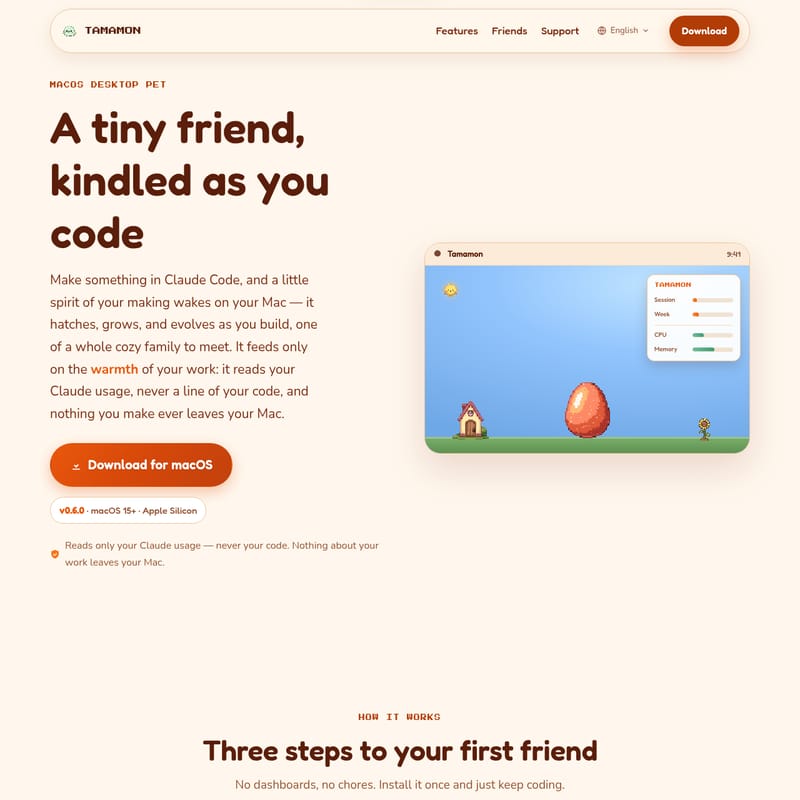
In the world of modern software development, focus and productivity are paramount. However, the long hours spent in front of a terminal can often feel isolating. Enter TAMAMON, a tiny friend kindled as you code. Specifically designed as a macOS desktop pet, TAMAMON is more than just a digital decoration; it is a companion that grows, evolves, and reacts to your progress within Claude Code.
TAMAMON brings a touch of magic to your workspace, transforming your coding sessions into a nurturing environment for a little spirit. Whether you are building complex applications or debugging scripts, your TAMAMON pet thrives on the warmth of your work, evolving alongside your technical achievements.
What is TAMAMON?
TAMAMON is a specialized virtual companion for Mac users, described as a "little spirit of your making" that wakes on your desktop while you utilize Claude Code. Unlike traditional virtual pets that require constant manual intervention and tedious menus, TAMAMON is powered by your actual coding activity.
When you engage with your projects, a little egg hatches, and a spirit begins its journey through various life stages. TAMAMON lives subtly at the bottom of your screen, resting above other windows to ensure it is always visible without obstructing your critical work area. It is a lightweight, privacy-first application that turns the abstract concept of "coding progress" into a living, breathing creature.
Key Features of the TAMAMON macOS Desktop Pet
TAMAMON is packed with features that make it a truly unique addition to any developer's toolkit. Here are the core highlights of this macOS desktop pet:
1. Growth through Coding Activity
Your friend feeds only on the "warmth of your work." As you use Claude Code, TAMAMON reads your session and weekly usage data to hatch, grow, and level up. The growth is strictly forward-moving; your pet advances through stages—Egg, Baby, Adult, and Evolved—based on how much you actually build.
2. Seamless Claude Code Integration
TAMAMON is designed for zero-friction setup. It reads your live session and weekly usage totals straight from your existing Claude Code login stored in your Mac's keychain. This means you do not need to deal with complex dashboards, API keys, or secondary account creations.
3. A Diverse Family of Friends
You aren't limited to just one type of spirit. TAMAMON features a whole family of creatures to meet, including lizards, baby dragons, and more. With over 50 species available, including unique variants like the Zingamint Greenglow, Punimo Orchardglow, and Floofsky Skyglow, there is always a new friend to discover. You can even track your collection in a dedicated "Dex" screen, featuring rarity rings that glow as you complete your collection.
4. Interactive Productivity Nudges
TAMAMON helps maintain your flow. When a Claude Code session is waiting on your input, your pet will give a little wave to catch your eye. This subtle nudge ensures your coding session doesn't sit idle, keeping your productivity at its peak.
5. Living World Mechanics
TAMAMON reacts to the real world. The habitat on your desktop shifts based on your actual time and weather.
- Sunny/Cloudy: Your pet enjoys the day.
- Rainy: Rain sends your friend home for shelter.
- Night: Nightfall brings out sleepy stars, and your pet adjusts its behavior accordingly.
6. Personal Interaction and Customization
You can interact with your TAMAMON in several ways to keep it happy:
- Feed: Provide snacks to keep it nourished.
- Play: Use balls and bubbles to entertain your pet.
- Decorate: Customize its nest to create a cozy home.
- Cozy Room: Open a dedicated isometric room where all your collected creatures can walk around and hang out together.
How to Use TAMAMON
Setting up your first TAMAMON companion is a simple three-step process designed to get you back to coding as quickly as possible.
- Install & Run: Download the TAMAMON DMG file (v0.6.0 or later). Once installed, the pet settles in along the bottom of your screen, floating above your active windows.
- Code with Claude: Simply continue your work in Claude Code. The application quietly monitors your activity totals—no extra login or API key setup is required.
- Watch it Grow: As you work, the egg will hatch. Monitor your pet's growth stages and interact with it to ensure it stays happy and healthy.
Use Case: Enhancing the Developer Experience
TAMAMON is the perfect companion for various development scenarios:
- Deep Work Sessions: For developers who spend hours in terminal-based environments like Claude Code, TAMAMON provides a visual representation of their effort, making long tasks feel more rewarding.
- Focus Management: The "nudge" feature is invaluable for developers who might get distracted while waiting for a process to finish or for Claude to prompt for input.
- Workspace Personalization: For users who enjoy the aesthetic of "pixel art" and "cozy" workspaces, TAMAMON adds a layer of personality to the macOS desktop without the heavy resource overhead of traditional games.
Privacy and Security: Your Code Stays Private
Privacy is a core pillar of the TAMAMON experience. The developers have ensured that:
- No Code is Read: TAMAMON never reads a single line of your code or your private conversations.
- Local Operation: Nothing you make ever leaves your Mac. There are no external servers, no tracking, and no data uploads.
- Usage Only: It only reads your Claude usage numbers (current session and weekly totals) to calculate growth.
- Safe Install: The software is signed and notarized for macOS, ensuring a safe, one-click installation process.
Frequently Asked Questions (FAQ)
Is TAMAMON free? Yes, it is completely free to use. You can choose to support the solo project by tipping on Ko-fi to "buy TAMAMON a snack," but it is not required.
What exactly does it read from my computer? It only reads your Claude usage numbers—specifically your current session and weekly totals—via your existing Claude Code login. It never accesses your files, code, or conversations.
Do I need to connect an API key? No. It reuses the Claude Code login already stored safely in your Mac's keychain, so no API key or extra sign-in is necessary.
What happens if I stop coding for a while? TAMAMON is a living creature. If neglected for days, it may get hungry and sulk. If left completely alone for extended periods, it can pass on. However, a well-raised adult will leave behind an egg to continue the story.
Which Macs are supported? TAMAMON requires macOS 15 (Sequoia) or later and an Apple Silicon processor.
Does it consume my Claude tokens? No. TAMAMON only reads usage totals; it never sends messages or spends tokens of its own.
How do I manage or uninstall the app? All controls are in the menu bar icon. You can show, hide, or quit the app from there. To uninstall, simply quit the app and drag it from your Applications folder to the Trash.