RetroMac
RetroMac: Transform Your macOS into a Classic CRT, VHS, or Vintage Macintosh Display
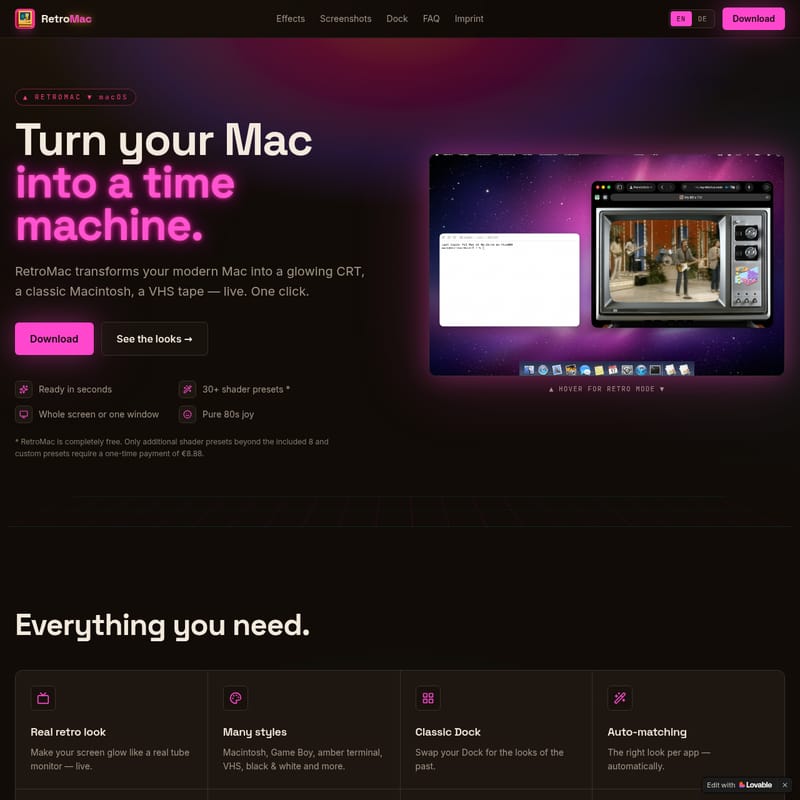
RetroMac is a powerful macOS tool that transforms your modern screen into a vintage time machine. Utilizing over 30 shader presets, it recreates the glowing aesthetics of CRT monitors, VHS tapes, and classic operating systems like Mac OS 9 and Windows 98. With features like auto-matching, custom docks, and webcam shaders, RetroMac offers a high-performance, nostalgic experience for any Mac user.
2026-05-25
7.0K
RetroMac Product Information
RetroMac: Turn Your Modern Mac Into a Nostalgic Time Machine
In an era of ultra-sharp displays and minimalist design, RetroMac offers a refreshing journey back in time. RetroMac is a specialized software application for macOS that transforms your high-resolution screen into a glowing CRT, a classic Macintosh, or even a worn VHS tape—instantly and live. Whether you want the aesthetic of a humming tube monitor from 1985 or the sleek teal deskbar of BeOS, RetroMac brings "pure 80s joy" to your modern workspace.
What's RetroMac?
RetroMac is essentially a visual engine that applies sophisticated shader presets to your operating system in real-time. It allows you to "turn your Mac into a time machine" with just a single click. Unlike a simple filter or static wallpaper, RetroMac works live across your entire screen, a single display, or even just one specific window.
This software is designed for those who miss the characteristic glow, scanlines, and unique artifacts of vintage hardware. From Game Boy handhelds to amber terminals, RetroMac provides an immersive retro experience without requiring you to own the original hardware. It is completely free to download and includes 8 essential shaders to get you started immediately.
Key Features of RetroMac
Real Retro Look
RetroMac makes your screen glow like a real tube monitor. It doesn't just overlay an image; it simulates the physics of light on older screens, providing a live, authentic look that reacts to what is happening on your macOS desktop.
A Massive Library of Styles
The application offers an extensive range of looks. You can choose from 30+ shader presets including:
- Macintosh Classic: The iconic monochrome look.
- Game Boy: That unmistakable green-tinted handheld LCD.
- Amber Terminal: The professional look of late-70s computing.
- VHS & VCR: Complete with grainy textures and tracking errors.
- Black & White: For a classic, high-contrast aesthetic.
Customizable Classic Dock
Beyond the screen shaders, RetroMac allows you to swap your modern macOS Dock for a version from the past. You can choose from iconic designs like Mac OS 9 (1999), Windows 95 (1995), or the original Aqua (2001) look. Each dock comes with custom icons, specialized clocks, and adjustable transparency to match your chosen era.
Advanced Display Flexibility
RetroMac is built for modern workflows. It features auto-matching, which can change the look of your display per app—automatically. If you have a multi-monitor setup, you can choose to apply the look to all screens, just one, or restrict the retro look to a single active window.
Performance-Driven Design
Worried about system lag? RetroMac includes Eco modes specifically designed to keep your Mac smooth and snappy. It is optimized to ensure that your hardware remains responsive even while rendering complex CRT or VHS effects.
Retro Webcam Shaders
Take your video calls and streams to the next level by applying your favorite retro shader to your webcam. This feature is perfect for creators who want to achieve a specific vintage vibe for their audience.
Themed Screenshots
When you capture a screenshot with RetroMac active, it saves the image exactly as you see it. Your themed screenshots will retain the glow, scanlines, and artifacts of the shader, making them perfect for sharing your setup.
Eight Shaders for Eight Eras
RetroMac provides a curated selection of shaders that define different generations of technology. Each one is a masterpiece of digital recreation:
- CRT Royal: The gold standard for high-end tube monitor simulation.
- Sony Trinity: Inspired by the legendary Trinitron television sets.
- NTSC Composite: Recreates the color bleeding and soft edges of analog signals.
- Retro LCD: Mimics the early flat-panel displays of the 90s.
- VHS: The signature look of home video tapes.
- VCR: Adds the specific mechanical noise and distortion of a video cassette recorder.
- Macintosh Classic: Revisit the high-contrast origins of the Mac.
- Game Boy: The distinct four-shade palette of the classic handheld.
How to Use RetroMac
The Control Center
RetroMac is incredibly easy to manage because it lives directly in your menu bar. From this tidy menu, you can:
- Pick a new theme or shader preset.
- Swap between different operating system styles like Windows 98 or Snow Leopard.
- Tweak the intensity of the effects to find your perfect balance.
Customization
Every aspect of RetroMac is adjustable. You can tweak everything from colors and icons to the specific intensity of the glow. For those who want more, the pro version (available for a one-time payment of €8.88) allows you to build your own custom shader presets.
Use Cases
Retro Gaming and Emulation
If you enjoy retro gaming on your Mac, RetroMac is the perfect companion. It adds the missing visual layer that these games were originally designed for, such as the Sony Trinitron or NTSC effects.
Operating System Nostalgia
RetroMac allows you to recreate famous historical desktop environments:
- Windows 98: Includes a fully working Start bar, taskbar clock, and chunky chrome.
- Mac OS 9: The "Classic" look including the 9.2 Control Strip.
- BeOS: The cult classic with its vertical Deskbar and deep teal desktop.
- Snow Leopard & OS X: Relive the eras of brushed metal, traffic lights, and glassy docks.
FAQ
What is RetroMac? RetroMac is a software for macOS that applies live shaders to your screen to make it look like vintage hardware, such as a CRT or VHS monitor.
Does it change my apps or files? No. It only affects the visual output of your screen. Your files and applications remain untouched.
Can I apply the look to just one window? Yes, you can choose to apply the effect to the whole screen, a specific display, or just one window.
Does it work with multiple displays? Yes, RetroMac supports multi-display setups.
Is it good for retro games? It is excellent for retro games, providing the authentic visual experience of original hardware.
Can I customize everything? Yes. You can adjust intensity, colors, icons, and even build your own shaders in the paid version.
Will it slow my Mac down? No. The software features Eco modes to ensure your Mac stays fast and responsive.
Which macOS do I need? RetroMac is designed for modern macOS versions. Check the download section for specific compatibility.
Is it a subscription? No. RetroMac is free to download with 8 shaders. A one-time payment of €8.88 unlocks all 30+ shader presets and custom preset building.