TabTasker
TabTasker: The Private, 100% Client-Side Digital Workbench for Secure File Processing
TabTasker is a comprehensive, browser-based digital workbench that prioritizes user privacy by processing all files 100% client-side. With over 50 tools—including PDF editing, AI-powered image enhancement, audio transcription, and developer utilities—TabTasker ensures that your data never leaves your device. There are no accounts to create, no file size quotas to manage, and no server queues to wait in. Whether you are merging PDFs, removing backgrounds with AI, or converting audio tracks, TabTasker runs entirely in your browser tab, making it a secure and fast alternative to traditional cloud-based processing services like iLovePDF.
2026-06-02
--K
TabTasker Product Information
TabTasker: The Ultimate 100% Client-Side Digital Workbench
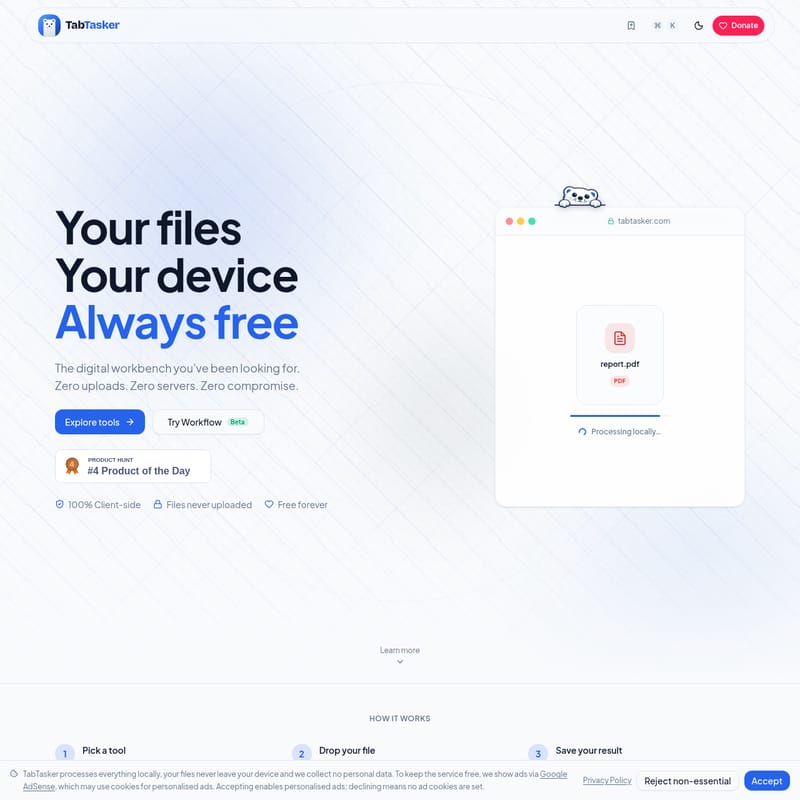
In an era where data privacy is paramount, TabTasker emerges as the digital workbench you have been looking for. Unlike traditional online tools that require you to upload sensitive documents to remote servers, TabTasker operates on a philosophy of zero uploads, zero servers, and zero compromise. It is a fully functional, browser-based ecosystem where your files stay in your tab, ensuring your data remains under your control at all times.
What’s TabTasker?
TabTasker is a comprehensive suite of over 50 productivity tools designed to handle PDF management, image editing, audio processing, and developer tasks entirely within your web browser. Built by Vehicularis, TabTasker is 100% client-side. This means that when you use a tool on tabtasker.com, the processing power comes from your own device rather than a third-party server.
By leveraging modern web technologies, TabTasker provides a "digital workbench" experience where privacy is the default. There is no backend to leak your data, no tracking attached to your files, and no requirement to create an account or sign up. It is a free-forever platform supported by privacy-respecting display ads, offering a professional-grade alternative to cloud-based services like iLovePDF.
Key Features of TabTasker
TabTasker is packed with a diverse range of tools, categorized to help you find exactly what you need for your workflow.
1. Robust PDF Management
With 16 dedicated PDF tools, TabTasker allows you to manipulate documents with ease. The PDF Workspace lets you open multiple PDFs, reorder or delete pages, and merge documents. Key PDF features include:
- Edit & Annotate: Draw, add text, highlight, and add stamps directly to your pages.
- Conversion: Convert PDF to Word (.docx), Excel, or high-res JPG images.
- Security: Unlock password-protected files or protect your own with passwords and permission flags.
- AI-Powered OCR: Make scanned PDFs searchable by extracting text layers locally.
- PDF to Podcast: A unique AI feature that turns your PDF into a narrated audio podcast, summary, or two-host dialogue.
2. Advanced Image Tools
TabTasker offers 10 specialized image tools, many of which leverage local AI. The Image Workspace allows side-by-side editing and exporting.
- AI Background Removal: Remove backgrounds from images 100% in-browser.
- Upscaling: Use AI super-resolution to increase image size by 2x, 3x, or 4x.
- Privacy Tools: Automatically detect and blur faces or remove EXIF/IPTC metadata from photos.
- Accessibility: Use Image Captioning (BLIP / ViT-GPT2) or Image OCR to understand and extract content from visuals.
3. Audio & Transcription Suite
Process your audio files without ever sending them to a cloud server. TabTasker includes 9 audio tools:
- Speech to Text: Use Whisper transcription fully in your browser.
- Text to Speech: Read text aloud locally with SpeechT5.
- Editing: Trim audio with a waveform editor, reduce noise with an FFT denoiser, or adjust pitch and speed independently.
4. Developer & Text Utilities
For power users and developers, TabTasker provides 14 essential tools:
- Formatters & Decoders: JSON Formatter, JWT Decoder, and Base64 Encode/Decode.
- Security: Generate strong random passwords/passphrases and check their entropy with zxcvbn.
- Generators: Create UUIDs in bulk (v1, v4, v7) or generate QR codes for URLs and text.
- Local AI: Chat with small Language Models (LLMs) that run entirely in your browser.
The TabTasker Workflow Builder (Beta)
One of the most powerful aspects of TabTasker is the Workflow Builder. This beta feature allows you to chain multiple tools into a single, reusable pipeline. Instead of manually moving a file from one tool to another, you can create a one-click sequence:
- Example 1: PDF → OCR → Compress (resulting in a searchable, small file).
- Example 2: Audio → Transcribe → Export as PDF notes.
- Example 3: Image → Remove BG → Upscale (resulting in a clean, high-res PNG).
How to Use TabTasker
Using TabTasker is designed to be as simple as possible, requiring only three steps:
- Pick a tool: Choose from the list of over 50 tools (PDF, Image, Audio, Text, or Developer).
- Drop your file: Simply drag and drop your file into the browser. The file stays in your tab and is never uploaded to a server.
- Save your result: Once the local processing is complete, save the result to your device and close the tab.
Note: AI-powered tools (like background removal or OCR) will download their specific AI model the first time you use them. Once cached in your browser, they run fully offline.
Use Cases for TabTasker
- Privacy-Sensitive Industries: Legal and medical professionals can edit and redact PDFs without risk of data leaks.
- Content Creation: Quickly remove backgrounds or upscale images for social media using local AI power.
- Developer Productivity: Quickly format JSON, decode JWTs, or test Regex expressions without leaving the browser.
- Offline Work: Travelers or those with unstable internet can use TabTasker's tools fully offline after the initial page load.
- High-Volume Processing: Since there are no server bottlenecks, processing speed is limited only by your own device's memory and CPU.
FAQ
Q: Is TabTasker really free? A: Yes, TabTasker is free to use with no premium tier. It is supported by privacy-respecting display ads.
Q: Do I need to create an account? A: No. There is no sign-up or account creation required. You can open the page, use the tools, and leave with no tracking attached.
Q: Does TabTasker work offline? A: Yes. After the first load, every tool runs without a network connection. AI tools require a one-time model download, after which they also work offline.
Q: Are there file size limits? A: TabTasker has no arbitrary file size quotas. You are only limited by your own device's memory.
Q: Is my data safe? A: Your data is extremely safe because it never leaves your computer. Since there is no backend server involved in the processing, there is no place for your data to be leaked or stored.