Specsight favicon

Specsight

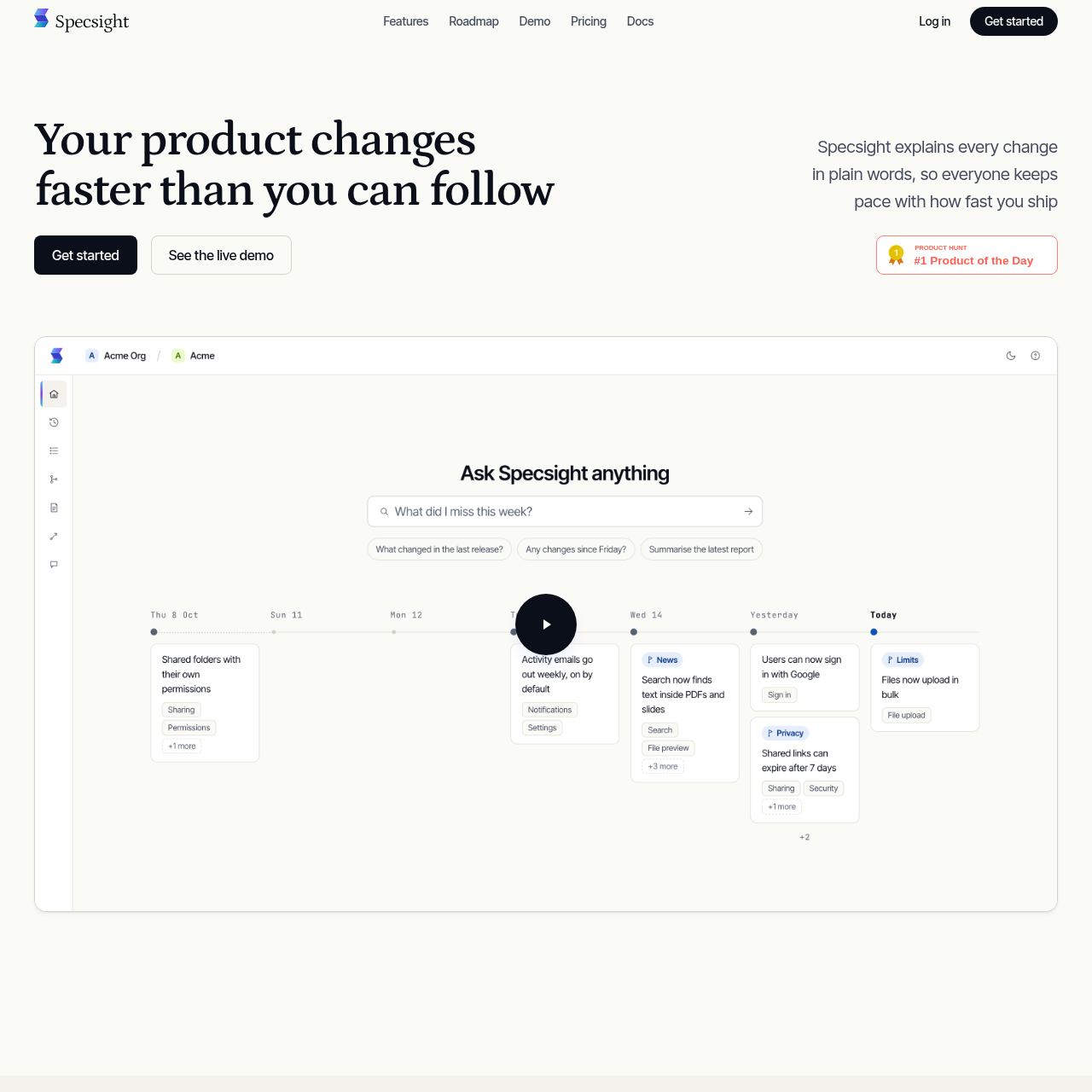
Specsight turns codebase changes into product explanations, maps, answers, updates, and release-note drafts.

Code & ITAutomatically follows changes shipped…Explains product changes in plain…Shows how product features and…Provides product answers in Specsight or
Specsight product interface screenshot
Listed on AIToolly

What Is Specsight? Product Overview

What the product does and how it is positioned

Specsight is a product-understanding tool that uses a codebase to document features and behaviours, track changes, and explain their customer impact.

Its documented outputs include a changelog, product map, product specification, product answers, weekly updates, and drafted release notes.

What Can You Use Specsight For?

Source-supported ways to use the product

Release communication

Teams can use documented changes to prepare weekly product updates and draft release notes.

Product and support questions

People can ask questions about the product and receive answers in Specsight or through MCP.

Journey exploration

The product map can be used to follow a user journey and see how its features and actions connect.

Cross-team product context

Plain-language explanations can help teams understand what changed and how customers are affected.

How to Use Specsight

The documented workflow, where available

  1. 1

    Provide read-only access

    The documented setup begins with read-only access to the product codebase.

  2. 2

    Track product changes

    Specsight follows changes shipped by the team and builds an up-to-date view of the product.

  3. 3

    Review generated context

    Users can review changelog entries, product maps, specifications, and answers about the product.

  4. 4

    Prepare communications

    Product updates can be summarized and release notes can be drafted from the documented changes.

Codebase-derived product context

Specsight describes its product specification as documentation of features and behaviours from the actual codebase. It also says the system follows shipped changes, linking source-level changes with explanations of what changed and how customers are affected.

  • Documents product features and behaviours from the codebase.
  • Tracks changes as the team ships them.
  • Presents customer-facing effects in plain language.

Product maps and product answers

The product map represents connected user journeys, while product answers provide a question-based way to retrieve information about the product. The source states that answers are available in Specsight or anywhere the team works through MCP.

  • Follows journeys from start to finish.
  • Shows relationships between product actions and features.
  • Supports questions about the product through Specsight or MCP.

What to Test Before Choosing Specsight

Checks to run with your own material and workflow

  • Confirm that read-only access meets the organisation's codebase access requirements.
  • Verify that the documented changelog, product map, and product specification cover the product areas that need review.
  • Check whether the team's preferred question-and-answer workflow can use MCP.
  • Review whether the generated product updates and release-note drafts fit the organisation's communication process.

Specsight Sources and Last Checked

What was checked and when

Official source
https://specsight.app/
Last checked
Category
Code & IT

Specsight Frequently Asked Questions

Answers based on the source-checked product record

What does Specsight document?

Specsight documents product features and behaviours from the actual codebase and follows changes as the team ships them.

What can the product map show?

The product map follows a user journey from start to finish and shows how the product's features and actions connect.

Can users ask questions about a product?

Yes. The source describes product answers that respond to questions in Specsight or through MCP.

Can Specsight create release-note drafts?

Yes. The product updates feature summarizes changes and presents a one-click option to draft release notes.

What access model does the documented setup use?

The product page describes the setup as using read-only access to the product codebase.

Explore other recently added tools in the same category.