SeedVideoAI
Seedance 3.0 AI Video Generator: Advanced Multi-Modal Creative Platform by SeedVideo
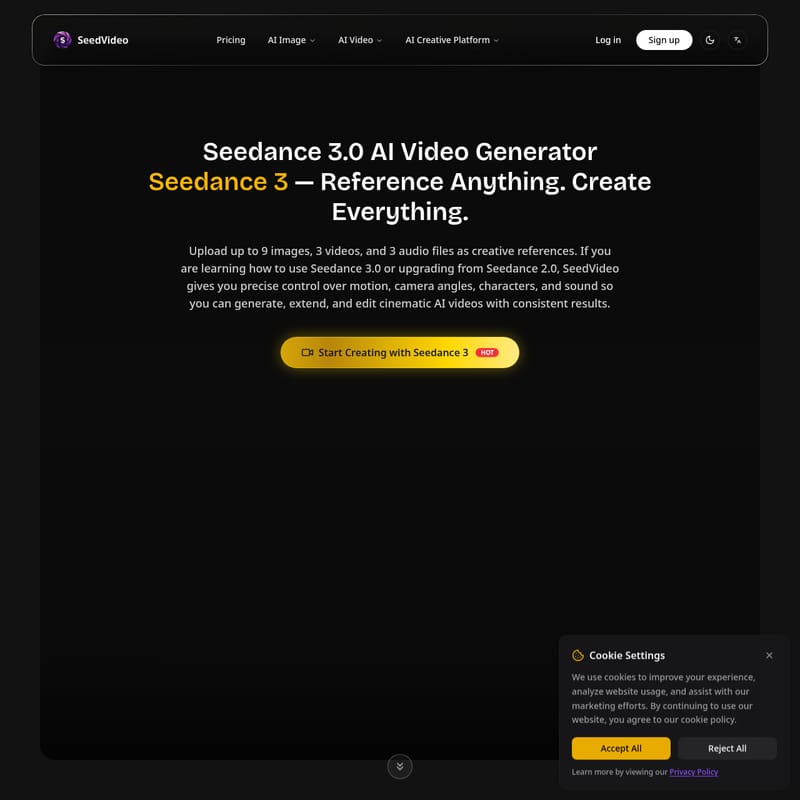
Seedance 3.0, powered by SeedVideo, is a groundbreaking AI Video Generator that offers truly controllable multi-modal creation. By allowing users to upload up to 9 images, 3 videos, and 3 audio files as creative references, Seedance 3.0 provides precise control over motion, camera angles, and character consistency. Whether using Text to Video, Image to Video, or Reference to Video modes, this AI Creative Platform ensures cinematic quality with resolutions up to 1080p and durations up to 15 seconds. With built-in audio generation and the ability to replicate complex choreography from reference clips, Seedance 3.0 empowers creators to extend and edit videos with unprecedented flexibility. Explore the future of AI video production with SeedVideo's Seedance 3.0.
2026-04-27
2.0K
SeedVideoAI Product Information
Seedance 3.0: The Ultimate AI Video Generator by SeedVideo
In the rapidly evolving landscape of digital content, Seedance 3.0 emerges as a premier AI Creative Platform, redefining how creators approach video production. Developed under the SeedVideo umbrella, Seedance 3.0 is a truly controllable multi-modal AI video model that allows you to reference anything and create everything. This advanced AI Video Generator provides users with the tools to transform simple text, images, or reference videos into cinematic masterpieces with unparalleled precision.
What's Seedance 3.0?
Seedance 3.0 is the latest evolution in AI-driven video technology, following the successful Seedance 2.0. It is a comprehensive AI Video Generator designed for creators who demand high levels of control and consistency. Unlike traditional tools, Seedance 3.0 functions as a multi-modal system, meaning it can process and synthesize information from various sources simultaneously—including text prompts, images, videos, and audio files.
Whether you are a professional filmmaker or a hobbyist, Seedance 3.0 allows you to maintain exact control over motion, camera angles, characters, and sound. By utilizing the "Reference Anything" capability, users can guide the AI to replicate specific styles or movements, making it more than just a generator; it is a collaborative creative partner.
Key Features of Seedance 3.0
Seedance 3.0 stands out in the AI Video market due to its robust suite of features that prioritize user control and output quality.
Multi-Modal Input Flexibility
One of the most powerful aspects of Seedance 3.0 is its ability to handle complex inputs. Users can upload:
- Up to 9 images
- Up to 3 videos
- Up to 3 audio files
This flexibility allows you to combine these elements freely to express a unique vision that a simple text prompt could never achieve.
Precise Motion & Camera Control
Replicate complex choreography and cinematic camera movements directly from your reference videos. Seedance 3.0 understands the physics and flow of your provided clips, allowing you to recreate action sequences without needing to write overly detailed prompts.
Superior Character and Scene Consistency
Seedance 3.0 solves the common AI problem of "character drift." It ensures that faces, clothing, text, and visual styles remain consistent from the first frame to the last, providing a professional, flicker-free experience.
Built-in Audio Generation
The platform doesn't just create visuals; it generates context-aware sound effects and background music. It can even sync video movements to the beats of your uploaded audio files for a perfectly timed result.
Video Extension & Editing
Beyond creation, Seedance 3.0 serves as a powerful editing tool. You can:
- Extend existing videos seamlessly.
- Merge multiple clips into a cohesive narrative.
- Modify specific segments, such as replacing characters or adding new elements, while keeping the background intact.
How to Use Seedance 3.0
Getting started with this AI Video Generator is intuitive, thanks to the streamlined SeedVideo interface. Follow these steps to create your first video:
- Select Your Mode: Choose between Text to Video, Image to Video, or Reference to Video from the dashboard.
- Upload References: If using the reference mode, upload your images (up to 9), videos (up to 3), or audio files to guide the AI's style and motion.
- Enter Your Prompt: Type your idea into the prompt box (up to 2500 characters). You can use natural language to describe which parts of the reference content you want the model to focus on.
- Configure Settings:
- Aspect Ratio: Choose from Landscape (16:9), Portrait (9:16), Square (1:1), Standard (4:3), Mobile (3:4), or Ultrawide (21:9).
- Output Quality: Select between 480p, 720p, or 1080p (costs vary from 4 to 12 credits/s).
- Duration: Set the length of your clip from 4s up to 15s.
- Enable Advanced Options: Toggle features like "Generate Audio," "Return Last Frame" (for continuity), or "Web Search" for enhanced context.
- Generate: Click the "Generate" button to consume your credits and produce your cinematic AI video.
Use Case Scenarios
- Cinematic Storytelling: Filmmakers can use reference videos to dictate camera paths and character movements, ensuring the AI output matches their directorial vision.
- Social Media Content: Marketing teams can use the AI Image to video feature to turn static product shots into dynamic advertisements in various aspect ratios like 9:16 for Mobile.
- Music Videos: By utilizing the built-in audio sync, creators can generate visuals that pulse and change in time with a specific soundtrack.
- Character Animation: Maintain a consistent brand mascot across multiple scenes by using the character reference feature to prevent visual variations.
FAQ
Q: What are the main differences between Seedance 2.0 and Seedance 3.0? A: Seedance 3.0 introduces superior consistency, multi-modal reference capabilities (up to 9 images and 3 videos), and more precise control over motion and camera angles compared to the previous version.
Q: What resolutions are supported? A: You can generate videos in 480p, 720p, and high-definition 1080p.
Q: Can I remove the watermark? A: Yes, the option to remove watermarks is available for paid users.
Q: How long can the generated videos be? A: Seedance 3.0 supports video durations ranging from 4 seconds to a maximum of 15 seconds.
Q: Does Seedance 3.0 generate sound? A: Yes, it includes built-in audio generation for context-aware sound effects and music synchronization.