Quartz
Quartz: Secure AI-Powered Email Client for Mac and Gmail with On-Device Processing
Quartz is a privacy-focused email client for Mac and Gmail that utilizes local AI to categorize messages and draft replies. Designed for Apple Silicon, it ensures your data never leaves your device while helping you focus on what matters.
2026-06-20
--K
Quartz Product Information
Quartz: The Future of Private, AI-Driven Email for Mac and Gmail
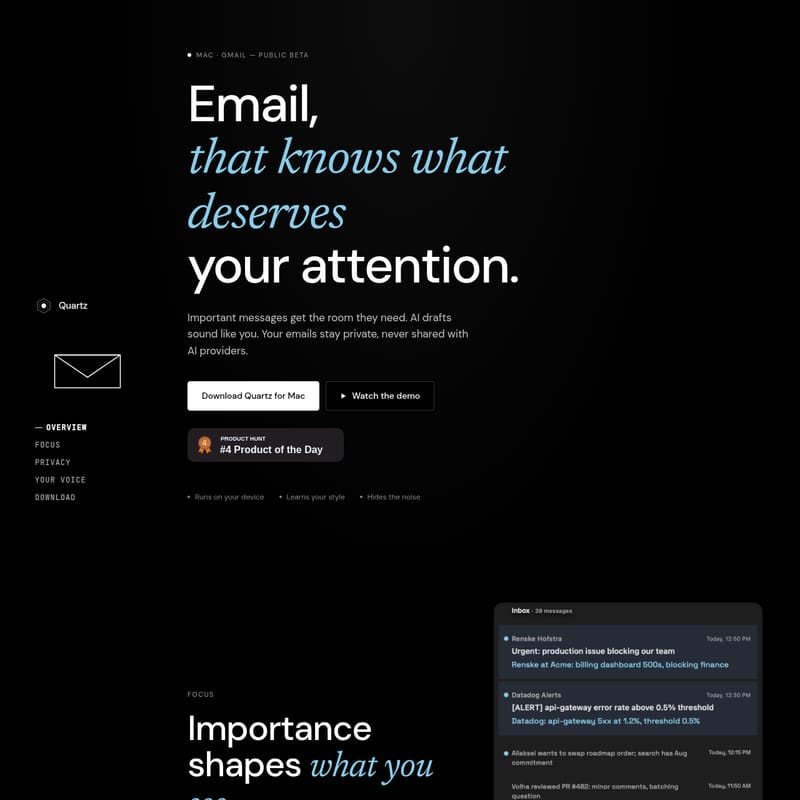
In an era where our inboxes are constantly flooded with distractions, Quartz emerges as a revolutionary solution for users who demand both efficiency and absolute privacy. Quartz is an advanced email client specifically designed for Mac users operating on Gmail, currently available in public beta. By leveraging the power of local artificial intelligence, Quartz transforms how you interact with your messages, ensuring that your attention is always directed where it is most needed.
What's Quartz?
Quartz is an intelligent email application built for the modern professional. It is not just another mail interface; it is a sophisticated layer of intelligence that sits on top of your Gmail account. The primary goal of Quartz is to manage the noise of daily communication through high-level automation and personalized AI features.
What sets Quartz apart from other AI-integrated tools is its commitment to security. While most AI services process your data in the cloud, Quartz runs its models locally on your Mac. This means that Quartz learns your habits, recognizes your writing style, and categorizes your mail without ever uploading your private correspondence to a third-party server.
Key Features of Quartz
Quartz is packed with features designed to streamline your workflow and protect your digital footprint. Here are the core pillars of the Quartz experience:
1. Intelligent Focus and Categorization
Quartz understands that not every email requires an immediate response. The application uses importance-based shaping to organize your view:
- Auto-Categorization: Quartz automatically sorts every message based on importance levels defined by you and learned by the AI over time.
- Room for Important Messages: High-priority emails are given the prominence they deserve, ensuring you never miss a critical update.
- Organized Noise Reduction: Items labeled as FYI, Icebox, and Noise are automatically collapsed, keeping your main inbox clean and scannable.
2. Privacy-First On-Device AI
Privacy is the foundation of Quartz. Unlike other platforms, Quartz ensures that your mail is processed exclusively on your device.
- Local Processing: The AI models used for sorting and drafting run locally on your Mac.
- Apple Silicon Optimization: To provide this level of local intelligence, Quartz is optimized for Apple Silicon.
- No Server Access: The developers of Quartz cannot read your mail, and neither can their servers, because there are no central servers processing your content.
3. End-to-End Security
Security in Quartz goes beyond just local processing. It adheres to the highest industry standards to protect your data:
- Encryption: All mail is encrypted on your device using keys that only you hold.
- CASA Tier 2 Certified: Quartz has been independently audited and certified under Google's Cloud Application Security Assessment (CASA) Tier 2 standards, providing peace of mind for professional users.
4. Personalized AI Drafting: Your Voice
One of the most impressive features of Quartz is its ability to draft replies that actually sound like you.
- Style Learning: By providing a few bullet points, Quartz learns your specific writing cadence and phrasing.
- Relationship Context: The AI understands your relationship with the sender and the context of the entire email thread.
- Human-Like Cadence: Quartz avoids the generic, robotic tone typical of standard Large Language Models (LLMs), delivering drafts with your specific level of warmth and professionality.
Use Case Scenarios for Quartz
The Busy Executive
For an executive managing hundreds of Gmail messages daily, Quartz acts as a digital gatekeeper. By automatically moving newsletters and status updates into the FYI or Noise categories, the executive can focus solely on "Important" messages that require executive decision-making. When a response is needed, they can provide three bullet points to Quartz, which then generates a perfectly phrased draft in their own voice, ready for a quick review and send.
The Privacy-Conscious Professional
Legal and financial professionals often deal with sensitive information that cannot be shared with cloud-based AI providers. Quartz provides a safe haven. Because all AI classification and drafting happen on the user's Mac via Apple Silicon, the professional gains the efficiency of AI without violating client confidentiality or data sovereignty regulations.
The Minimalist Communicator
Users who suffer from "inbox anxiety" can use Quartz to regain control. The ability of Quartz to collapse secondary categories like the Icebox allows for a minimalist interface where only the most pressing tasks are visible, reducing cognitive load and improving daily productivity.
How to Use Quartz
Getting started with Quartz is a straightforward process designed to get you into a focused state as quickly as possible:
- Download the App: Visit the official site to download Quartz for Mac.
- Connect Gmail: Authenticate your Gmail account within the app to begin the synchronization process.
- Train the AI: As you use the app, Quartz will begin to learn which messages you consider important. You can help it along by defining your preferences early on.
- Draft with Ease: When replying, provide a few bullet points and let Quartz generate a draft that matches your unique voice and the context of the thread.
"Quartz is an inbox worth opening. It provides the room important messages need while keeping the noise at bay."
FAQ
Is Quartz free to use?
Currently, Quartz is in public beta and is free for beta users.
What platforms does Quartz support?
Quartz is specifically designed for Mac users with Apple Silicon and works with Gmail accounts.
Does Quartz upload my emails to the cloud for AI training?
No. Quartz utilizes on-device AI. All classification and drafting run locally on your Mac. Your mail is never uploaded to AI providers or Quartz servers.
What is CASA Tier 2 certification?
It is an independent security audit and certification under Google's Cloud Application Security Assessment, ensuring that the application meets high-security standards for handling user data.
Can Quartz write in my specific style?
Yes. Quartz learns the way you write, understands your relationship with the sender, and picks up on the context of each thread to ensure drafts match your phrasing and level of warmth.
Quartz represents a significant step forward in email technology, proving that you don't have to sacrifice privacy for the sake of AI-driven productivity. By keeping everything on your Mac, Quartz ensures that your Gmail experience is faster, smarter, and more secure than ever before.