Photo Animate
AIToolly product video
See Photo Animate in motion
Photo Animate: The Professional AI Photo to Video Animator for Realistic Motion and Family Memories
Photo Animate is a cutting-edge AI picture animator that transforms static photos into lifelike videos. Utilizing Grok Imagine Video 1.5 technology, it offers photo to video AI features like natural facial expressions, native audio integration, and specialized templates for animating old family photos and memorial portraits.
2026-07-05
0.1K
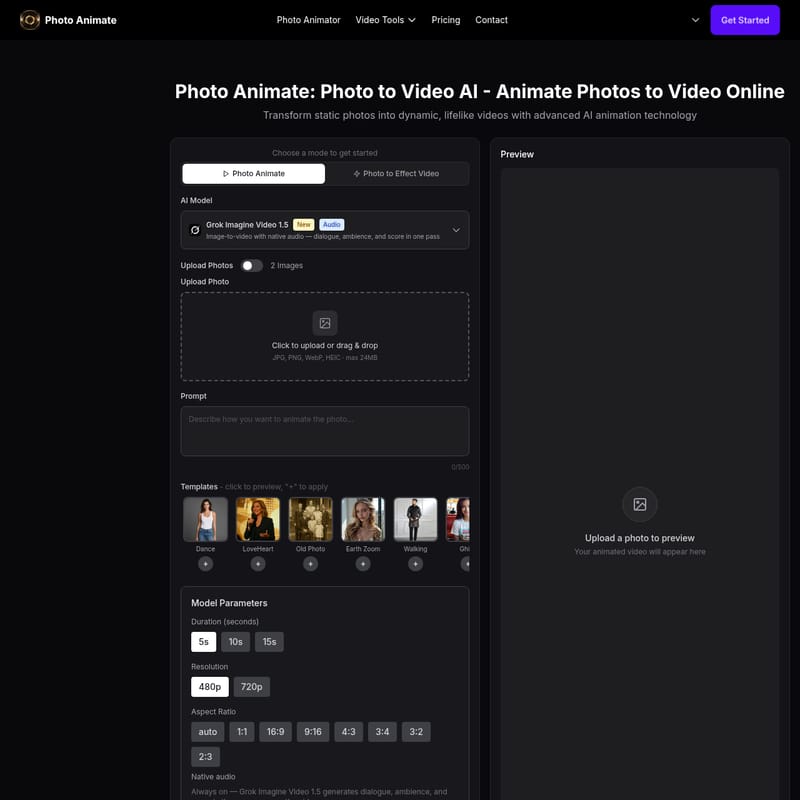
Photo Animate Product Information
Photo Animate: The Ultimate AI Photo to Video Animator for Bringing Memories to Life
In the digital age, static images often feel like moments frozen in time, yet the desire to see those moments move and breathe remains universal. Photo Animate emerges as a leading AI picture animator designed to bridge the gap between a still photograph and a dynamic cinematic experience. By leveraging advanced photo to video AI technology, this tool allows users to transform portraits, vintage snapshots, and cherished family archives into high-quality videos with natural, fluid motion.
Whether you are looking to animate photos for a creative social media project or seeking a respectful way to animate an image of a loved one for a memorial, Photo Animate provides the professional-grade tools necessary to achieve realistic results. This comprehensive image to video AI platform is built for both emotional storytelling and practical creative workflows.
What is Photo Animate?
Photo Animate is a sophisticated AI picture animator that helps users bring photos to life through advanced artificial intelligence. Unlike basic animation tools that apply simple filters, Photo Animate focuses on generating realistic photo to video results that maintain the integrity and original feeling of the source image. It is particularly effective at turning portraits into moving clips, making it an essential tool for those interested in family history, digital archiving, and modern content creation.
As a versatile photo to video AI solution, the platform utilizes state-of-the-art models like Grok Imagine Video 1.5 to ensure that every generated video features lifelike movements. From making a subject blink and smile to creating complex dance routines from a single portrait, Photo Animate simplifies the process of animating photos while delivering professional-tier output.
Key Features of Photo Animate
Photo Animate is packed with features that set it apart from generic animation tools. Here is a detailed look at what this AI photo animator offers:
1. Advanced AI Model: Grok Imagine Video 1.5
At the heart of the platform is the Grok Imagine Video 1.5 model. This powerhouse technology is responsible for the high-fidelity rendering and natural motion that users experience. It ensures that when you animate photos, the transitions are smooth and the facial features remain consistent with the original person.
2. Native Audio Integration
One of the standout capabilities of Photo Animate is its ability to generate image-to-video with native audio. In a single pass, the AI can generate dialogue, ambience, and a musical score that perfectly matches the visual animation. This makes the transition from a static photo to a full video clip more immersive than ever before.
3. Diverse Animation Templates
To make the creative process even easier, Photo Animate includes a variety of pre-set templates. Users can quickly apply specific styles to their images, including:
- Dance: Turn a portrait into a high-energy dance video.
- LoveHeart: Perfect for romantic or sentimental clips.
- Old Photo: Specifically tuned for vintage textures and gentle motion.
- Ghibli & Cartoon: Transform real photos into stylized animation styles.
- Cloth Swap & Walking: Advanced motion templates for creative experimentation.
4. Professional Model Parameters
Users have full control over the final output of their animated photo. The platform supports:
- Duration: Choose between 5s, 10s, or 15s clips.
- Resolution: High-definition options including 480p and 720p.
- Aspect Ratios: Flexible sizing including 1:1, 16:9, 9:16, 4:3, 3:4, 3:2, and 2:3 to suit any platform from TikTok to a widescreen family slideshow.
Use Cases: How to Animate Your World
Photo Animate is built for a wide range of emotional and practical scenarios. Here are the primary ways users are utilizing this photo to video AI tool:
Bring Old Family Photos to Life
Family history becomes much more vivid when you can see your ancestors move. By uploading faded portraits or wedding photos, users can create short, expressive videos that capture the warmth and personality of their relatives, making these memories easier to share with younger generations.
Animate Deceased Loved Ones
One of the most touching uses of Photo Animate is the creation of memorial projects. The AI allows for respectful motion, such as subtle eye movements, smiles, and head tilts. These small details help in honoring the memory of loved ones in a way that feels natural and dignified.
Animate Old Black and White Photos
Vintage photography often suffers from blurriness or lack of detail. Photo Animate works seamlessly with restored images to generate motion that helps old black and white memories feel vivid again. By improving facial clarity during the animation process, the tool brings a new level of realism to historical snapshots.
"Photo Animate focuses on natural-looking motion that keeps the original feeling of the photo, ensuring that the essence of your memory is never lost during the animation process."
How to Animate a Photo with Photo Animate
Creating a high-quality video from a still image is simple and requires no previous editing experience. Follow these three steps to animate an image:
- Upload Your Photo: Open the Photo Animate tool and upload your image (JPG, PNG, WebP, or HEIC, up to 24MB). You can even drag and drop your files for convenience.
- Describe the Motion: You can use a text prompt to describe the desired movement or choose from the available templates. Whether you want a natural expression, a subtle smile, or a specific dance, the choice is yours.
- Generate and Download: Preview the result to ensure the motion looks natural. Once satisfied, use your credits to generate the final clip and download it for family sharing or social media use.
Frequently Asked Questions (FAQ)
What is Photo Animate?
Photo Animate is an AI picture animator that helps you animate photos to video. It turns still portraits and family photos into short clips with realistic facial motion and easy-to-use controls.
How does photo to video AI work on Photo Animate?
Simply upload a photo and choose a motion style. The system uses the Grok Imagine Video 1.5 model to analyze the face and composition, creating a short animated video that looks natural and lifelike.
Can I animate deceased loved ones' photos?
Yes. Photo Animate is frequently used to create respectful memorial clips. We recommend using subtle motions like blinking or gentle smiles to maintain a natural and respectful result.
Can I make ancestors talk with AI?
Yes, by combining a clear face image with a specific expression or speech prompt, you can create talking-style portrait videos from old family photos.
Can I animate old black and white photos?
Absolutely. The tool is highly effective at animating black and white portraits, especially if they have been restored. Clearer facial details typically lead to higher-quality motion.
How do I make a picture of someone blink and smile?
Upload your portrait and select a natural expression workflow. Using subtle prompts is the best way to ensure the blinking and smiling look authentic to the original person.
Is Photo Animate good for bringing old family photos to life?
Yes, it is specifically optimized for family archives, heritage projects, and reunion gifts. It is one of the easiest ways to turn still memories into moving portraits.
What makes Photo Animate different from other tools?
Unlike generic tools, Photo Animate focuses on portrait realism and memory-driven use cases. It provides native audio generation and specific templates tailored for emotional storytelling rather than just flashy effects.
Is my uploaded photo kept private?
Photo Animate is designed with privacy in mind. Users are encouraged to review the Privacy Policy for full details on how media is processed and stored.
Contact and Support
If you have questions regarding billing, the quality of your old photo animation, or general support, you can reach the team at [email protected]. Start your journey today and discover how easy it is to animate photos and preserve your most precious memories in motion.