
OpenUI
OpenUI: The Open Standard for Generative UI Applications
OpenUI is an open-source toolkit designed to enable AI applications to respond with dynamic, interactive user interfaces. It streamlines the development of Generative UI by allowing developers to define component libraries that LLMs can render in real-time. With high token efficiency and performance optimization, OpenUI works with any UI library and major LLM framework.
2026-03-13
78.0K
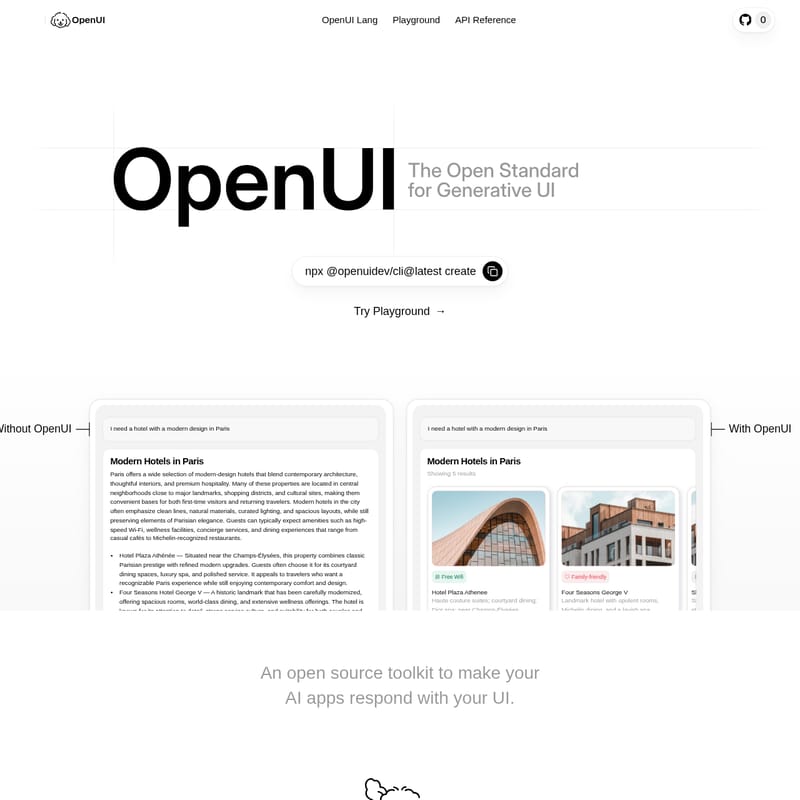
OpenUI Product Information
OpenUI: The Open Standard for Generative UI
In the rapidly evolving landscape of artificial intelligence, providing users with plain text responses is often insufficient for complex tasks. OpenUI emerges as the premier open-source toolkit designed to bridge the gap between Large Language Models (LLMs) and rich user experiences. By establishing an open standard for Generative UI, OpenUI allows developers to create AI applications that respond with functional, interactive, and beautifully designed user interface components instead of static text.
What's OpenUI?
OpenUI is a specialized framework and developer toolkit that enables AI applications to generate and render UI components on the fly. It functions as a translation layer between the logic of an LLM and the visual requirements of a modern web or mobile application.
At its core, OpenUI provides the infrastructure to define a component library, generate system prompts for LLMs, and parse the model's output—referred to as OpenUI Lang—into fully functional interface elements. Whether you are building a travel booking assistant that needs to show hotel cards or a data analysis tool requiring dynamic charts, OpenUI provides the standard to make it happen.
Key Features of OpenUI
OpenUI is packed with features designed for performance, flexibility, and developer experience:
1. Performance and Efficiency
- Performance Optimized: OpenUI offers up to 3.0x faster rendering compared to traditional json-render methods.
- Token Efficient: It is highly optimized for LLM communication, using up to 67.1% fewer tokens than json-render, significantly reducing API costs and latency.
- Streaming Native: Supports streaming and partial responses, allowing the UI to populate as the LLM generates data.
2. Universal Compatibility
- Works with Any UI Library: OpenUI is unopinionated. You can use it with your own custom design system, ShadCN, Material Design, or any other library.
- LLM Agnostic: Compatible with all major models, including OpenAI, Anthropic, Gemini, and Mistral.
- Framework Support: Seamlessly integrates with the Vercel AI SDK, LangChain, CrewAI, and various Agent SDKs.
3. Developer-Centric Design
- Native Types: Built to be performant and memory-safe.
- Interactive Flows: Beyond static display, OpenUI handles user inputs and complex interactive flows within the generated components.
- Safe by Default: Ensures security by preventing arbitrary code execution during the rendering process.
- Cross-Platform: Currently supports JS Runtimes, with native support for iOS and Android coming soon.
How to Use OpenUI
Implementing Generative UI with OpenUI follows a clear, four-step process that integrates directly into your development workflow.
Step 1: Define Your Library
You begin by registering your components using defineComponent and createLibrary. This involves defining the props of your components using schemas like Zod.
Example Code Snippet:
import { z } from "zod"
import { defineComponent, createLibrary } from "@openuidev/react-lang"

const CarouselCard = defineComponent({
  name: "CarouselCard",
  props: z.object({
    title: z.string(),
    imageUrl: z.string().url(),
    ctaLabel: z.string(),
  }),
  component: ({ props }) => <CarouselCard {...props} />,
})

export const library = createLibrary({
  root: "Carousel",
  components: [CarouselCard]
})
Step 2: Generate System Prompt
Once your library is defined, OpenUI automatically generates a system prompt that informs the LLM about the available components and their required data structures.
Step 3: LLM Responds in OpenUI Lang
The LLM processes the user query and responds using OpenUI Lang, a condensed language format optimized for UI structure.
Step 4: Render UI
The OpenUI renderer parses the response and instantly renders the interactive UI components on the screen.
Use Case: Modern Hotel Search in Paris
Consider a travel application where a user asks: "I need a hotel with a modern design in Paris."
- Without OpenUI: The user receives a long block of text describing various hotels, neighborhood districts (1st–8th, Le Marais, Latin Quarter), and travel tips. Information like the stable occupancy rates or the best time to visit (April to October) is buried in paragraphs.
- With OpenUI: The application responds with a dynamic carousel of hotel cards. Each card, such as for the Hotel Plaza Athénée or Four Seasons George V, features a clear title, amenity tags (e.g., "Free Wifi", "Family-friendly"), and a functional "Book" button. Accompanying the cards are interactive tables for currency (Euro) and local cuisine (Macarons, Crêpes), and structured lists for neighborhood details. This makes the information digestible, actionable, and visually engaging.
FAQ
Q: Is OpenUI compatible with mobile platforms? A: Currently, OpenUI runs on JS Runtimes. However, native support for iOS and Android is on the roadmap and coming soon.
Q: How does OpenUI save on token costs? A: OpenUI uses a specialized format called OpenUI Lang, which is significantly more concise than JSON. This reduces the number of tokens the LLM needs to output by up to 67.1%.
Q: Can I use my own custom CSS or design system? A: Yes, OpenUI is designed to work with any UI library, including your own proprietary design systems or popular ones like ShadCN and Material Design.
Q: Is it safe to render UI generated by an AI? A: Yes, OpenUI is built to be safe by default. It does not allow for arbitrary code execution, ensuring that the components rendered are only those you have explicitly defined in your library.
Q: How do I get started?
A: You can build a Generative UI chat in minutes by running the CLI command: npx @openuidev/cli@latest create.







