OpenArt Director
Vibe: Direct Your Next Video with AI-Powered Chat and Professional Editing Tools
Vibe is a comprehensive AI video creation platform that allows you to direct videos through chat. From short films to UGC ads, Vibe offers tools like Motion Sync and Lip-Sync.
2026-06-25
9300.0K
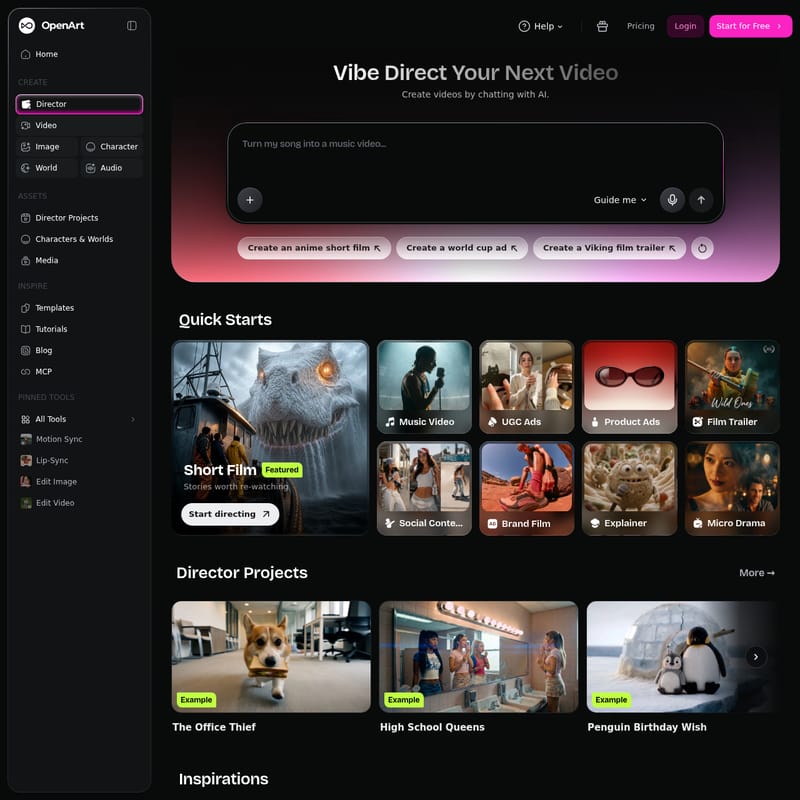
OpenArt Director Product Information
Vibe: Direct Your Next Video Using AI Chat Technology
In the era of rapid digital content consumption, Vibe emerges as a revolutionary platform that empowers creators to direct your next video through the power of Artificial Intelligence. Vibe simplifies the complex process of video production, allowing users to create high-quality, professional-grade videos by simply chatting with AI. Whether you are a seasoned filmmaker or a social media enthusiast, the Vibe AI video platform provides an intuitive interface to bring your creative visions to life.
What's Vibe?
Vibe is an advanced AI video creation and direction platform designed to bridge the gap between imagination and execution. At its core, Vibe allows you to "Direct Your Next Video" by engaging in a conversational interface with an AI assistant. Instead of navigating complex timelines and manual editing tools from the start, users can use the Vibe Director to chat their way into a finished product. The platform is built to support a wide variety of formats, ranging from cinematic short films to quick-hitting social media ads, making it a versatile tool for the modern creator.
The Core Philosophy of Vibe
The fundamental premise of Vibe is that everyone can be a director. By leveraging sophisticated AI, the platform handles the technical heavy lifting, allowing the user to focus on the "vibe" and narrative direction. With Vibe, the process of video creation becomes a collaborative dialogue between human creativity and artificial intelligence.
Key Features of Vibe
Vibe offers a robust suite of tools organized to facilitate every stage of the creative process. From the initial spark of an idea to the final edit, Vibe provides the necessary infrastructure.
Creative Suite: The "CREATE" Section
The Vibe dashboard is centered around several core creation modules:
- Director: The primary hub where you direct your next video through chat interaction.
- Video: Dedicated tools for generating and refining video content.
- Image: AI-powered image generation to support your visual storytelling.
- Character: A specialized tool to create and manage consistent characters across your projects.
- World: Allows for the creation of immersive environments and settings for your videos.
- Audio: Tools to manage and generate soundscapes that match the visual energy of your project.
Pinned Tools for Advanced Editing
To ensure professional results, Vibe includes several Pinned Tools that address specific technical needs:
- Motion Sync: A powerful tool designed to synchronize movement within your video perfectly.
- Lip-Sync: This feature ensures that character dialogue and mouth movements are perfectly aligned, enhancing the realism of AI-generated characters.
- Edit Image: A built-in editor to refine visual assets without leaving the Vibe platform.
- Edit Video: A comprehensive video editor to put the finishing touches on your Vibe projects.
Asset Management and Inspiration
Vibe helps users stay organized and inspired through its ASSETS and INSPIRE sections:
- Director Projects: Keep track of all your ongoing and completed AI-directed works.
- Characters & Worlds: A library where you can store and revisit your custom-created assets.
- Media: Centralized storage for all your uploaded and generated media files.
- Templates & Tutorials: For those looking for a head start or wanting to master the Vibe platform, these resources offer guidance and pre-set structures.
Use Cases for Vibe AI
Vibe is designed to cater to a diverse range of industries and creative needs. The platform categorizes its capabilities into several distinct use cases, ensuring that the AI understands the specific requirements of each format.
Entertainment and Storytelling
- Short Film: Vibe is capable of producing complete narrative shorts, told from start to finish with cinematic flair.
- Music Video: Create performance pieces and visual stories that are perfectly cut to a specific track.
- Film Trailer: Develop teasers and trailers that effectively sell a bigger story and build anticipation.
- Micro Drama: Perfect for modern mobile audiences, Vibe can create bite-size vertical episodes featuring fast hooks and cliffhangers.
Advertising and Marketing
- UGC Ads: Create creator-style advertisements that feel native to social media feeds, increasing engagement and authenticity.
- Product Ads: Produce polished, studio-style product commercials and demos that highlight features effectively.
- Branding Film: Focus on the "vibe" rather than the pitch, creating brand films and spots that build a lasting identity.
Educational and Social Content
- Explainer Videos: Walkthroughs and how-tos designed to make complex ideas easy to grasp for any audience.
- Social Content: Produce scroll-stopping stories specifically optimized for various social media feeds.
How to Use Vibe
Starting your journey with Vibe is straightforward, thanks to its user-friendly interface and "Quick Start" options.
- Login and Start for Free: Users can begin by creating an account and selecting the "Start for Free" option to explore the platform's capabilities.
- Choose Your Direction: You can use the "Guide me" feature for inspiration or select a "Quick Start" category like Short Film or Music Video.
- Chat to Create: Use the AI chat interface to provide prompts. Examples of prompts you can use in Vibe include:
"Create an anime short film" "Create a world cup ad" "Create a Viking film trailer"
- Refine Your Assets: Utilize the Character and World tools to define the look and feel of your video.
- Apply Advanced Tools: Use Motion Sync and Lip-Sync to polish the technical aspects of your video.
- Review Featured Inspirations: Look at examples like The Office Thief, High School Queens, or Penguin Birthday Wish to see what is possible within the Vibe ecosystem.
FAQ
Q: What is the main way to create videos in Vibe? A: The primary method is through the Vibe Director, where you direct your next video by chatting with the AI.
Q: Does Vibe offer tools for character consistency? A: Yes, Vibe includes a dedicated Character asset tool to help you create and maintain characters across your video projects.
Q: Can I use Vibe for social media advertising? A: Absolutely. Vibe specializes in UGC Ads, Product Ads, and Social Content that are designed to stop users from scrolling.
Q: Are there tutorials available for new users? A: Yes, the INSPIRE section of the Vibe platform contains tutorials and a blog to help users learn the nuances of AI video direction.
Q: Is there a cost to use Vibe? A: Vibe offers a "Start for Free" option, and further details can be found in the Pricing section of the platform.