Moda
Moda: AI-Powered Editable Design Tool for Professional Visual Assets and On-Brand Content
Moda is a revolutionary AI design platform that allows users to create fully-editable, on-brand visual assets on a real canvas. Unlike traditional AI tools, Moda provides full control over the design process, enabling the creation of slides, social media posts, PDFs, diagrams, and UI designs. It serves as a powerful alternative to Canva and agencies, helping teams save time and money while driving leads through high-quality professional visuals.
2026-02-20
--K
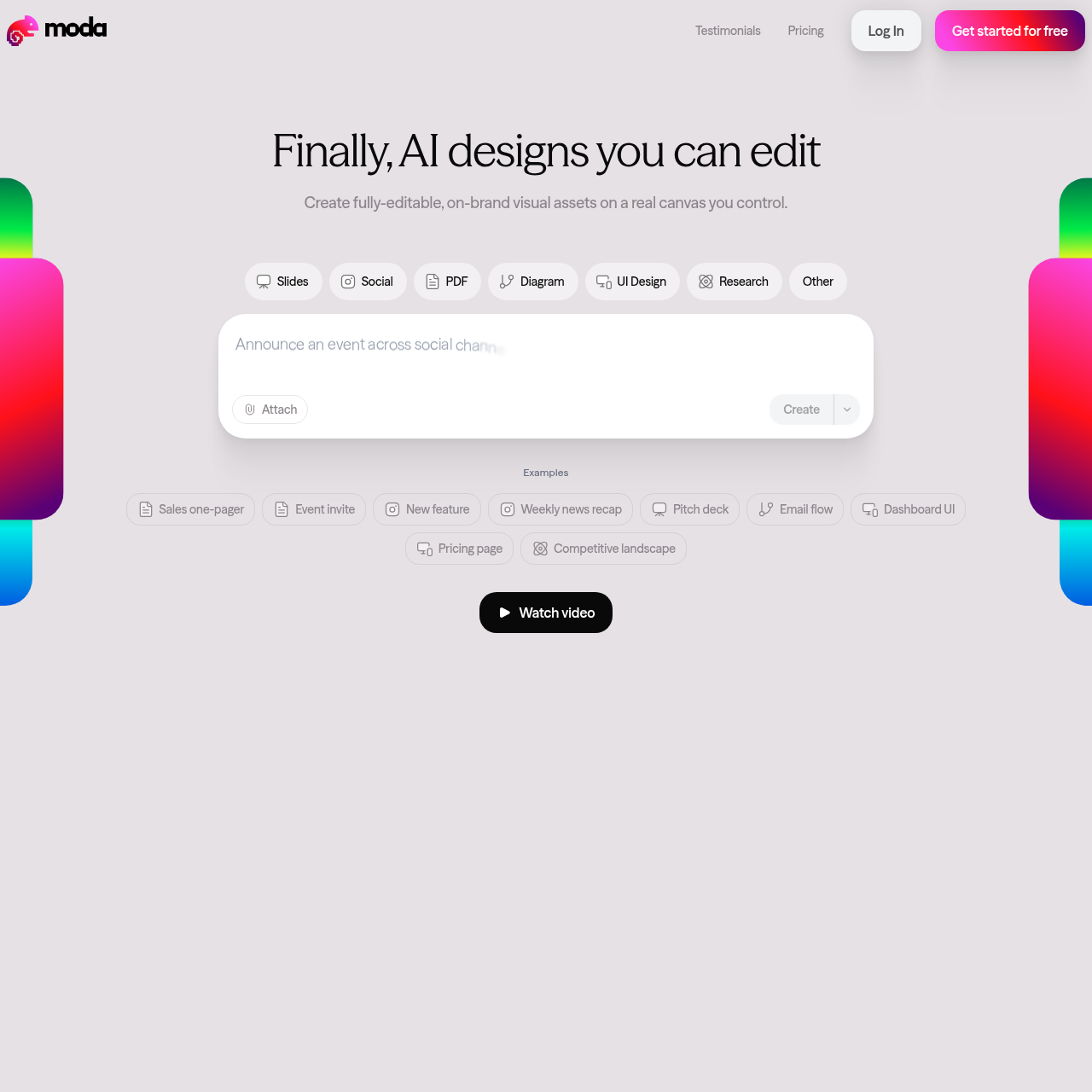
Moda Product Information
Moda: Creating Fully-Editable, On-Brand Visual Assets with AI
In the modern digital landscape, the demand for high-quality visual content is higher than ever. Businesses and creators often find themselves caught between the high costs of creative agencies and the limitations of generic design tools. Moda bridges this gap by offering a revolutionary AI design platform where users can create fully-editable, on-brand visual assets on a real canvas that they control.
Whether you are looking to design a pitch deck, a social media carousel, or a complex UI layout, Moda provides the flexibility and power needed to produce professional results in minutes rather than hours. It is the design tool of choice for teams moving away from traditional platforms in search of more control and better aesthetics.
What's Moda?
Moda is an AI-powered design platform that allows users to generate and refine visual content using a real, interactive canvas. Unlike other AI tools that produce static images or rigid layouts, Moda focuses on real editable visuals. This means that once the AI generates a design based on your prompt, you have full control to modify, tweak, and perfect every element of the asset.
From startup founders to marketing directors, users are adopting Moda as their go-to solution for democratizing branded asset creation. It is specifically designed to handle the diverse needs of a go-to-market organization, ensuring that every piece of content—from internal documents to external marketing materials—looks professionally designed and remains strictly on-brand.
Key Features of Moda
Moda stands out in the crowded design software market by offering features that prioritize user agency and design quality.
Real Canvas and Full Control
The hallmark of Moda is its real canvas. While other AI tools might lock you into a specific output, Moda gives you the steering wheel. You can edit every part of the design, ensuring the final product meets your exact specifications.
Diverse Format Support
Moda is versatile enough to handle a wide range of projects, including:
- Slides and Pitch Decks: Create structured, visually stunning presentations.
- Social Media Assets: Design Instagram carousels and LinkedIn posts that stop the scroll.
- PDFs and Documents: Turn generic documents into beautifully designed assets.
- Diagrams: Visualize complex information with ease.
- UI Design: Prototype dashboard UIs and pricing pages.
- Research and Sales One-Pagers: Professional layouts for critical business data.
AI-Powered Remixing
The "Remix" feature allows users to take existing templates—such as a Quarterly Sales Stats report or a Fundraising Announcement—and instantly make them their own. This speeds up the creative process while maintaining high design standards.
Brand Consistency
Moda is built to create on-brand visual assets. This ensures that even when multiple team members are creating content, the visual identity of the company remains consistent across all channels.
Use Cases for Moda
How are professionals utilizing Moda to improve their workflow? Here are several common use cases:
- Go-to-Market Organizations: Teams use Moda to democratize asset creation, allowing non-designers to create high-quality visuals that drive leads without needing a creative agency.
- Executive Leadership: Chiefs of Staff use the platform to transform employee-facing documents from "generic Google Docs" into polished, designed materials.
- Marketing and Growth Teams: Senior Directors of Growth use Moda for slide decks and social media carousels, citing its ease of use compared to tools like Canva or Gamma.
- Sales Teams: Rapidly create sales one-pagers, competitive landscape documents, and pricing pages to close deals faster.
- Internal Communications: Designing team offsite agendas, weekly news recaps, and hiring posters in minutes.
Why Professionals are Switching to Moda
"We moved off Canva and haven't looked back." — Mitch Thompson, CEO, PandoPartner
Many users highlight that Moda is simply easier and more effective than the competition. The transition from platforms like Canva, Gamma, or Nano Banana to Moda is often driven by the desire for better layouts, more structural control, and the ability to fly through design work without the friction of traditional software.
FAQ
How does Moda differ from other AI design tools?
Unlike many AI tools that provide a "take it or leave it" output, Moda provides a real canvas where the visuals are fully-editable. You have full control over the final result, allowing you to move elements, change colors, and refine the brand voice.
Can I use Moda for free?
Yes, you can get started for free to explore the features and start creating your first visual assets.
What kind of assets can I create?
You can create a wide variety of assets including slides, social media posts, PDFs, diagrams, UI designs, research papers, and more. Specific examples include pitch decks, email flows, and dashboard UIs.
Is Moda suitable for professional business use?
Absolutely. Moda is used by CEOs, Chiefs of Staff, and Growth Directors at companies like Fermat Commerce, Noetica, and Magic Spoon to create lead-driving, branded content.
Do I need design experience to use Moda?
No. Moda is designed to be intuitive. Users have reported making beautiful Instagram carousels and professional one-pagers in their first week with no prior training, often finishing in minutes what used to take hours.