Kavel favicon

Kavel

Kavel is a browser-based AI creative studio that provides a unified workspace for image and video generation using models like Nano Banana 2, Seedance 2, and Veo 3.1.

VideoGenerates high-resolution images and…Edits and combines up to 14 reference…Unified Credit SystemUpfront Cost Estimationai image generatorai video generatorimage to videotext to videoai photo editorold photo restorationai hairstyle changernano banana
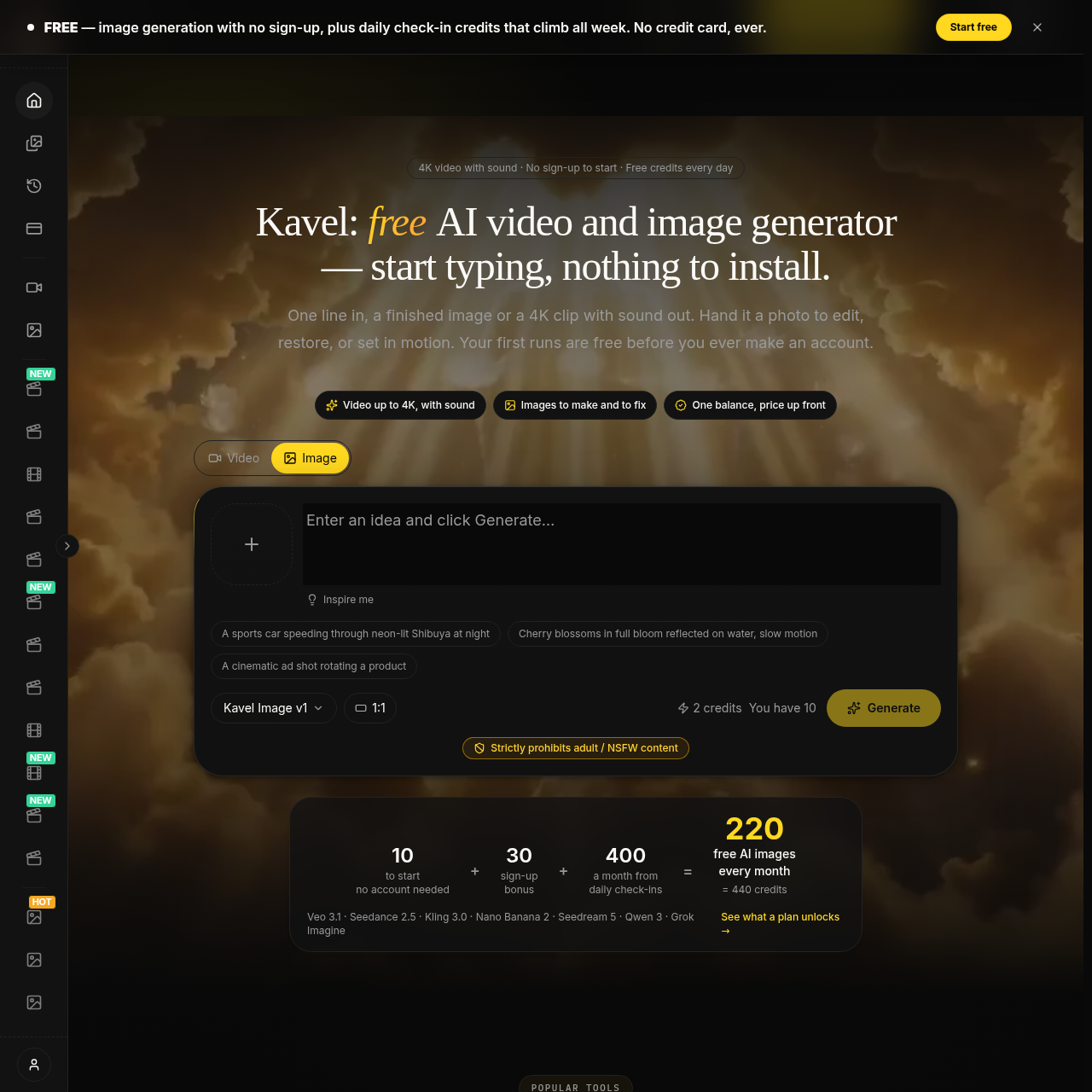
Kavel product interface screenshot
Listed on AIToolly

What Is Kavel? Product Overview

What the product does and how it is positioned

Kavel is an AI-powered creative studio that integrates image and video generation into a single browser-based interface.

The platform utilizes multiple models, including Nano Banana 2 for high-resolution stills and Seedance 2 or Veo 3.1 for cinematic video clips.

A central feature is the transparent credit system, which calculates and displays the cost of a generation before the user initiates the process.

In addition to standard prompting, the service offers specialized tools pre-configured for tasks such as photo restoration, style filters, and background generation.

What Can You Use Kavel For?

Source-supported ways to use the product

Social Media Content

Creating high-quality thumbnails and short-form video clips with native audio for digital platforms.

E-commerce Marketing

Developing product visuals and cinematic advertisements that maintain visual consistency across different media types.

Concept Visualization

Transforming initial text descriptions or reference photos into detailed blueprints, maps, or animated loops for project planning.

How to Use Kavel

The documented workflow, where available

  1. 1

    Select a Model or Tool

    Choose a specific AI model like Nano Banana 2 for images or Veo 3.1 for video, or pick a pre-set specialized tool.

  2. 2

    Provide Creative Input

    Enter a text prompt describing the desired output or upload up to 14 reference photos for editing and style transfer.

  3. 3

    Configure Output Settings

    Adjust parameters such as resolution from 1K to 4K, video length, and specific motion settings for video generations.

  4. 4

    Review Credits and Generate

    Confirm the estimated credit cost displayed on the screen before running the generation and downloading the final asset.

Unified Creative Workspace and Credit Management

Kavel consolidates various AI generation capabilities into a single environment, allowing users to manage both image and video projects without switching between different services. This integration is supported by a unified credit balance that applies to all available models, including Nano Banana 2, Seedance 2, and Veo 3.1. The interface is designed to provide transparency by showing the exact credit cost of a generation based on the selected resolution, length, and model before the user commits to the task.

  • Access to multiple specialized models for different creative requirements.
  • Real-time credit estimation based on user-defined output specifications.
  • Protection against failed generations, as credits are only deducted for successful runs.
  • Support for high-resolution outputs ranging from 1K to 4K for both images and video.

Kavel Pricing

Human-maintained commercial information

subscriptionfreemium
  • USD 19.9/month

Pricing can change. Confirm the current plan and billing terms on the official site before purchasing.

What to Test Before Choosing Kavel

Checks to run with your own material and workflow

  • Confirm the availability of specific models like Veo 3.1 and Nano Banana 2 within the generator interface.
  • Verify that the credit estimator updates correctly when switching between different resolutions and video lengths.
  • Review the library of ready-made tools to ensure they provide the expected pre-set configurations for tasks like photo restoration.
  • Check the system's ability to handle up to 14 reference photos for complex image editing or style transfer tasks.

Kavel Sources and Last Checked

What was checked and when

Official source
https://www.kavel.ai/
Last checked
Category
Video

Kavel Frequently Asked Questions

Answers based on the source-checked product record

Which AI models are available for use on Kavel?

Kavel offers Nano Banana 2 for image generation and editing, while video production is handled by Seedance 2.0 and Veo 3.1 models.

How is the cost of a generation determined?

The cost is calculated in credits based on the specific model used, the chosen resolution, the length of the video, and the type of input provided.

What happens if a generation fails to complete?

Kavel does not charge credits for failed generations, so that users only pay for successfully completed image or video outputs.

Can I use existing photos to guide the AI?

Yes, the platform allows users to upload up to 14 reference photos to combine, edit, or use as a starting point for video animations.

Is there a requirement to install software to use Kavel?

No, Kavel is a browser-based platform that requires no installation, allowing users to generate content directly through their web browser.

Explore other recently added tools in the same category.