image 2
GPT Image 2: The Professional AI Image Generator for High-Fidelity Design and Typography
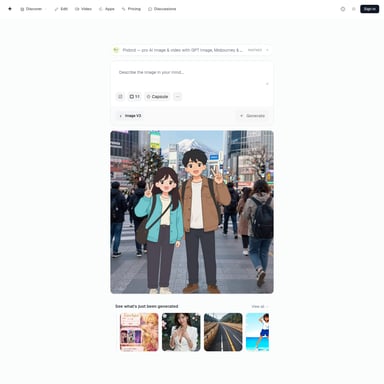
GPT Image 2 is a specialized AI image workspace on the Image 2 platform, offering production-ready text rendering, photorealism, and brand-consistent product photography. It provides creators with a centralized hub for prompts, reference images, and generation history to build high-quality visual assets, UI mockups, and multilingual marketing content.
2026-07-02
0.7K
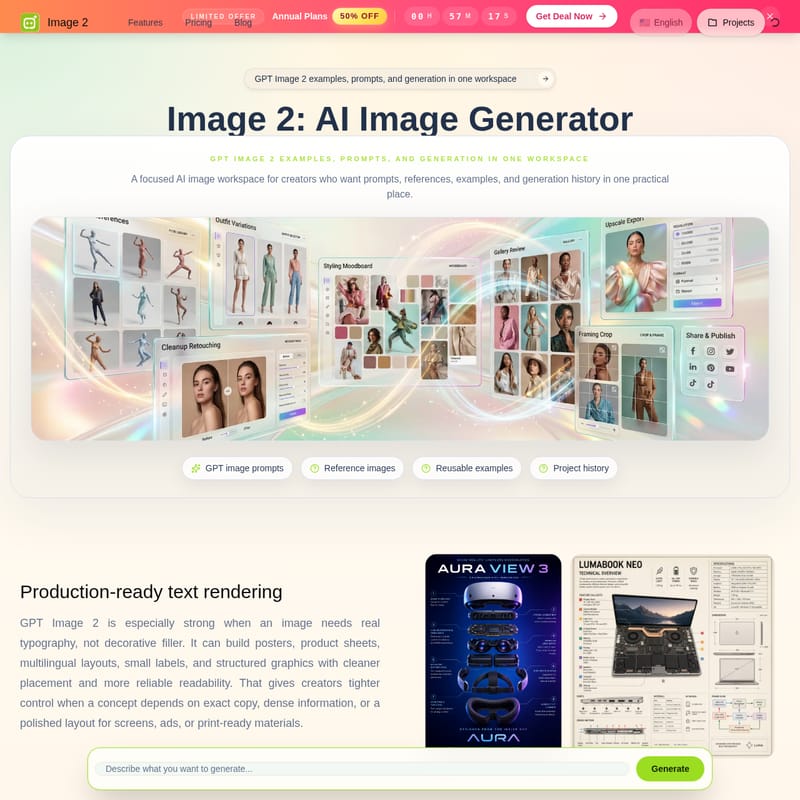
image 2 Product Information
GPT Image 2: The Comprehensive AI Image Workspace for Professional Creators
In the rapidly evolving world of digital content creation, GPT Image 2 stands out as a focused and powerful AI image workspace designed specifically for creators who demand precision, quality, and a centralized management system. Part of the Image 2 ecosystem, GPT Image 2 provides a practical environment where prompts, references, reusable examples, and generation history coexist. This workspace is engineered to move beyond simple concept art, offering production-ready visuals that are grounded in realism and technical accuracy.
What's GPT Image 2?
GPT Image 2 is a state-of-the-art AI image generator and creative workspace hosted at image2.to. Unlike generic generators, GPT Image 2 is built to serve as a comprehensive hub for designers, marketing teams, and developers. It provides a focused environment where users can manage their entire creative process—from initial prompt engineering to final asset organization. The tool is designed to empower your visual presence by utilizing advanced AI to generate high-fidelity images, adjust poses, and even design dynamic actions for videos.
Whether you are looking to generate a single high-impact visual or build a library of repeatable brand assets, GPT Image 2 offers the tools necessary to maintain consistency and quality throughout your project history.
Features of GPT Image 2
Production-Ready Text Rendering
One of the most significant advantages of GPT Image 2 is its ability to handle real typography. While many AI models struggle with text, creating decorative filler instead of readable words, GPT Image 2 is especially strong when a concept depends on exact copy. This feature allows creators to build:
- Professional posters with clear headlines.
- Detailed product sheets and small labels.
- Structured graphics with reliable readability.
- Multilingual layouts for global campaigns.
By offering tighter control over text placement, GPT Image 2 ensures that your ads, screens, and print-ready materials are polished and professional from the start.
State-of-the-Art Photorealism
GPT Image 2 is engineered for finished-looking images that feel grounded and coherent. The model excels at creating believable materials, natural lighting, and detailed environments. From expansive cinematic location imagery to intricate miniature cities, the Image 2 engine follows precise prompts to produce realistic depth and texture. This makes it an ideal choice for creators who need visual ideas that look ready for immediate use across various styles.
Brand-Consistent Product Photography
For e-commerce and marketing, maintaining a consistent brand tone is vital. GPT Image 2 allows teams to keep packaging, lighting, and scene direction working together harmoniously. You can test shelf-ready product shots, lifestyle scenes, and seasonal concepts without the need to rebuild physical setups. This repeatable brand system allows for faster iteration for product launches and promotional materials.
UI Mockups and Design Exploration
Interface teams can leverage GPT Image 2 to visualize app screens and product flows long before production begins. The tool helps designers compare layouts, onboarding flows, dashboards, and navigation hierarchies. By using GPT Image 2 to explore design directions, teams can discuss and finalize a clearer direction before investing heavily in full implementation and coding.
Multilingual and Technical Visual Content
GPT Image 2 provides robust support for specialized information within a visual frame. It can reliably handle localized layouts, making it useful for regional marketing concepts. Whether your project requires Japanese, Indonesian, or Cyrillic-style text, the generator maintains the same structure and brand tone. This is particularly useful for technical explainers, ingredient boards, and educational graphics where clarity is as important as style.
Use Case Scenarios for GPT Image 2
Text-Rich Marketing and Social Assets
Marketing teams can use GPT Image 2 to create high-conversion assets such as social media carousels, livestream screens, and launch visuals. Because the model keeps headlines, product callouts, and badges readable, it speeds up the transition from a creative brief to a usable asset.
E-commerce Branding and Product Shots
GPT Image 2 is perfectly suited for e-commerce environments. It allows you to explore how a product looks in various lifestyle settings or retail-style hero images. This is a cost-effective way to test brand mood and product scale across different formats like ads and web banners without a full photography shoot.
UI/UX Design and Screen Concepts
Designers can use GPT Image 2 to build screen concepts and hero states. It provides a fast way to compare different visual systems, cards, and typography layouts, helping to bridge the gap between a concept and a functional dashboard or app flow.
Editorial and Technical Imagery
For articles and product stories, GPT Image 2 supports the creation of detailed editorial scenes. It can manage many small elements within a single frame while maintaining a clear visual hierarchy, making it perfect for educational pages and complex creative campaigns.
How to Use GPT Image 2: Workflow
Generating professional-grade visuals with GPT Image 2 is a structured and intuitive process. Follow these steps to move from an idea to a finished result:
- Write the Prompt: Start by describing your subject, scene, style, and lighting. Be specific about where the image will be used to help the AI tailor the output.
- Add a Reference if Needed: If text alone isn't enough, provide a visual anchor. GPT Image 2 can use a reference image to ensure the generation stays aligned with your specific vision.
- Generate and Compare: Create several variations of your idea. Use this stage to judge the composition, detail, and style fidelity of the results.
- Save or Continue: Once you have the perfect output, save it to your project history. If you need further refinements, you can move into the next iteration to perfect the visual.
FAQ: Frequently Asked Questions
What is Image 2? Image 2 is an advanced AI platform that allows users to freely adjust poses in photos and design dynamic actions for videos, offering a suite of visual tools including GPT Image 2.
Is Image 2 the same as GPT Image 2? GPT Image 2 is a specific model and focused workspace within the Image 2 platform, specialized in high-fidelity generation, photorealism, and advanced text rendering.
Why does GPT Image 2 need a focused workspace? A focused workspace allows creators to keep prompts, references, examples, and project history in one place, enabling a more organized and professional creative workflow.
Can I start generation from an example? Yes, you can reuse examples provided within the workspace to jumpstart your creativity and maintain style consistency.
Can GPT Image 2 use a reference image? Absolutely. You can provide a visual anchor to the model to help guide the generation process when text descriptions are highly specific.
What prompts work best? Prompts that describe the subject, scene, style, lighting, and intended use in detail tend to yield the most accurate and high-quality results in GPT Image 2.
How do credits work with GPT Image 2? Information regarding credits and pricing for GPT Image 2 can be found in the pricing section of the image2.to website, with various plans available including limited-time annual discounts.
Can outputs be saved for later? Yes, GPT Image 2 features a project history function that allows you to save and organize your best generations for future use.